germars

Forum Replies Created
-
Hi again Adam,
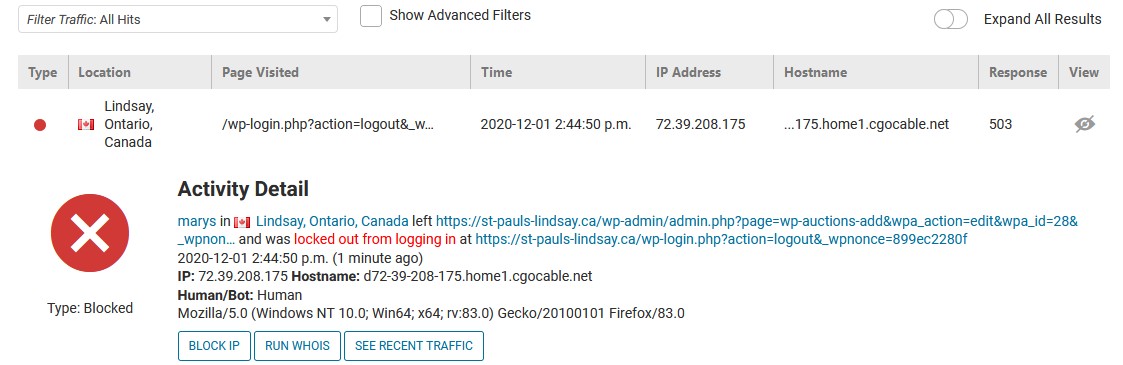
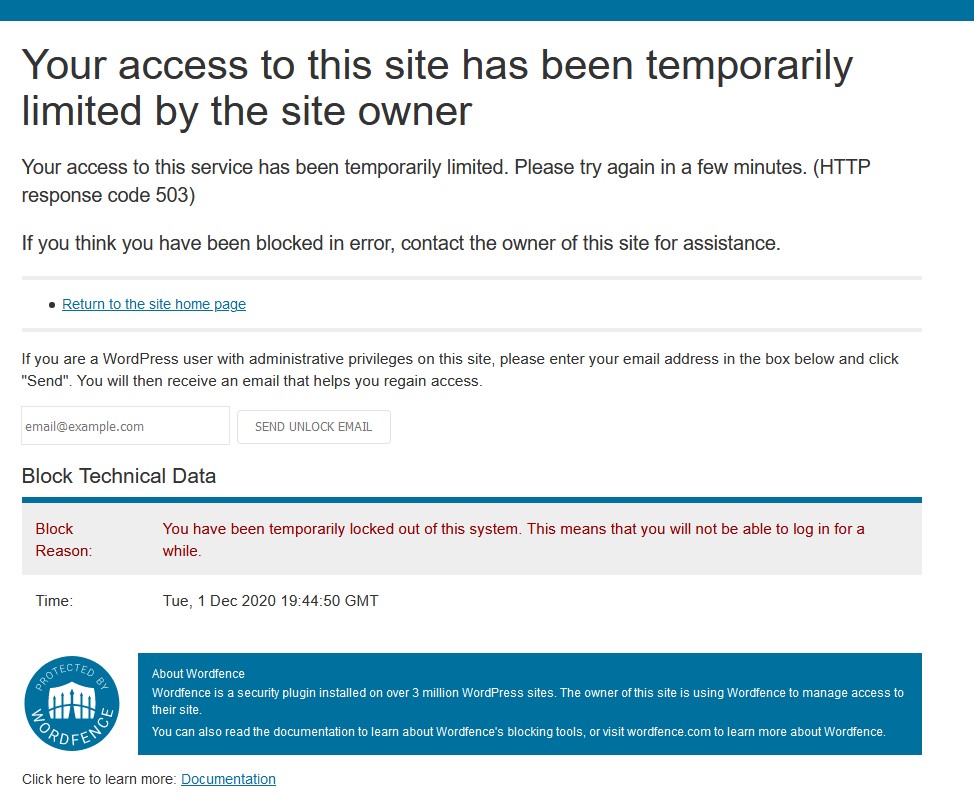
So I was working on the site https://st-pauls-lindsay.ca and when I click on the logout button I get the “you are locked out” page from Wordfence. I’m attaching that message as well as the wordfence Live traffic report.
I’m the admin, I’m already signed in, I’ve used this plugin for a few years now, why suddenly is it thinking I’m the enemy? I’m also using it at the same IP address, on the same computer. It’s very strange and I’ve had to disable it again.
https://germars.com/images/wordfence%20live%20traffice%20st%20pauls.jpg
https://germars.com/images/wordfence-stpauls.jpg
I hope we can figure out what is going wrong.
Thank you!
Mary
Hi Adam,
I’ve already done that for her. I’ve just not turned Wordfence on again to avoid problems again. And there was no notice at all in s2member that she has gone over her limit. What happened was that she changed her password successfully and then was blocked from the sign in page altogether with the notice I sent you. She tried on a couple of different browsers. I have no way of knowing whether it was just her or perhaps the whole group that wasn’t able to sign in, as it’s possible that she’s the only one that tried at that time.
I’m also wondering why myself, on a different site and while already signed in, also got blocked when I tried to preview a page I was working on. I’ll turn WF back on for both of those sites and see if the issue comes up again and let you know.
Okay, that sounds like a good explanation, but why did another site do the same thing to me while I was signed into the site? I am unable to turn wordfence on again now because I get that error. I’m not having any issues signing in.
And she said that she thought it was the browser so she tried on a second one as well as her cell phone and then tried again when she got home. All the same error.
Hello @wfadam,
Thank you for your reply. I have a screen shot from the client that signed in. Link below. The other site doesn’t use s2member, and it was just me that was blocked. I just clicked the back button and was able to uninstall wordfence. I’ve tried to turn it on again but it continues to do this.
For the client that got this page, she got to the sign in page, clicked on her “forgot” password link and created a new password. But when she went to sign in, she got the Site access limited message, she wasn’t able to even get to the sign in page. I looked at the s2member files for her and it didn’t note that she was blocked or that she’d done anything wrong.
The link to the screenshot is here. https://germars.com/images/wordfence-error.jpeg
The link to the live traffic for this person is here. https://germars.com/images/wordfence%20live%20traffic.jpg
And this is the link for the other site without s2member. I can’t get it to stop that Live update thing so the text is greyed out.
https://germars.com/images/different%20site.jpgThanks for your help.
Mary
Forum: Plugins
In reply to: [WP-SpamShield] PHP deprecated notice in PHP 7.4Thank you, I figured that too. The website was gone as well. Thanks for following up and giving me an alternative to try. Take care!
Forum: Plugins
In reply to: [WP-SpamShield] PHP deprecated notice in PHP 7.4I’m getting the same error. I’ve had to deactivate it. Doesn’t seem to be anyone from wp-spamshield helping.
Forum: Themes and Templates
In reply to: [Sydney] Mobile hamburger menu icon not showingForum: Themes and Templates
In reply to: [Sydney] Mobile hamburger menu icon not showing@catheg what was the solution? It’s helpful to answer the question if you find out. Or link to the solution.
Thanks
Thank you Scott. I can’t convince my 60 odd clients to purchase Wordfence sadly so they all get the free version. And I didn’t know hackers would find the new log in so quickly (within a day). So I’ll just change that back. Just makes it slightly harder for me to remember it.
And I’ve changed my sites to lock people out permanently if they use admin or another login that looks like they are taking it from the site for 2 months instead of a day. In pretty much all the cases, I’m the only one signing in, but for those clients that do updates themselves, I will give them more leeway.
Thanks again.
I’m so glad that I was able to help. It is amazing what stops things from working correctly. Happy that it is working now.
Take care!I had this trouble and I had it set up but it wasn’t showing. I wasn’t using the correct shortcode for the province in the tax settings. I had typed in Ontario rather than ON. It was that simple. I was using WooCommerce with Square, so it was related to that.
Good luck, these things can take ages to figure out and be so frustrating and then you find out it is something silly.
- This reply was modified 6 years, 2 months ago by germars.
Forum: Plugins
In reply to: [WooCommerce] Tax not added during checkoutI replied via email, but thank you so much. That saves the day.
Thank you so much for your prompt help.
Have a safe and healthy day!
Mary
Forum: Plugins
In reply to: [WooCommerce] Tax not added during checkoutHi RK,
I’ve set it up in Square, as well as in WooCommerce. I’ll do some screen shots so you can see what I’ve set up.
Thank you, I appreciate your help.
I can’t see where to put a screen shot so here is where I have put them all for you.
https://perennialpetals.com/testMary
I’m having this issue. I have added a tax for Ontario in the Standard Rates section of woocommerce, settings, tax, but it is not calculating tax, even though I have also asked for General tax to be applied. There is only one tax that I’ve listed as it is a local product. Should I be putting it somewhere else as well?
Thank you.
Forum: Plugins
In reply to: [WooCommerce] Products not showing price/description.woocommerce-Price-amount.amount {
color: #000 !important;
}for anyone that also has this issue.