enginematt

Forum Replies Created
-
Hey,
Sorry to keep butting in here but if I could get some more info it probably will help everyone here.
* Are you running NGINX or Apache?
* Have you checked the logs for errors? If there are any present can you please post if possible?
* Has a debug log provided anything usefully?define( 'WP_DEBUG', true ); define('WP_DEBUG_LOG', true); define('WP_DEBUG_DISPLAY', true);I am not sure if it could be a PHP setting such as memory_limit but that could point you into the right direction.
Hey there,
Not sure if you have tried this, but in the past I have noticed this causing issues. Do you have any plugins that have optimize css options? If you have a staging/development environment you can push there and see if there is anything that you can find in the plugins.
Forum: Fixing WordPress
In reply to: Site not loadingOn the point advice as always. In addition to that,I suggest checking memory limit for your php.ini. let us know if this doesnt work
Forum: Fixing WordPress
In reply to: can't add media and other nonworking buttonsJust a long shot on this one, can you install ‘Use Google Libraries` it is a plugin I have used to assist with similar issues.
Also has your php version recently changed? Is your memory_limit increased/set to 64+M(128M is what I use)? Also have you tried doing your .htaccess with just the wordpress rewrites?
Just making sure sorry if this doesn’t help.
Forum: Fixing WordPress
In reply to: Import file too largeHey there just reading the post, I would increase post_max and max upload size, this can be found in the php.ini file. If you are using multi site go to My sites/settings/network settings I believe/should be the last option in the settings.
Please let me know if this doesn’t work.
Forum: Fixing WordPress
In reply to: Updating to 4.1The suggestion above is 100% correct, follow those. One thing I did was view my theme developers page to ensure the theme had been updated/compatable with 4.1. You can do this with plugins but can be time consuming.
Forum: Fixing WordPress
In reply to: Blank Dashboard PageHey, personally I would try the following.
1. Memory_limit and session_save_path should be set correctly.
2. Disable plugins via renaming folder or through the databse just make sure you copy it to a note pad/try default WordPress installation theme such as 2014/2015.
3. Check your .htaccess file make sure default rewrites are in.
4. Check file permissions/ownership.
5. Last and most importantly if you turn on wp_debug, check/post error logs. So we can see more info.Please backup your site/database to have a local copy.
Let me know if this did not work.
Forum: Fixing WordPress
In reply to: how to make sure which version i run !?Also can go into your wp-includes/version.php and see what the version is there. Both ways will get you the answer you desire
Forum: Fixing WordPress
In reply to: SSL lock not showing and securing digital downloadsAnother plugin that can go in conjunction with WordPress https, is SSL Insecure Content Fixer. Also if you have WooCommerce/eCommerce shopping cart make sure that there is no additional SSL redirects.
Forum: Fixing WordPress
In reply to: wp-login.php is blankIt is a blank screen for me and not showing any errors 🙁
If it is W3 Total Cache it can input a .htaccess rewrite and that is what I would be looking at now.
Rename the current .htaccess file to .htaccess.old, create a new .htaccess file and copy/pasta the default .htaccess file into there.
Let me know.
Forum: Fixing WordPress
In reply to: wp-login.php is blankThe debug logs should show on your website.
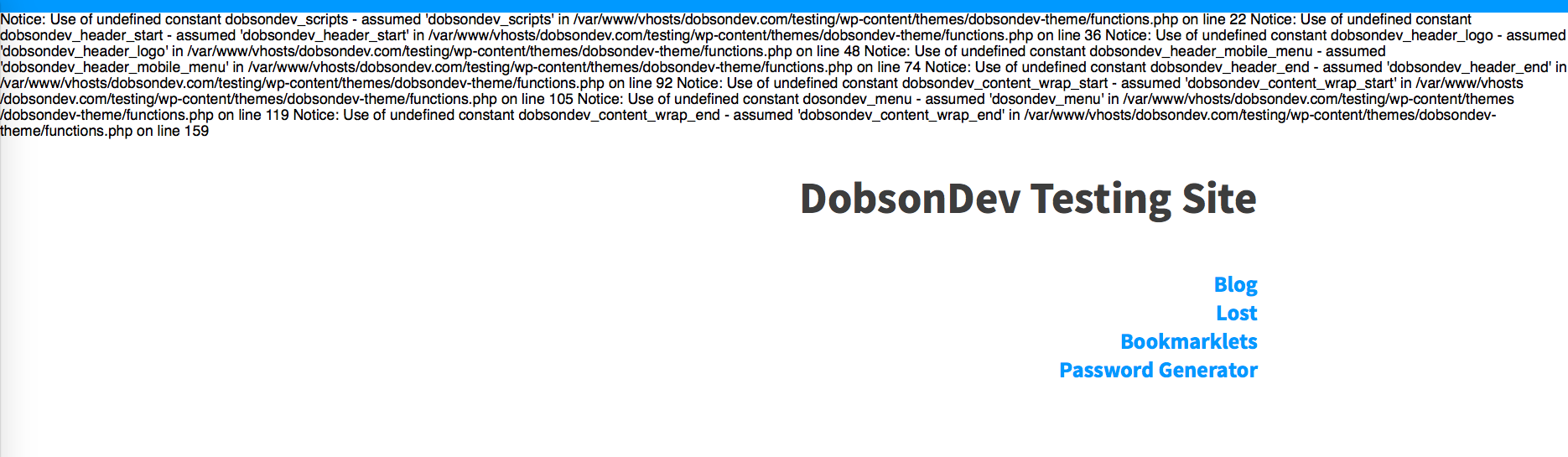
http://dobsondev.com/wp-content/uploads/2014/08/WP-DEBUG-True.pngShould look something like this and what you see along the top of your webpage. Since I do not have access it is tough to show/explain how to do this but here is what I would do.
1. Change theme
http://www.inmotionhosting.com/support/edu/wordpress/change-theme-in-db
2. edit your .htaccess file:
http://support.hostgator.com/articles/specialized-help/technical/apache-htaccess/how-to-edit-your-htaccess-file
Make sure you copy the correct set of code, for your .htaccess file.3. Making changes to your wp-config.php or php.ini file (i do the php.ini file personally):
https://documentation.cpanel.net/display/CKB/How+to+Edit+Your+php.ini+File
http://codex.wordpress.org/Editing_wp-config.php(change memory_limit to 128 MB)
I hope this helps with me having access is it difficult to see what the issue is or access to the logs.
Forum: Fixing WordPress
In reply to: wp-login.php is blankThe debug logs should show on your website.
Should look something like this and what you see along the top of your webpage. Since I do not have access it is tough to show/explain how to do this but here is what I would do.
2. edit your .htaccess file:
Make sure you copy the correct set of code, for your .htaccess file.
3. Making changes to your wp-config.php or php.ini file (i do the php.ini file personally):
(change memory_limit to 128 MB)
I hope this helps with me having access is it difficult to see what the issue is or access to the logs.
Forum: Fixing WordPress
In reply to: wp-login.php is blankIt should display content/errors on your website.
Make sure to backup your site and database. If you have a local backup that you know is working, you could restore that to the server.
Forum: Fixing WordPress
In reply to: wp-login.php is blank*wp_debug
Forum: Fixing WordPress
In reply to: wp-login.php is blankHello all those things I would have done also. Here are a couple more.
1. Check memory_limit and session_save_path make sure those are correct in your php.ini.
2. Make sure your .htaccess file is correct with just default rewrites.
3. Try to disable the theme with 2014/2015 see if that works.
4. If all else fails turn on wp_degub and let us know what that says.Let me know!