eleopard

Forum Replies Created
-
Forum: Plugins
In reply to: [Animate It!] Combining Multiple Animations to Run as OneHi Michael,
Apologies for the delayed reply due to my busy schedule.
I am sorry but a loop would not be possible for the setup you want.I tried and was not able to attain it. I believe you’d need to achieve this using some custom script, which resets the animations after a said interval.
For a single animation cycle. This is the code I used:
https://animateittest.wpdevcloud.com/mtosh-demo/<div class="ai-test"> <h5 class="ai-test" style="text-align: center;"> [edsanimate_start entry_animation_type="fadeInUp" entry_delay="0.5" entry_duration="0.5" entry_timing="linear" exit_animation_type="fadeOutUp" exit_delay="4" exit_duration="1" exit_timing="linear" animation_repeat="1" keep="no" animate_on="load" scroll_offset=""]<span style="color: #000000;">VOC Testing</span>[edsanimate_end] [edsanimate_start entry_animation_type="fadeInUp" entry_delay="1.75" entry_duration="0.5" entry_timing="linear" exit_animation_type="fadeOutUp" exit_delay="4" exit_duration="1" exit_timing="linear" animation_repeat="1" keep="no" animate_on="load" scroll_offset=""]<span style="color: #000000;">Real Time</span>[edsanimate_end] [edsanimate_start entry_animation_type="fadeInUp" entry_delay="3" entry_duration="0.5" entry_timing="linear" exit_animation_type="fadeOutUp" exit_delay="4" exit_duration="1" exit_timing="linear" animation_repeat="1" keep="no" animate_on="load" scroll_offset=""]<span style="color: #000000;">Real Fast</span>[edsanimate_end] </h5> </div>Forum: Plugins
In reply to: [Behance Portfolio Manager] Duplicate Page TitlesHi Chaten,
I will get back to you on this on Monday.
Forum: Plugins
In reply to: [Behance Portfolio Manager] Duplicate Page TitlesHi Chaten,
Thanks for using the Portfolio manager.
However, I am afraid changing of URLs is not possible in the plugin.The behance links of the projects are unique, hence we used that as the links for WordPress as well.
Anyway, How do you believe this setting would result in negative SEO? as the links from behance are SEO friendly.
Forum: Plugins
In reply to: [Animate It!] Animation code leave spaceHi Ibrahim,
Sorry for the late reply.
Can you send me the website link?
I do not have a storefront theme setup, so I won’t be able to check how the header is applied.Forum: Plugins
In reply to: [Behance Portfolio Manager] No API keys?Hi Erik,
API key sent via email.
Forum: Plugins
In reply to: [Animate It!] Combining Multiple Animations to Run as OneDear Mtosh,
I apologize for the delayed reply.
Thanks for using the Animate It!The link you have shared is not opening. I believe it is just a preview link.
You need to share a public link of the post/page.Forum: Plugins
In reply to: [Animate It!] Animation code leave spaceHi Ibrahim,
Like I said, the WordPress editor and theme CSS might be causing this.
When you add animation to a selected component, the editor might be adding some extra tags (most possibly paragraph).There is no sure way around it.
Regarding animating the logo, yes it can be possible if the theme you are using has option to add custom CSS classes. Let me know your website link and I can check it out for you.
Forum: Plugins
In reply to: [Animate It!] Animation code leave spaceHi Ibrahim,
Thanks for using the Animate It!
The space you are referring to might be due to the font-size and letter-spacing of set by the theme.Please try adding this CSS into WordPress Backend > Settings > Animate It! > Custom CSS:
.animated{
    font-size: 0;
    letter-spacing: 0;
}
.animated > *{
    font-size: 1em;
    letter-spacing: inherit;
}
Please note that this might effect the text elements inside the animate block.
If that’s the case, please share with me your animation page/post and I’ll try to find a solution.Forum: Plugins
In reply to: [Behance Portfolio Manager] No API keys?Hi Rabik,
The API key has been sent to your email.
Forum: Plugins
In reply to: [Animate It!] Help animating site logoNo problem.
Please feel free to let me know if you have any other questions.Forum: Plugins
In reply to: [Animate It!] Add a hyperlink to animated graphicHi Malcom,
Apologies for the delayed reply.
You can add any paramater/class to theor even <div> tag.
However, for the top DIV, the image is set using the background-image property, so I don’t believe the plugin would work. You can try chaning the DIV to add the tags though:
<div class="hover-image wp-image-6309" width="274" height="274" style="background-image: url('http://testsite.dtptypes.com/wp-content/uploads/SenticoGridSquare1.png');">Forum: Plugins
In reply to: [Animate It!] Add a hyperlink to animated graphicHi Malcom,
Adding an href just above the
is working fine for me.
This structure should work fine:<div class="hover-wrapper"> <div class="hover-image" style="background-image: url('http://testsite.dtptypes.com/wp-content/uploads/SenticoGridSquare1.png');"> <a href="https://testsite.dtptypes.com/home/senticosansdt" target="_blank"> <img src="http://testsite.dtptypes.com/wp-content/uploads/SenticoGridSquare2.png"> </a> </div> </div>You can see that the above code works fine here:
https://www.loom.com/share/7c7e804a4ea34015b33a61e90a65cd5bPlease feel to let me know if this resolved the issue.
_____________Regarding the retina images, I am not familiar with how it should work on WordPress. However I believe you can use some of the available plugins.
e.g. https://wordpress.org/plugins/wp-retina-2x/Forum: Plugins
In reply to: [Animate It!] Add a hyperlink to animated graphicHi Malcom,
Thanks for using the Animate It!
It seems like the issue you have can be fixed using a little custom CSS.Can you please send me the actual link to the page where you have this?
Also, place the link like you want as well. I’ll test it out on my end and will provide you the CSS.Forum: Plugins
In reply to: [Behance Portfolio Manager] Behance Portfolio – zoom imagesHi Dv8info,
Thanks for the suggestion.
This is a good update, and we’ll definitely keep this in mind in our next release.Forum: Plugins
In reply to: [Animate It!] Can’t get icon in editor toolbarHi Wasana,
Apologies for the delayed reply.
Thanks for using the Animate It!Unfortunately, Beaver Builder does not load any third party plugin icons on their Text editor. This is mentioned in their own website here: https://community.wpbeaverbuilder.com/t/animate-it-plugin/5097
Neither Animate It!, nor any other plugin icons would be visible in their Text Editor.So you’ll have to use the alternative way mentioned in the above thread.
__Secondly, you can create the animations of your choice from here:
https://www.downloads.eleopard.in/class-generator-wordpress
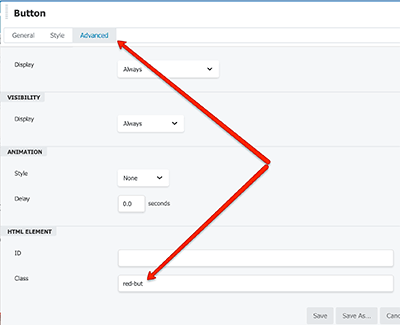
Copy the classes and put it in any of the Beaver Builder modules’ Class input box: https://wpbeaches.com/wp-content/uploads/2018/02/button-css-style.pngHope this works.
- This reply was modified 5 years, 5 months ago by eleopard.