eleopard

Forum Replies Created
-
Forum: Plugins
In reply to: [Animate It!] Sliding in from right?I tried the 3 columns on my end, using Guterberg Editor to create the columns, and adding a Classic editor on each column, and then repeated the process using Elementor as well:
Here is an example with Gutenberg Editor:
https://visas.wpdevcloud.com/lestexas60-gutenberg/Here is same example using Elementor:
https://visas.wpdevcloud.com/lestexas60-elementor/Please let me know if this is what you wanted.
Forum: Plugins
In reply to: [Animate It!] Is this compatible with Elementor?Yes the animation would work fine there as well. However, since elementor uses its own text editor, we cannot put our icon on it.
All the short-codes and classes would work fine.The best way is, you can generate you animation classes from here:
https://www.downloads.eleopard.in/class-generator-wordpressCopy the classes and paste them in the Custom Class box in Elementor:
https://d34b8fs2z18t5a.cloudfront.net/wp-content/uploads/2019/05/css-id-class.jpg
____Please let me know if this helps.`
Forum: Plugins
In reply to: [Animate It!] Sliding in from right?Dear LesTexas60,
I believe your question is regarding alignment of images.
This has nothing to do with the Animate It!For centering an image, you can just align the items to center using the alignment option in Text editor: https://i.ytimg.com/vi/eRe60Ys6pyA/maxresdefault.jpg
The animation would start, and end at wherever you have placed the image (left, center or right).
Regarding Elementor pages, yes the animation would work fine there as well. However, since elementor uses its own text editor, we cannot put our icon on it.
All the shortcodes and classes would work fine.The best way is, you can generate you aniamton classes from here:
https://www.downloads.eleopard.in/class-generator-wordpressCopy the classes and paste them in the Custom Class box in Elementor:
https://d34b8fs2z18t5a.cloudfront.net/wp-content/uploads/2019/05/css-id-class.jpg
____Please let me know if this helps.
Forum: Plugins
In reply to: [Animate It!] animation loading in accordion boxGreat. Please feel free to let me know if you face any other issues.
Forum: Plugins
In reply to: [Animate It!] animation loading in accordion boxHi genocom,
Thanks for using the Animate It!
I checked the Link you shared, and the issue is not with Animate It!, but with the counter-on-scroll.js file located in /wp-content/themes/understrap-child/js/counter-on-scroll.js.
You can check your console to see the errors:
https://shared-assets.adobe.com/link/928494b0-2523-4215-4f41-fdbc728685c1Due to this, the Animate It! script is not loading (and maybe other scripts as well)
Please try removing this script and check again, the animations should load fine.Forum: Plugins
In reply to: [Animate It!] Sliding in from right?Dear LesTexas60,
Is it possible for you to share the link to the page where this issue is?
That way I can troubleshoot it and let you know.Forum: Plugins
In reply to: [Animate It!] Sliding in from right?Dear LesTexas60,
My apologies for the delayed reply.
This seems like a conflict with the existing theme or some other plugin.Could you please share the link to the page where this issue is?
That way I can troubleshoot it and let you know.Forum: Plugins
In reply to: [Animate It!] Add CSS code to existing classDear Millioni,
Apologies for the delayed reply.
I am afraid there is no set guideline for this.
You just have to have CSS knowledge to implement these things.With adding CSS like this, you can have only one animation (bounce or flash)
Another limitation is animation on scroll.
As the plugin uses javascript for this, we cannot implement it using CSS.Please let me know which button, or section you wish to apply the animation (with the page link), and I will provide you with the necessary CSS.
- This reply was modified 4 years, 11 months ago by eleopard.
Forum: Plugins
In reply to: [Animate It!] Add CSS code to existing classDear Millioni,
In the WordPress backend, please go to Settings > Animate It! > Custom CSS box and paste this CSS:
.send-enquiry{
	-webkit-animation-name: tada;
	-moz-animation-name: tada;
	-o-animation-name: tada;
	animation-name: tada;
	animation-duration: 1.5s;
	animation-delay: 0.5s;
	animation-timing-function: linear;
	animation-iteration-count: 1;
}
This will apply the required animation to any button that has the send-enquiry class.
Please let me know if this work for you.
Forum: Plugins
In reply to: [Animate It!] Add CSS code to existing classSorry for not explaining it more clearly before.
I need to know what animation do you plan on adding as well.You can create the classes from here:
https://www.downloads.eleopard.in/class-generator-wordpressAnd share them with me.
Forum: Plugins
In reply to: [Animate It!] Add CSS code to existing classHi Millioni,
Thanks for your interest in Animate It!
Yes it is possible to add animations to other unique classes using some custom CSS.
If you could send me the link to your website, with which button needs to animate, I will get back to your with the requires instructions.Dear pola11,
Got it. It worked.
Thanks.Dear Gary,
You can apply the animation to anything that has a custom CSS classes box.
Just generate the classes from here:
https://downloads.eleopard.in/class-generator-wordpressand paste these classes to your custom CSS classes box.
e.g.
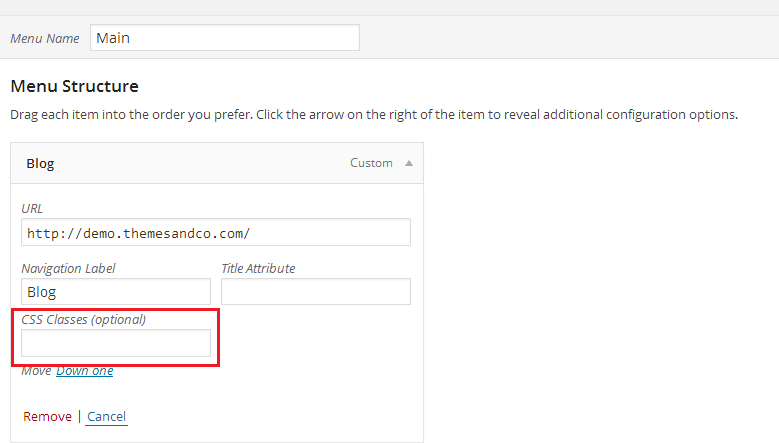
Use Custom CSS box in menu item to add the animation classes:
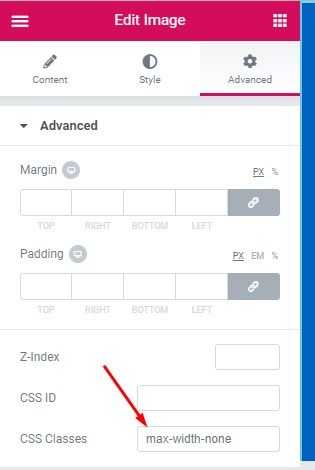
https://presscustomizr.com/wp-content/uploads/2013/10/adding-css-class-to-a-wordpress-menu-item.pngUse Custom CSS box in any text editor like Elementor to apply the animations:
https://docs.droitthemes.com/wp-content/uploads/2019/12/custom_class.jpgPlease let me know if this resolves your issue.
Forum: Plugins
In reply to: [Animate It!] Compatibility with WP 5.7Dear Jérémy,
We are working towards creating the first version of the Gutenberg plugin.
However, due to the Gutenberg’s limited features, it is taking time to implement it.Forum: Plugins
In reply to: [Animate It!] Progressive animation delayHi fernand,
Thanks for using the Animate It!
You can achieve the examples animations by adding the animation delay.
On the 2 side by side elements, add the following classes.First Column:
animated fadeInUp delay1 duration1 eds-on-scrollFirst Column:
animated fadeInUp delay2 duration1 eds-on-scrollNote: If there are more column in the row, just repeat the process with increasing delays (e.g. 3rd column with have delay3)
Repeat these on each row of blocks, and you can have the desired animation.
Please let me know if this works for you.