davmerit

Forum Replies Created
-
Forum: Plugins
In reply to: [Contact Form 7] Add people to databasehttps://wordpress.org/plugins/mailpoet-contact-form-7/ – could be of help
Forum: Plugins
In reply to: [Contact Form 7] checkboxesPlease include a link to your Contact Form 7 form plus all your input in the Form and Mail sections of the CF7 interface. If others here are able to understand your actual problem, they may be able to offer a possible solution.
Forum: Plugins
In reply to: [Contact Form 7] Contact form "Failed to send your message."Though the plugin successfully sends millions of emails every day, there are a host of issues that can stop or delay emails on both the sending and receiving ends. It depends entirely on your local Server & WordPress configuration. You will need to investigate this issue for your particular local configuration.
See Contact Form 7 Email Issues. There is a link at the bottom of the page to a comprehensive and detailed article which covers many issues. Most people that work through this information appear to be able to resolve their email sending & receiving issues.
Forum: Plugins
In reply to: [Contact Form 7] Phone No. In Contact Us Form[phone your-phone-number]Is not available in Contact From 7 tag syntax. See tag sytax
You probably want to try something like this
[number* your-number]* – indicates a required field. Also see number field
Remember to add
[your-number]to your mail section where you want to display the values entered by the user.Forum: Plugins
In reply to: [Contact Form 7] Can you give form numberThis is not available directly in Contact Form 7. It can be done via custom programing but you would need to be rather skilled at WordPress development using PHP and/or jQuery.
Forum: Plugins
In reply to: [Contact Form 7] Forms not workingIt could be that you’ve missed something. You may take a look at getting started with contact form 7
Forum: Plugins
In reply to: [Contact Form 7] Receive email notification but no form contentDo you have your form tags in the mail section of your CF7?
Please include a link to your Contact Form 7 form plus all your input in the Form and Mail sections of the CF7 interface. If others here are able to understand your actual problem, they may be able to offer a possible solution.
Forum: Plugins
In reply to: [Contact Form 7] Mail Section Formatting IssueIt was better when one could input html codes in the form’s email section. Now it’s not accepting html codes
Contact From 7 still accepts HTML in the mail section.
Microsoft Word is probably not the right text processing software you need to processes html mark-up. There several text editors available in your specific operating system that would help you format HTML mark-up. See brackets and notepad ++Also remember to check the “USE HTML content type” in the mail section of your CF7 form interface.
Forum: Plugins
In reply to: [Contact Form 7] Quote not correctly displayed in the mailPlease include a link to your Contact Form 7 form plus all your input in the Form and Mail sections of the CF7 interface. If others here are able to understand your actual problem, they may be able to offer a possible solution.
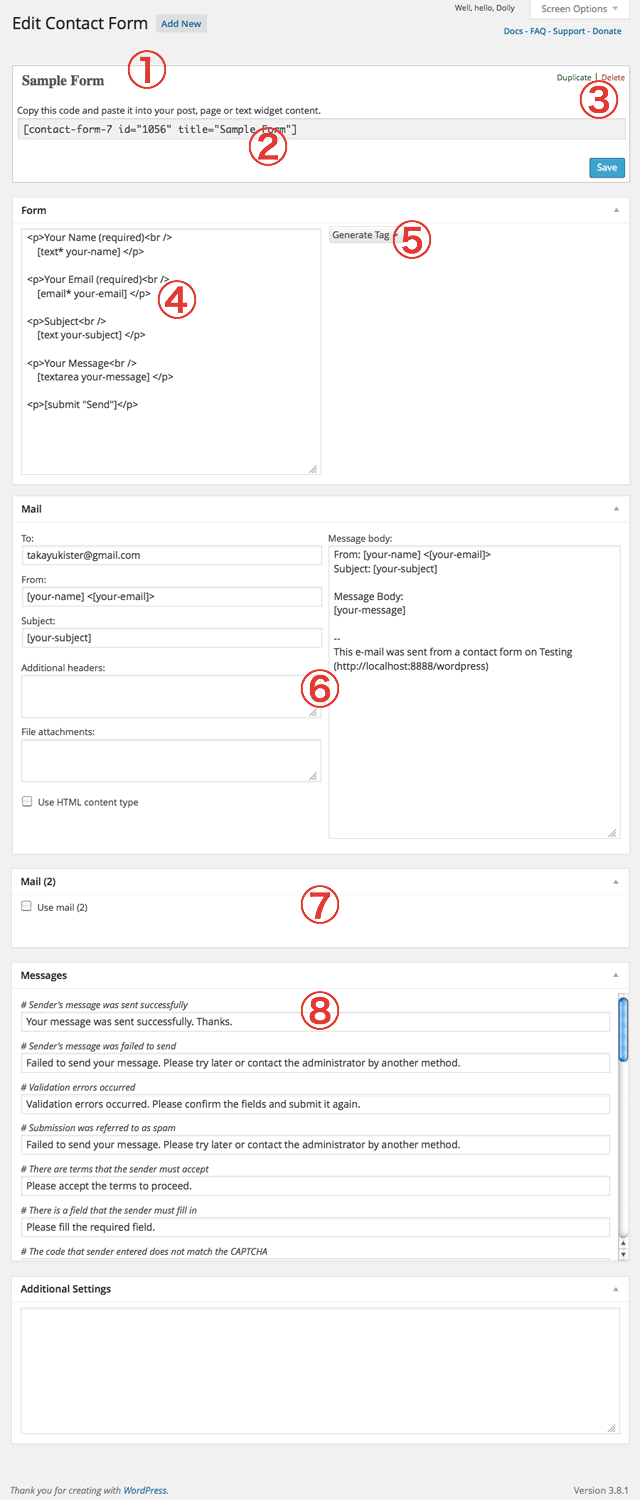
See Contact Form 7 Interface at https://cacoo.com/diagrams/2xhVwuNicE1G20Df-6E3D9.png
Please supply the info you have used in the sections marked 4 & 6 in that image.
Many people just paste the relevant sections as code here.
For example the info from the default CF7 form looks like this:
FORM:
Your Name (required)
    [text* your-name]
Your Email (required)
   [email* your-email]
Subject
    [text your-subject]
Your Message
    [textarea your-message]
[submit "Send"]
MAIL:
To:
name@example.com
From:
[your-name] <[your-email]>
Subject:
[your-subject]
MESSAGE BODY:
From: [your-name] <[your-email]>
Subject: [your-subject]
Message Body:
[your-message]
--
This mail is sent via contact form on WordPress http:example.com
Forum: Plugins
In reply to: [Contact Form 7] Adding Headers to drop downMy situation is a little different as i am using Contact Form 7 – PayPal Add-on – Pro.
I can confirm that the solution I have provided above would work with Contact Form 7. (I have tested it. see thread).
However I am not sure how the outcome will be for CF7 and PayPal Add-on – Pro. I would have to look into is before I can provide you with a suitable solution.
Is the add-on you are using the same as https://wordpress.org/plugins/contact-form-7-paypal-add-on/installation/ ?
Forum: Plugins
In reply to: [Contact Form 7] table too wideSee Styling Contact Form for a general explanation of styling CF7 forms using CSS.
There is a link at the bottom of the page to a comprehensive and detailed article on Styling Contact Form 7 Forms. The article shows people, with suitable HTML & CSS skills, how to change the appearance of their Contact Form 7 Forms to meet their particular requirements.
I changed it to table width 100% and row width 50%
That is probably the cause of the problem. Please include a link to your Contact Form 7 form plus all your input in the Form sections of the CF7 interface. If others here are able to understand your actual problem, they may be able to offer a possible solution.
Forum: Plugins
In reply to: [Contact Form 7] Increase Text Size Of DropDown MenusSee Styling Contact Form for a general explanation of styling CF7 forms using CSS.
There is a link at the bottom of the page to a comprehensive and detailed article on Styling Contact Form 7 Forms. The article shows people, with suitable HTML & CSS skills, how to change the appearance of their Contact Form 7 Forms to meet their particular requirements.
If you find you need more detailed advice, after reading and working through the above links, please include a link to your Contact Form 7 form, so others here can examine your form in detail using Firebug or Chrome Dev Tools to understand the CSS used for your CF7 form elements and provide you with a possible solution.
Forum: Plugins
In reply to: [Contact Form 7] Dropdown menu to select recipient's emailPlease read from the link @nae has provided.
You can add something like this to your form
[select your-recipient "ceo@example.com" "sales@example.com" "support@example.com"]Please remember to add
[your-recipient]in your mail section if you need to display the users choice.Forum: Plugins
In reply to: [Contact Form 7] Adding Headers to drop downPlease include a link to your Contact Form 7 form plus all your input in the Form of the CF7 interface. I would guide you with the code and where to pate it. 🙂
See Contact Form 7 Interface at https://cacoo.com/diagrams/2xhVwuNicE1G20Df-6E3D9.pngPlease supply the info you have used in the sections marked 4 & 6 in that image.
Many people just paste the relevant sections as code here.
For example the info from the default CF7 form looks like this:
FORM:
Your Name (required)
    [text* your-name]
Your Email (required)
   [email* your-email]
Subject
    [text your-subject]
Your Message
    [textarea your-message]
[submit "Send"]
MAIL:
To:
name@example.com
From:
[your-name] <[your-email]>
Subject:
[your-subject]
MESSAGE BODY:
From: [your-name] <[your-email]>
Subject: [your-subject]
Message Body:
[your-message]
--
This mail is sent via contact form on WordPress http:example.com
Others use image sharing sites like http://photobucket.com/ and http://tinypic.com/
.
Forum: Plugins
In reply to: [Contact Form 7] contact form not sending mail to admin?But there are about 3 contact form with the same email address.other two is working fine
There several factors that could cause problem. Please include all your input in the Mail sections of the CF7 interface.