davmerit

Forum Replies Created
-
Forum: Plugins
In reply to: [Contact Form 7] hide contact form from editorsForum: Plugins
In reply to: [Contact Form 7] POSSIBLE TO CHANGE BACKGROUND COLOR?Use Firebug or Chrome Dev Tools to examine the HTML and CSS of your CF7 form in detail. Once you understand how the HTML and CSS is configured in your CF7 form, you should be able to see the CSS changes you need to change the appearance of the form to suit your requirements.
See Styling Contact Form for a general explanation of styling CF7 forms using CSS.
There is a link at the bottom of the page to a comprehensive and detailed article on Styling Contact Form 7 Forms. The article shows people, with suitable HTML & CSS skills, how to change the appearance of their Contact Form 7 Forms to meet their particular requirements.
If you find you need more detailed advice, after reading and working through the above links, please include a link to your Contact Form 7 form, so others here can examine your form in detail using Firebug or Chrome Dev Tools to understand the CSS used for your CF7 form elements and provide you with a possible solution.
Forum: Plugins
In reply to: [Contact Form 7] To : [your-email]I want the form results to go to my email AND to the person who submitted the form.
Yes, you can replicate the content of the mail section of your CF7 interface in the mail (2) to achieve this.
Forum: Plugins
In reply to: [Contact Form 7] Not able to sendThough the plugin successfully sends millions of emails every day, there are a host of issues that can stop or delay emails on both the sending and receiving ends. It depends entirely on your local Server & WordPress configuration. You will need to investigate this issue for your particular local configuration.
See Contact Form 7 Email Issues. There is a link at the bottom of the page to a comprehensive and detailed article which covers many issues. Most people that work through this information appear to be able to resolve their email sending & receiving issues.
Forum: Plugins
In reply to: [Contact Form 7] Submit style works only on firefoxPlease include a link to your Contact Form 7 form so we can examine your form in detail using Firebug or Chrome Dev Tools to understand the CSS used for your CF7 form elements.
Forum: Plugins
In reply to: [Contact Form 7] Contact form 7 – how change backgroundThe actual look of CF7 forms on your website will depend largely on the current WordPress theme used and the CSS styling that theme applies to standard HTML form elements.
To change the style of your CF7 forms you would need to edit the CSS style sheets used by your WordPress theme.
See Styling Contact Form for a general explanation of styling CF7 forms using CSS.
There is a link at the bottom of the page to a comprehensive and detailed article on Styling Contact Form 7 Forms. The article shows people, with suitable HTML & CSS skills, how to change the appearance of their Contact Form 7 Forms to meet their particular requirements.
If you find you need more detailed advice, after reading and working through the above links, please include a link to your Contact Form 7 form, so others here can examine your form in detail using Firebug or Chrome Dev Tools to understand the CSS used for your CF7 form elements and provide you with a possible solution.
Forum: Plugins
In reply to: [Contact Form 7] Outgoing Mail CSSIf you set the responder Mail to “Use HTML content type” then you can include regular HTML in the “Message body” in the mail section.
See also The Foundations of Coding HTML Email.
Forum: Plugins
In reply to: [Contact Form 7] To : [your-email]I tried using To :
[your-email]but i don’t receive the mail when i test it.If you are using the default CF7 form, then To:
[your-email]would probably send the form the users email address so you wont receive it.I’m trying to get the form to send to the person who submitted the form.
Is this possible?If you want to receive the emails and respond to the user with an auto responder, then I would suggest you take a look at setting up mail
Scroll down to Mail (2)
Forum: Plugins
In reply to: [Contact Form 7] size limit of form submit messageThere is no limit.
However you can set a limit see http://contactform7.com/text-fields/
minlength:10sets a minimum length of 10.
maxlength:90sets a maximum length of 90.Forum: Plugins
In reply to: [Contact Form 7] Cannot get textarea multilineThe actual look of CF7 forms on your website will depend largely on the current WordPress theme used and the CSS styling that theme applies to standard HTML form elements.
To change the style of your CF7 forms you would need to edit the CSS style sheets used by your WordPress theme.
See Styling Contact Form for a general explanation of styling CF7 forms using CSS.
There is a link at the bottom of the page to a comprehensive and detailed article on Styling Contact Form 7 Forms. The article shows people, with suitable HTML & CSS skills, how to change the appearance of their Contact Form 7 Forms to meet their particular requirements.
If you find you need more detailed advice, after reading and working through the above links, please include a link to your Contact Form 7 form, so others here can examine your form in detail using Firebug or Chrome Dev Tools to understand the CSS used for your CF7 form elements and provide you with a possible solution.
Forum: Plugins
In reply to: [Contact Form 7] Receive email notification but no form contentIt seems you missed the most important part of my request, the mail section of your form. Please include the form input in the mail section of your form.
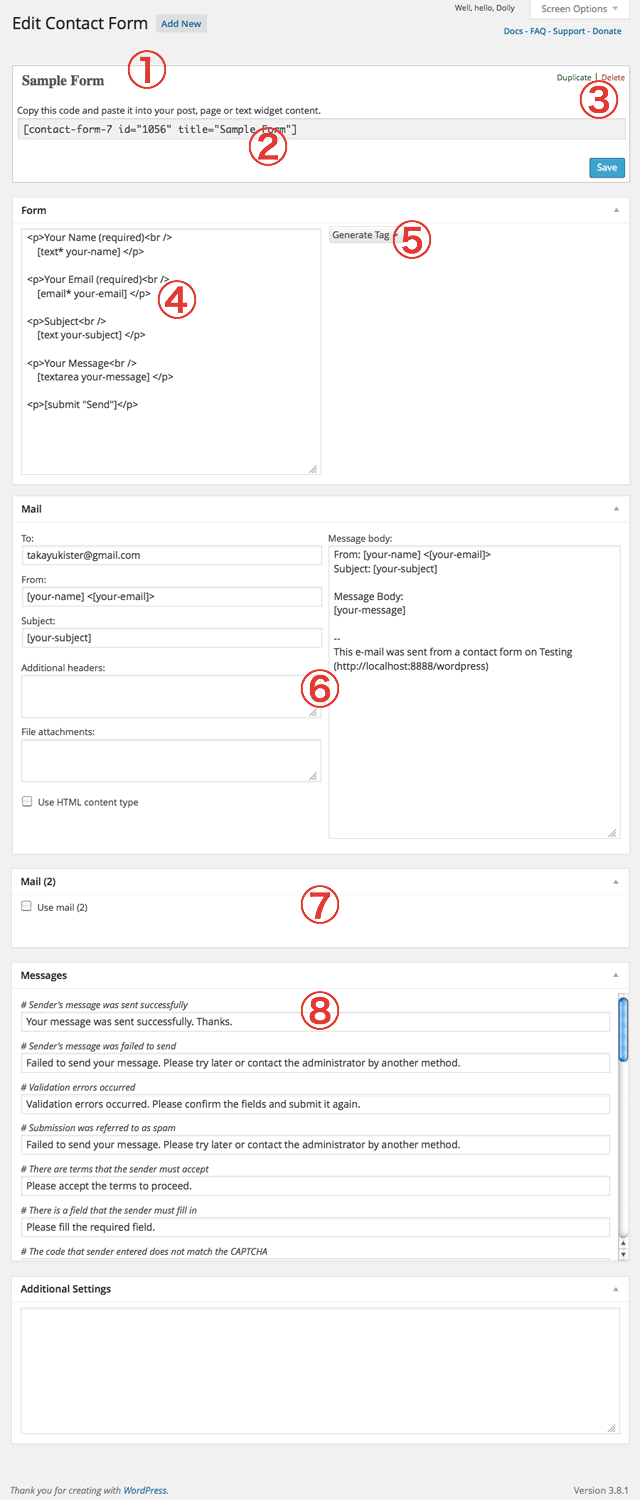
See Contact Form 7 Interface at https://cacoo.com/diagrams/2xhVwuNicE1G20Df-6E3D9.png
Please supply the info you have used in the sections marked 6 in that image.
Many people just paste the relevant sections as code here.
For example the info from the default CF7 form mail like this:
FORM:
Your Name (required)
    [text* your-name]
Your Email (required)
   [email* your-email]
Subject
    [text your-subject]
Your Message
    [textarea your-message]
[submit "Send"]
MAIL:
To:
name@example.com
From:
[your-name] <[your-email]>
Subject:
[your-subject]
MESSAGE BODY:
From: [your-name] <[your-email]>
Subject: [your-subject]
Message Body:
[your-message]
--
This mail is sent via contact form on WordPress http:example.com
Others use image sharing sites like http://photobucket.com/ and http://tinypic.com/
Forum: Plugins
In reply to: [Contact Form 7] datepicker doesn't let you select year/month?Are you using any of the plugins recommended to you?
Please include a link to your Contact Form 7 form. If others here are able to understand your actual problem, they may be able and willing to offer a possible solution.Forum: Plugins
In reply to: [Contact Form 7] Multi Dropdown FieldsLooks like you are looking for Conditional Logic which is not available directly in the Contact Form 7 plugin.
This sort of conditional logic is not available directly in Contact Form 7. It can be done via custom programing but you would need to be rather skilled at WordPress development using PHP and/or jQuery.
Some of the premium Form plugins do offer some Conditional Logic including Gravity Forms and Ninja Forms.
Forum: Plugins
In reply to: [Contact Form 7] CSS for "Required field" message for Contact Form 7The actual look of CF7 forms on your website will depend largely on the current WordPress theme used and the CSS styling that theme applies to standard HTML form elements.
To change the style of your CF7 forms you would need to edit the CSS style sheets used by your WordPress theme.
See Styling Contact Form for a general explanation of styling CF7 forms using CSS.
There is a link at the bottom of the page to a comprehensive and detailed article on Styling Contact Form 7 Forms. The article shows people, with suitable HTML & CSS skills, how to change the appearance of their Contact Form 7 Forms to meet their particular requirements.
If you find you need more detailed advice, after reading and working through the above links, please include a link to your Contact Form 7 form, so others here can examine your form in detail using Firebug or Chrome Dev Tools to understand the CSS used for your CF7 form elements and provide you with a possible solution.
Forum: Plugins
In reply to: [CF7 Skins for Contact Form 7] Colour changes?See How to Customise Your Selected CF7 Skins Style in the Documentation for some explanation on how to do this.
You may have to use Chrome Dev Tools or Firebug to examine the form elements added to your form by CF7 Skins Magnum style. You would require some HTML and CSS skill to be able to do this.
Add changes via Child Theme or custom CSS plugin.