davmerit

Forum Replies Created
-
Forum: Plugins
In reply to: [Contact Form 7] contact form not sending mail to admin?The green Success message and not receiving any error messages is a very clear indication that CF7 is sending the email.
So your email is probably being seen as spam somewhere in the email process. This is usually due to email headers, in particular the From email address used or email content. You may have to specify a FROM: email address in this case.
Emails can be considered spam for a whole host of reasons and get rejected at many points in the email process in addition to your spam folder.
See Contact Form 7 Email Issues – this links to a much more comprehensive article which also covers emails being considered spam.
See also Best Practice to Set Up Mail.
Forum: Plugins
In reply to: [Contact Form 7] Dropdown menu to select recipient's emailWould you like to provide users with the option to select which department they would like to send their request?
Please add more details to your question. If others here are able to understand your actual problem, they may be able and willing to offer a possible solution.Forum: Plugins
In reply to: [Contact Form 7] Contact Form in Single RowSee Styling Contact Form for a general explanation of styling CF7 forms using CSS.
There is a link at the bottom of the page to a comprehensive and detailed article on Styling Contact Form 7 Forms. The article shows people, with suitable HTML & CSS skills, how to change the appearance of their Contact Form 7 Forms to meet their particular requirements.
If you find you need more detailed advice, after reading and working through the above links, please include a link to your Contact Form 7 form, so others here can examine your form in detail using Firebug or Chrome Dev Tools to understand the CSS used for your CF7 form elements and provide you with a possible solution.
Forum: Plugins
In reply to: [Contact Form 7] Form submit issue on iPadThis could be a JavaScript conflict with either your current WordPress theme or one of the other plugins you are using – see Contact Form 7 Email Issues – there is a link there that covers JavaScript Conflicts.
Forum: Plugins
In reply to: [Contact Form 7] Line Spacing/ Line height in Message BoxSee Styling Contact Form for a general explanation of styling CF7 forms using CSS.
There is a link at the bottom of the page to a comprehensive and detailed article on Styling Contact Form 7 Forms. The article shows people, with suitable HTML & CSS skills, how to change the appearance of their Contact Form 7 Forms to meet their particular requirements.
If you find you need more detailed advice, after reading and working through the above links, please include a link to your Contact Form 7 form, so others here can examine your form in detail using Firebug or Chrome Dev Tools to understand the CSS used for your CF7 form elements and provide you with a possible solution.
Forum: Plugins
In reply to: [Contact Form 7] Contact form 7 Custom field as per dropdownLooks like you are looking for Conditional Logic which is not available directly in the Contact Form 7 plugin.
This sort of conditional logic is not available directly in Contact Form 7. It can be done via custom programing but you would need to be rather skilled at WordPress development using PHP and/or jQuery.
Some of the premium Form plugins do offer some Conditional Logic including Gravity Forms and Ninja Forms.
Also see https://wordpress.org/support/topic/plugin-contact-form-7-this-is-how-to-showhide-fields-with-jquery
Forum: Plugins
In reply to: [Contact Form 7] Place checkboxes on their own lineSee Styling Contact Form for a general explanation of styling CF7 forms using CSS.
There is a link at the bottom of the page to a comprehensive and detailed article on Styling Contact Form 7 Forms. The article shows people, with suitable HTML & CSS skills, how to change the appearance of their Contact Form 7 Forms to meet their particular requirements.
Please include a link to your Contact Form 7 form so we can examine your form in detail using Firebug or Chrome Dev Tools to understand the CSS used for your CF7 form elements and provide you with a possible solution.
Forum: Plugins
In reply to: [Contact Form 7] VisibilityThe actual look of CF7 forms on your website will depend largely on the current WordPress theme used and the CSS styling that theme applies to standard HTML form elements.
To change the style of your CF7 forms you would need to edit the CSS style sheets used by your WordPress theme.
See Styling Contact Form for a general explanation of styling CF7 forms using CSS.
There is a link at the bottom of the page to a comprehensive and detailed article on Styling Contact Form 7 Forms. The article shows people, with suitable HTML & CSS skills, how to change the appearance of their Contact Form 7 Forms to meet their particular requirements.
Please include a link to your Contact Form 7 form so we can examine your form in detail using Firebug or Chrome Dev Tools to understand the CSS used for your CF7 form elements and provide you with a possible solution.
Forum: Plugins
In reply to: [Contact Form 7] Text boxSee Styling Contact Form for a general explanation of styling CF7 forms using CSS.
There is a link at the bottom of the page to a comprehensive and detailed article on Styling Contact Form 7 Forms. The article shows people, with suitable HTML & CSS skills, how to change the appearance of their Contact Form 7 Forms to meet their particular requirements.
Forum: Plugins
In reply to: [Contact Form 7] Submit button issueThe actual look of CF7 forms on your website will depend largely on the current WordPress theme used and the CSS styling that theme applies to standard HTML form elements.
To change the style of your CF7 forms you would need to edit the CSS style sheets used by your WordPress theme.
See Styling Contact Form for a general explanation of styling CF7 forms using CSS.
There is a link at the bottom of the page to a comprehensive and detailed article on Styling Contact Form 7 Forms. The article shows people, with suitable HTML & CSS skills, how to change the appearance of their Contact Form 7 Forms to meet their particular requirements.
Please include a link to your Contact Form 7 form so we can examine your form in detail using Firebug or Chrome Dev Tools to understand the CSS used for your CF7 form elements.
Forum: Plugins
In reply to: [Contact Form 7] [url] is not creating a link in the message bodyMake sure you tick the “Use HTML content type” option below the “Message body” section in the mail section and URL should be sent as a clickable link.
Forum: Plugins
In reply to: [Contact Form 7] Not showing success messageThis is could be due to a JavaScript conflict with either your current WordPress theme or one of the other plugins you are using – see Contact Form 7 Email Issues – there is a link there that covers JavaScript Conflicts.
Forum: Plugins
In reply to: [Contact Form 7] Customize the Contact Form 7I try put the box on contact form 7, with phone, but dosent work, i dont
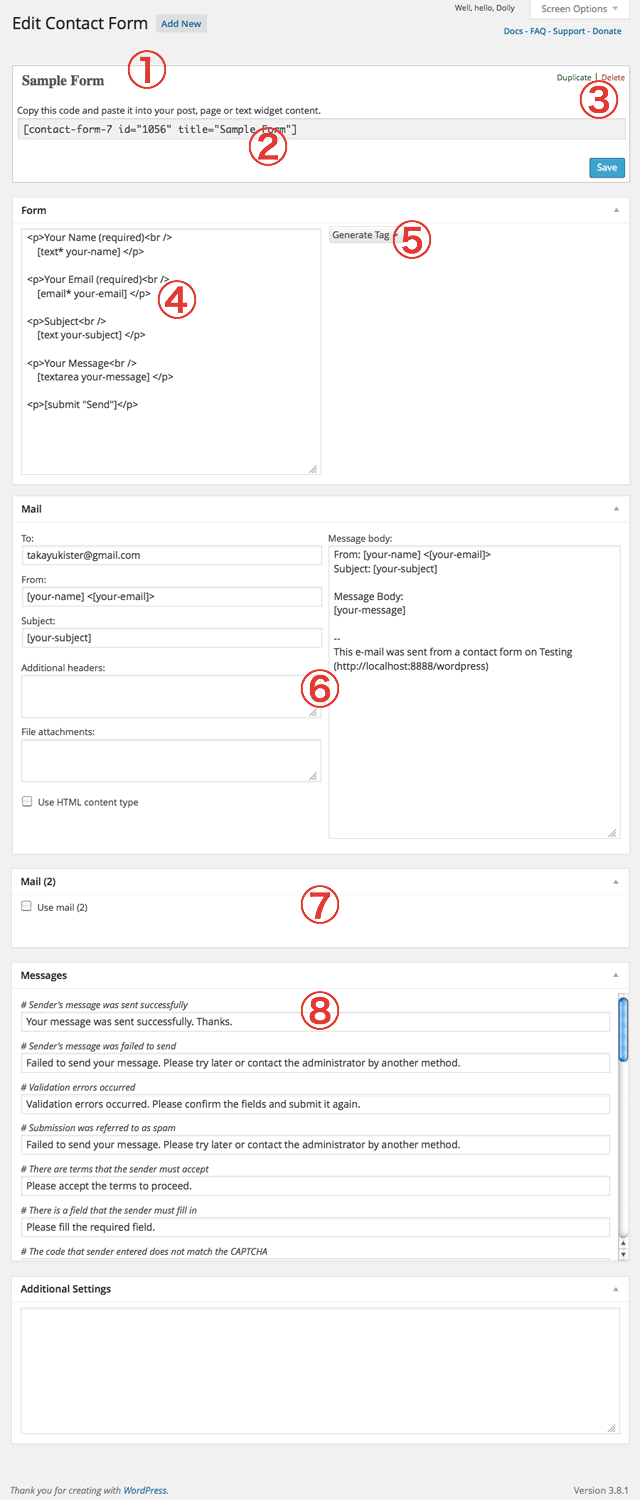
recieve information on my email of phoneYou need to make sure that any CF7 tags used in the MAIL section match exactly with CF7 tags used in the form section of the Contact Form 7 Interface (see https://cacoo.com/diagrams/2xhVwuNicE1G20Df-6E3D9.png)
I want use on my contact form a font Google Roboto, is possible change on css the font of contact form or
more ?There is some guidance on this at How to Customise Your Selected CF7 Skins Style in the CF7 Skins Knowledge Base. They also offer Premium Email Support to deal with CF7 Skins Pro users questions and problems, if you need more assistance.
Forum: Plugins
In reply to: [Contact Form 7] Preset Date DatepickerThis is not available directly in Contact Form 7. It can be done via custom programing but you would need to be rather skilled at WordPress development using PHP and/or jQuery.
Some of the premium Form plugins do offer some Conditional Logic including Gravity Forms and Ninja Forms.
Forum: Plugins
In reply to: [Contact Form 7] Text boxPlease include a link to your Contact Form 7 form so we can examine your form in detail using Firebug or Chrome Dev Tools to understand the CSS used for your CF7 form elements.