datsyuk

Forum Replies Created
-
The Malware Scanner started this time, but it stopped again with the same error. It managed to find and analyze 57 files before failing.
So unfortunately, the issue is still not resolved. Could you please help me identify what is causing the scan to stop? If you need any logs or additional information, I’ll be happy to provide them.
Thank you!
Thank you. That worked.
But the Malware Scan stops:
Internal server error.
Stage: important_files_listingHello,
I marked all the Spam submissions.
best regards
JörgHey there,
is there still no solution to that issue?
Maybe in the Pro Version? Or any Code Snippet available?
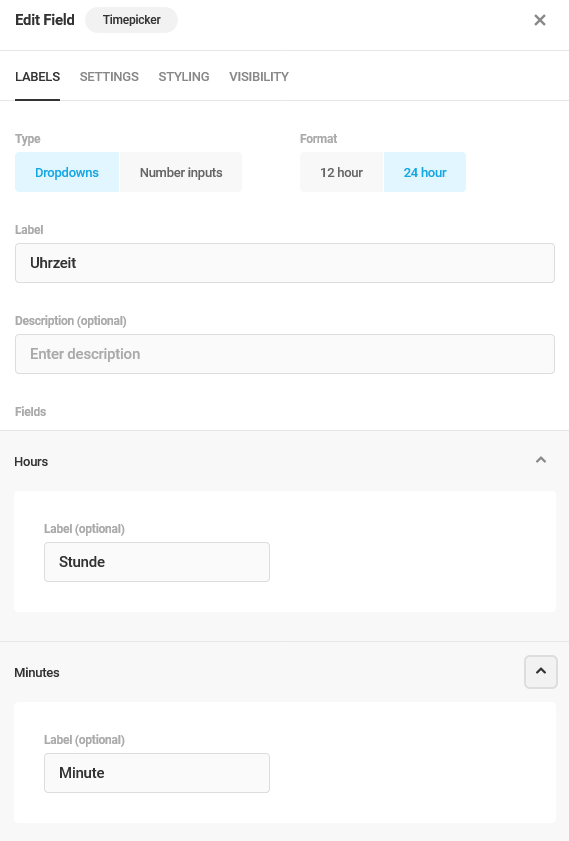
I mean Time Selection using dropdowns is the only way I can force clients to select time intervals (like every 30 minutes) but it ruins the design of my whole form that the label of all Dropdows (like “Date”) are translated to Geman, but the time still shows “Select”.
Hope there is a solution.
Thanks and best regards
Jörg- This reply was modified 1 year, 9 months ago by datsyuk.
Forum: Plugins
In reply to: [WooCommerce] Order of coupon application in WooCommerceHi Shahzeen,
Thank you for your response and for taking the time to investigate this issue!
To clarify, I am not using any third-party plugins or custom code related to coupons. The behavior you’re seeing in the screenshots comes directly from the default WooCommerce functionality.
Specifically, I am using the official WooCommerce shortcode
[woocommerce_cart]to display the cart. When this shortcode is used, it shows a breakdown of how much is deducted from each coupon. While this breakdown is helpful, it should not influence the order in which the coupons are applied.The issue I’m observing is that WooCommerce consistently applies $50 from coupon2 first, followed by $20 from coupon1, regardless of the order in which the coupons are entered in the cart. This behavior persists even on a clean WooCommerce installation without any additional plugins or customizations.
I hope this clarification helps! Do you have any additional insights on what might be causing this?
Thank you again for your support!
Best regards,
JörgForum: Plugins
In reply to: [WooCommerce] Order of coupon application in WooCommerceHi Mahfuzur,
Thank you for your detailed explanation! It would actually be sufficient for us if the coupons were applied in the order they are added in the cart. However, this does not match my experience.
Here are two screenshots from my demo shop:
- http://woo.karldigital.net/wp-content/uploads/2024/12/woo1.png
- http://woo.karldigital.net/wp-content/uploads/2024/12/woo2.png
As you can see, $50 is always applied from coupon2 and $20 from coupon1 – regardless of the order in which I enter the coupons. This is precisely the issue I am trying to resolve.
I also tested whether the “Calculate coupon discounts sequentially” setting affects this behavior, but it doesn’t make a difference whether this option is enabled or disabled. The result remains the same in both cases.
You can reproduce this behavior yourself here:
http://woo.karldigital.net/shop/Do you have any idea why WooCommerce behaves this way?
Thank you in advance for your support!
Best regards,
JörgForum: Plugins
In reply to: [WooCommerce] Order of coupon application in WooCommerceHi there,
Apologies for the misunderstanding earlier, as we are indeed talking about Fixed Cart Discounts. My question is not about setting up coupons, but specifically about how WooCommerce handles multiple Fixed Cart Discounts when applied to a single order.
Here’s an example to clarify:
- Coupon A: $50 Fixed Cart Discount
- Coupon B: $50 Fixed Cart Discount
- Cart total: $80
WooCommerce deducts $50 from one coupon first (let’s say Coupon A) and then applies the remaining $30 from Coupon B. It seems that WooCommerce automatically selects one coupon to be fully applied first, regardless of the order in which the coupons are entered.
I’d like to understand:
- What logic does WooCommerce use to determine which coupon is applied first?
- Is there any way to influence this behavior so that, for example, the oldest coupon is applied first?
Thank you for your patience, and I appreciate your help in clarifying this!
Best regards,
JörgForum: Plugins
In reply to: [WooCommerce] Order of coupon application in WooCommerceThank you for the explanation! However, my question concerns fixed-value coupons, not percentage-based coupons.
For example:
- Coupon A: $50
- Coupon B: $50
- Order total: $80
WooCommerce deducts $50 from one coupon (e.g., Coupon A) and the remaining $30 from the second coupon (Coupon B). It seems to apply one coupon fully first, regardless of the order in which the coupons are entered.
I’m trying to understand the logic WooCommerce uses to decide which coupon is applied first when fixed-value coupons are used. Ideally, I would like the oldest coupon to be applied first.
Could you clarify how this works for fixed-value coupons? Is there a way to change this behavior or influence the order in which the coupons are applied?
thank you!Hello Saurabh,
Thank you for your response and explanation.
I still find it very confusing that all dropdowns allow for a custom preselection except for the time dropdown. I also don’t understand why this might have caused issues in the past, as the “Select” option cannot be chosen anyway.
Of course, I can translate the plugin using Loco Translate or similar tools, but I believe Forminator should provide an onboard solution for this.Thank you very much, and best regards,
JörgHello,
thanks for your quick reply.
these fields only appear, when I select “Number inputs”, when I switch to “Dropdowns” the fields disappear:
https://genussart.club/wp-content/uploads/2024/12/Firefox_Screenshot_2024-12-02T20-17-28.336Z.png
I’m running Forminator Version 1.37.1
Best regards
JörgDone. Thanks
Hello,
thank you for your fast reply. I marked (most of) the entries already.
Unfortunately I cannot post my customers URLs here in a public forum. Can I submit them privately anyhow?
Best regards
JörgHello Kris,
the fields are set to Hidden under Edit Field –> Settings:
For example to count the amount of Participants which are added by a repeated field. Still the Fields ere visible in the confirmation Mail when using the{all_fields}Tag.
You can download the exported form here:
https://notebookpartner-my.sharepoint.com/:t:/g/personal/schnaitmann_notebookpartner_onmicrosoft_com/EfnchXYFfvNBlX4U48wQ-y4B3r4b2fIlUWltYbf0Lg1E2g?e=JHgeWf
Thanks and Best Regards
Jörg- This reply was modified 3 years ago by datsyuk.
Hello Kris,
thanks for your offer. Maybe there would also be a way for that calculations without hidden fields. But the question is still why hidden fields are shown in the confirmation mail for the submitter?
I mean hidden should be hidden (whatever the cause is to hide them).
Hoping for a{all_visible_fields} Shortcode.
thanks & best regards
JörgHello Nithin,
thanks for your fast reply. Yes I tried to add the fields manually because the Shortcodes{all_fields}and{all_non_empty_fields} also show the hidden fields of the form in the e-mail. Since we have some calculations and logics running in the background (using hidden fields) that looks very strange to the mail recipient.
Can I avoid to show hidden fields in the confirmation mail?
thanks and best regards
Jörg