corusx

Forum Replies Created
-
Forum: Fixing WordPress
In reply to: audio files from windows recorderYes sure. Windows 10 audio recorder produce m4a audio files.
can you send 2-3 sec recorded file sample ? use file sharing platform like wetransfer
Am I able to access the WordPress files if i don’t have an FTP?
without FTP/SSH/SFTP you can still access your files using your hosting control panel, if you have one otherwise you may have to contact your hosting provider
Does WP file manager have a way i can look into those without logging into my dashboard?
No you must have to login in wp-admin to access WP file manager
Forum: Fixing WordPress
In reply to: audio files from windows recorderOP are you sure your file format is m4a ? bcos WP by default allow m4a upload : https://codex.wordpress.org/Uploading_Files
edit : also ALLOW_UNFILTERED_UPLOADS grant access to admin only
- This reply was modified 5 years ago by corusx.
I can’t access to your server, so I can’t check your files.
i was replying to OP 😀
Forum: Networking WordPress
In reply to: Error message on my websiteit seems your homepage problem is fixed, regarding admin login try this : http://www.thecandlelightng.com/wp-login.php
Since i couldn’t find any in my site folders, i created one in /var/www/html/.htaccess and input:
.htaccess file should be here /var/www/html did you list hidden files and check ?
- This reply was modified 5 years ago by corusx.
Forum: Fixing WordPress
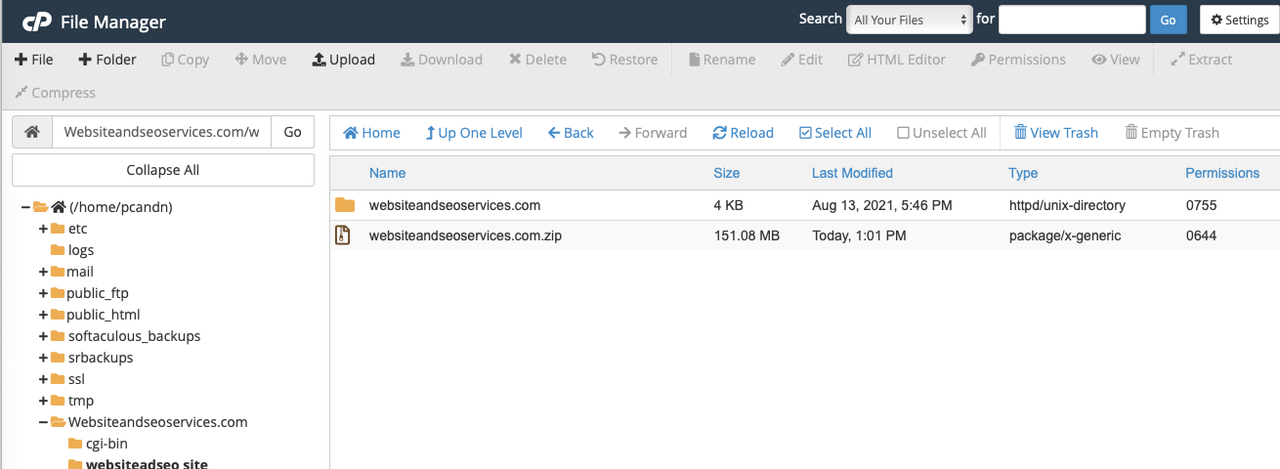
In reply to: Making a site live on hosting account?https://i.postimg.cc/k4G5HzFM/Screen-Shot-2021-08-15-at-2-19-11-PM.png
you need to extract that zip file and restore the database : https://wordpress.org/support/article/restoring-your-database-from-backup/
Forum: Fixing WordPress
In reply to: WP / ELEMENTOR – template wont loadopening your website throws 500 and 404 error codes. so most probably either files are corrupted or plugin compatibility issue
Try this to narrow down the cause : https://wordpress.org/support/article/debugging-in-wordpress/
to be honest, if you are not good with managing servers I would advise getting managed services otherwise you will have a hard time managing it by yourself.
Forum: Fixing WordPress
In reply to: Problems with WP after reinstall.edit: ignore the original reply it was meant for someone else
try this : https://wordpress.org/support/article/editing-wp-config-php/#increasing-memory-allocated-to-php
- This reply was modified 5 years ago by corusx.
you have to SSH or SFTP into your server and remove the plugin files from /var/www/htdocs/wp-content/plugins
but i would advice if it’s a managed server then contact your hosting provider for the support
Forum: Fixing WordPress
In reply to: Site index failureare you using any one-click installation application like softaculous? because it seems you have installed WordPress in sub directory instead of the main domain directory
try to install manually : https://wordpress.org/support/article/how-to-install-wordpress/
Forum: Fixing WordPress
In reply to: Replacing old site with newhow do I transfer the new design to the current site without losing anything? I thought about simply transfer the whole new site and replace the current one, but I’d miss out a lot of orders and new products that have been made in the meantime.
most probably you are using WooCommerce, so export users, orders, products and import them on your newly developed website. then replicate all the WooCommerce settings from your old website to the new one.
i would also suggest posting this in WooCommerce plugin support forum : https://wordpress.org/support/plugin/woocommerce/
Forum: Networking WordPress
In reply to: Error message on my websiteit seems like your .htaccess file is corrupted, using any security plugin or SSL plugin?
anyway rename your existing htaccess file and create new one : https://wordpress.org/support/article/htaccess/
Forum: Fixing WordPress
In reply to: s.w.org is always notified when I login & edit/create posts?With every new login to edit or create a new post, s.w.org is contacted.
this domain is used for loading core static assets of wp-admin and wp-includes (images, js, etc)
I’m sure one of the mod/admin will provide more detailed info about these