cookiebot

Forum Replies Created
-
You should not compromise site speed. All plugins should be able to co-exist in harmony, often it’s about using the correct settings.
While we do support many caching plugins, we haven’t seen exactly this issue. We’ll try to reproduce it and get back to you.
In the meanwhile, you are welcome to reach out to W3 Total Cache and pagespeedninja to see if they can offer some help. We already did half of the debugging in previous post. They may be able to find the issue faster and offer guidance.
The Cookiebot script tag is being rendered in a weird way on your website. This is what it looks like (note: we have hidden your domain group id):
<script id="Cookiebot" data-cbid="your-domain-group-id" data-culture="EN" type="012c340b02d190918c330d8e-text/javascript" async>ress_js("https://consent.cookiebot.com/uc.js");</script>The console shows this error:
Uncaught ReferenceError: ress_js is not defined
at <anonymous>:1:1
at t.activateScript (VM259 rocket-loader.min.js:1)
at VM259 rocket-loader.min.js:1
at t.run (VM259 rocket-loader.min.js:1)
at VM259 rocket-loader.min.js:1
at HTMLScriptElement.<anonymous> (VM259 rocket-loader.min.js:1)This is most likely an issue with your caching plugin/plugins.
What you ideally want is for the script tag to be rendered like this:
<script id="Cookiebot" src="https://consent.cookiebot.com/uc.js" data-cbid="your-domain-group-id" type="text/javascript" data-culture="EN" async></script>Does it help if you refresh your cache?
Hi,
Could you provide your domain name or Domain Group ID so that we can check?
You can send it to support@cookiebot.com and provide us a ticket number here so that we can follow up.
Thanks!
Hi there, Tubsitubs!
If you want a placeholder to be shown instead of the video until cookies are accepted you can create the placeholder and add the css class:
“cookieconsent-optout-marketing”
and add the class:
“cookieconsent-optin-marketing”
to the iframe containing your facebook video.If you want the user to accept multiple categories of cookies you can just add another class such as:
“cookieconsent-optin-statistics” and “cookieconsent-optout-statistics”
I hope that helps! 🙂
Hi @abcwebsites
Glad you got it working!
It is possible that our EU visitors are experiencing some issues with the load order of their scripts when visiting the site(s) and that also may be interfering with the consent button functionality. So, deferring the script seems to help.
We haven’t experienced that before, but if it works for you then great!
Have a nice day 🙂
Hi @redwolfmendoza,
Thanks for reaching out!
Most often, the issue is not with Cookiebot, but scripts on customers sites that are interfering with the click event of the OK button.
By inspecting the OK button on your website, in Chrome Developer, we found that my.min.js has a click event attached to the button.
See:
By further inspecting my.min.js, there is the following code:
$("a").each(function() {
  new RegExp("/" + window.location.host + "/").test(this.href) || $(this).click(function(a) {
    a.preventDefault(), a.stopPropagation(), window.open(this.href, "_blank")
  })
})
This is what is causing the issue. You should check with your developer to find a solution.
Regards
- This reply was modified 7 years, 1 month ago by cookiebot.
It seems that the issue was with Cookiebot itself (uc.js) and not the plugin.
Issue was fixed yesterday.
Which version of the plugin are you using?
What is the website so that we can test?
Hi @rapportdesign,
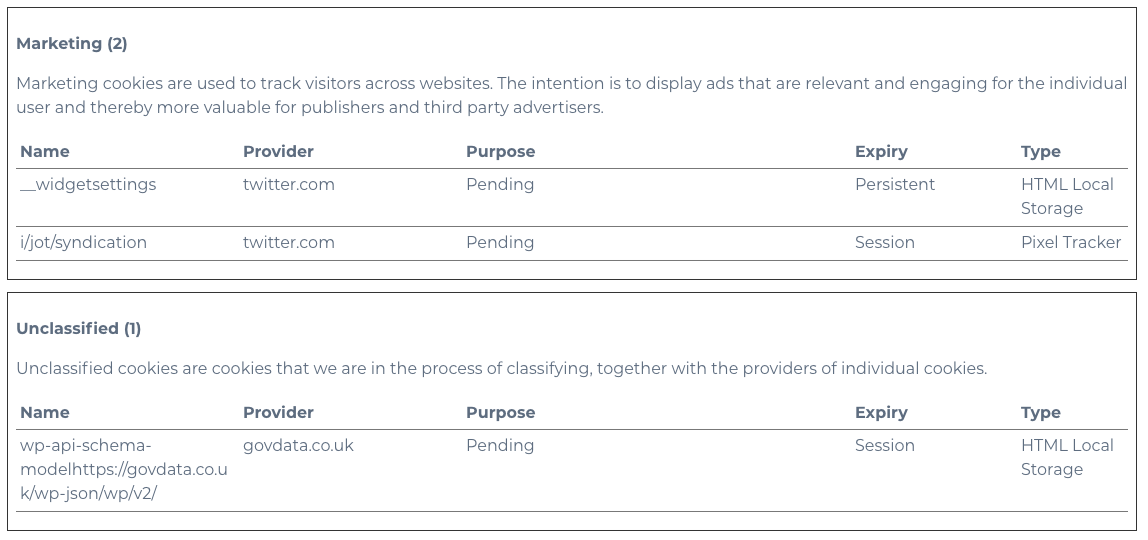
If you tag up twitter related widgets and scripts with the “marketing” attribute, you should be good.
Thanks for the suggestion. We will consider this feature, however, we cannot promise when or if it will be implemented.
Have a nice day!
We do understand your frustration.
Now that I know there are cookie files being set and the tools used for checking them, aren’t up to the job, I can’t see how the blame can possibly be put onto the site owner.
At least you know that there is something going on through the cookie report, and in the case of https://snag.gy/0aIn24.jpg, you can find out which page on your website the cookies were detected. Next step is to see if there is anything related to twitter on that page, and take it from there.
Surely a piece of code setting the advanced cookie, which can only be detected by a scanner that has been developed and refined over the past 6 years, is the responsibility of the person who produced that code? I realise they may have terms that cover them, but I still don’t understand how site owners can stop themselves from being liable.
AG Bobek opinion: the operator of a website embedding a plugin such as the #Facebook Like button, which causes the collection and transmission of a users’ personal data, is jointly responsible for that stage of the data processing
Please read the following article for clarification:
You could reach out to Zoho and ask if they would like to integrate with Cookiebot.
Regards
Thanks for reporting the bug @rapportdesign
Next release will include the bugfix.
We’ll go ahead and mark this thread as resolved.
Hi @rapportdesign,
Thanks for the video, it clearly shows that third party cookies are set.
Checking the source code on your link, we can see that the script tag for addtoany.min.js is correctly marked up according to Cookiebot guidelines.
However, addToAny loads one more file, page.js, from https://static.addtoany.com/menu/page.js, which is not marked up with text/plain.
We will investigate further and get back to you, with a possible update to the addon.