Chip Bennett

Forum Replies Created
-
Forum: Plugins
In reply to: [cbnet Different Posts Per Page] Where is the options panel?I found the issue. I had a bug with the user capability passed to
add_options_page().I’ve fixed that bug, and also moved the Plugin settings from a custom settings page to
Dashboard -> Settings -> Reading.Version 2.1 should resolve this issue.
Thanks again for using the Plugin!
Forum: Plugins
In reply to: [cbnet Different Posts Per Page] Activated, so where is it?@virtualmotorpix thanks for confirming! I’ll push out a bugfix ASAP.
Forum: Plugins
In reply to: [cbnet Different Posts Per Page] Activated, so where is it?I think I found a typo (silly search-replace error), that would cause the problem. Though, I have no idea why it isn’t breaking for me.
Anyway, would one of you mind testing something for me?
In the options.php file, line 434, can you change:
edit_Plugin_optionsto
manage_options…and let me know if that fixes the problem?
Thanks!
Forum: Plugins
In reply to: [cbnet Different Posts Per Page] Activated, so where is it?Another question: are you, by chance, using a username that is not an Administrator?
Forum: Plugins
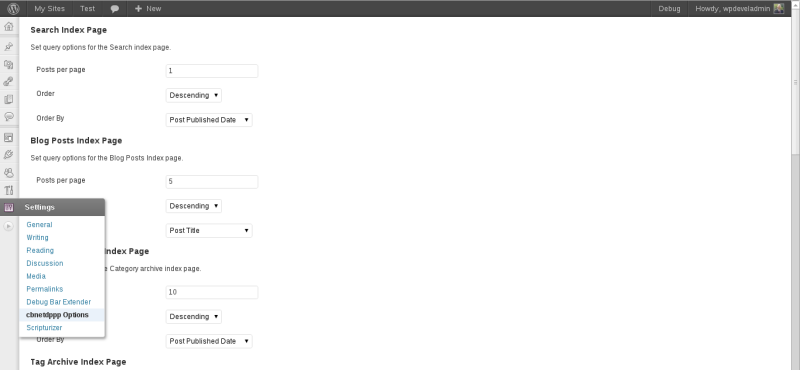
In reply to: [cbnet Different Posts Per Page] Activated, so where is it?I’ve uploaded a screencap of the settings page.
You don’t see anything under
Dashboard -> Settings?Forum: Plugins
In reply to: [cbnet Different Posts Per Page] Activated, so where is it?Hi all. Sorry, for some reason, I didn’t get email or RSS notification of this thread.
You should find the settings page under
Dashboard -> Settings -> cbnetdppp Options.Please let me know if you don’t find it there. I tested it exclusively under 3.5-RC, but there shouldn’t be any issues with 3.4.x.
Forum: Plugins
In reply to: [cbnet Different Posts Per Page] Where is the options panel?You should find the settings page under
Dashboard -> Settings -> cbnetdppp Options.That may not be the most clear title for the settings page. 🙂 I’m in the process of updating all my Plugins, and I’ll try to come up with something more clear and consistent for all of them, with respect to settings page naming convention.
Thanks for using the Plugin. I appreciate any feedback.
I’ve re-written the Plugin from the ground up, as version 2.0. It should be more easily extensible now, though I need to put a bit more thought into how to facilitate targeting specific taxonomy terms (including specific categories).
Once I figure out the best way to handle that, I’ll release another update. Until then, you can use a simple filter of your own to control the number of posts per page of your specific category.
Assuming the category is
foobarand that you want to display 5 posts per page, add the following to a site Plugin, or tofunctions.php:function aground_filter_pre_get_posts( $query ) { if ( is_main_query() && is_category( 'foobar' ) ) { $query->set( 'posts_per_page', '5' ); ) return $query; } add_action( 'pre_get_posts', 'aground_filter_pre_get_posts' );And that should be all you need. Just change
foobarand5as appropriate.Forum: Themes and Templates
In reply to: Oenology front page layoutJust as a follow-up on this one:
Currently, the front page layout is configurable via the “Layout” custom post meta on the edit-post screen for the page assigned as
page_on_front. I have also just added an option for Default Static Front Page Layout.These changes will be available in version 3.0, which will be released soon.
Forum: Themes and Templates
In reply to: [Oenology] [Theme: Oenology] Creating new headerHi Techstorm, and sorry for the late response; this one fell through the cracks.
For your first question: use a Child Theme and override the
infobar.phptemplate-part file, to remove/replace the infobar content.Your second question appears to be pure CSS, and would depend upon the specific markup for your replacement content.
For your third question, to remove the site title, filter
oenology_hook_site_header. For example, the following will return nothing instead of the site title/description:function oenology_child_filter_site_header( $site_header ) { __return_false(); } add_filter( 'oenology_hook_site_header', 'oenology_child_filter_site_header' );Hope this helps!
Forum: Themes and Templates
In reply to: Why is archive.php displays all post, not only monthTry getting rid of the custom query (i.e.
get_posts()) and just use the normal loop:if ( have_posts() ) : while ( have_posts() ) : the_post(); // Loop markup here endwhile; endif;The problem is your custom loop is stomping the normal query that WordPress is attempting to use, and it is that normal query that knows to display only posts from the given month.
You’re telling WordPress, “Don’t use the query you want to use; use my custom query instead.”
Forum: Themes and Templates
In reply to: Need Templates for Official WebsiteDo not link to sites such as those, that distribute non-GPL Themes, with spammy ads/links, encrypted code, and the like.
Here’s why you should only download Themes from trusted sources, such as the official Theme directory.
Forum: Fixing WordPress
In reply to: Why We Do Get Template PartThe
get_template_part()template tag is simply a file-include call to include any arbitrarily named file. It is analogous toget_header()to includeheader.php,get_footer()to includefooter.php,get_sidebar()to includesidebar.php(), andget_search_form()to includesearchform.php`.Calling
get_template_part( $slug )will include a file named <strong>$slug.php</strong>. The most common use case isget_template_part( 'loop' )to includeloop.php, as a means of abstracting the loop code out of the main template files.Calling
get_template_part( $slug, $name )will include a file named$slug-$name.php. So continuing our example above, you could have a different loop output for different post formats (video, image, gallery, aside, etc.). Combiningget_template_part()withget_post_format()yields a very powerful way to include post-format-specific loop output, viaget_template_part( 'loop', get_post_format() ). Using that call, if the current post has a post format of “gallery”, theloop-gallery.phpfile would be included automatically.But here’s the fun part:
get_template_part()is really just a fancy wrapper forlocate_template(): meaning that it is more powerful than a simpleinclude()call, because it has the built-in ability to fall back to less-specific files.If you are using a Child Theme, and call
get_template_part( $slug, $name ), WordPress will attempt to include each of the following files, in order:*
$slug-$name.phpin the <em>Child</em> Theme
*$slug-$name.phpin the <em>Parent</em> Theme
*$slug.phpin the <em>Child</em> Theme
*$slug.phpin the <em>Parent</em> ThemeSo if your parent Theme includes
loop.php, you can override that file just for posts that have the “gallery” post format, simply by includingloop-gallery.phpin your Child Theme, and ensuring that you callget_template_part( 'loop', get_post_format() )in the appropriate place(s).Forum: Fixing WordPress
In reply to: Premium Themes and PluginsI am quite confident in saying that any well and properly coded Plugin, whether free or commercial, will work just fine with any Theme you will find hosted in the official Theme directory – because directory-hosted Themes must pass a rigorous review process that verifies, among other things, that the Themes adhere to WordPress coding standards and best practices.
Whether or not a free or commercial Plugin will work well with a given commercial Theme depends on how well that commercial Theme is coded. Some do an excellent job of adhering to WordPress coding standards and best practices; others do not.
Forum: Themes and Templates
In reply to: create a new text menu above or below the headerDo you recommend any other source for free wordpress themes?
I would start with the official Theme repository:
http://wordpress.org/extend/themesYou’ll find many, many Themes that meet your stated criteria:
3 columns with left and right sidebar; customizable header for my header, phone number and other text; customizable background, colors.