cadfile

Forum Replies Created
-
Forum: Plugins
In reply to: [IntenseDebate Comments] Plugin: Intense Debate Ver 2.9.1 (Fatal Error)I just went to your site and this is the error message:
“Parse error: syntax error, unexpected ‘{‘ in /home/todo_fitness/todofitness.cl/wp-content/plugins/intensedebate/intensedebate.php on line 467”
So make sure you look for in the todofitness.cl/wp-content/plugins/intensedebate
I had the same error message deleted the directory and was able to access my dashboard again. The fix for the issue is posted here by the plugin writers so there isn’t much more they can do since they don’t have direct control of your install.
I would really recommend you submit a ticket to your hosting people.
Hope it works out for you
Forum: Plugins
In reply to: [IntenseDebate Comments] Plugin: Intense Debate Ver 2.9.1 (Fatal Error)Sorry to hear that egoipse. Like I said you wouldn’t get the error if the directory didn’t exist.
You might want to contact your server provider tech support and have them delete it for you.
Forum: Plugins
In reply to: [IntenseDebate Comments] Plugin: Intense Debate Ver 2.9.1 (Fatal Error)@egoipse – look for the following directory “wp-content/plugins/intensedebate”
It is there or you wouldn’t get the error.
I used an FTP program but you should still be able to delete it through an FTP manager.
Just delete the directory and then try to go to your dashboard again – might need to clear your browser cache.
Once you get back into it go to the plugins section and install the fixed file through the “Install” part of the plugin dashboard
Forum: Plugins
In reply to: [IntenseDebate Comments] Plugin: Intense Debate Ver 2.9.1 (Fatal Error)add me to the list of the error
“Parse error: syntax error, unexpected ‘{‘ in /nfs/c03/h04/mnt/50940/domains/secularleft.us/html/wp-content/plugins/intensedebate/intensedebate.php on line 467”
Forum: Plugins
In reply to: Akismet has detected a problemMake sure you add the comma to the httpversion line – the line unaltered doesn’t have the comma so unless you add it, it may cause an error
Also make sure the timeout line is inside the );
Forum: Plugins
In reply to: Akismet has detected a problemThanks for the suggestion. I will try it out and let you know
Forum: Plugins
In reply to: Akismet has detected a problemThe phantom upgrade came up again and I upgraded manually (downloaded files and FTP’d them to my site) now got several moderation e-mails with Akismet claiming there was a problem.
This time the offending spam ended up in the trash which is fine but the way the plugin is acting is bothering me.
I contacted my host and they said to contact you guys.
What kind of question should ask my host.
By the way when I looked at my fresh akismet.php file I found this on line 31:
‘define(‘AKISMET_VERSION’, ‘2.5.0’);’ even though the title block said 2.5.1
Forum: Fixing WordPress
In reply to: Weird problem – Plugin upgrading, but not upgradingI just had this happen to me again where I manually updated the Akismet plugin due to another issue I was having and yesterday the autoupdater prompted me to upgrade and said I still had 2.5.0 which I know I didn’t because I downloaded 2.5.1 and FTP’d it to my space.
I looked at akismet.php and while it says version 2.5.1 in the file header in the actual file I found this line near the beginning:
‘define(‘AKISMET_VERSION’, ‘2.5.0’);’ on line 31
Could this be the issue? The updater is seeing the 2.5.0
Forum: Fixing WordPress
In reply to: 3.0.3 – Sending Comment/Spam Emails, Nothing In QueueI just checked and I am using 2.5.1 and also thought the spike was swamping the checks. That’s one reason I have comments turn off after 14 days normally to hold that down.
When I checked the status screen all the ip numbers were green.
I was thinking of deleting the plugin and installing it manually since I think I had an update glitch before where I was sure I had updated it and it came up again.
Forum: Fixing WordPress
In reply to: 3.0.3 – Sending Comment/Spam Emails, Nothing In QueueOh and also – might be relevant – since upgrading I don’t have any of those “cleared by…” notes on the comments that are approved. Do they only show up for new comments or also for old comments
Forum: Fixing WordPress
In reply to: 3.0.3 – Sending Comment/Spam Emails, Nothing In QueueI don’t have any plug-ins that interact with comments beyond Akismet except for “Subscribe To Comments” v2.1.2
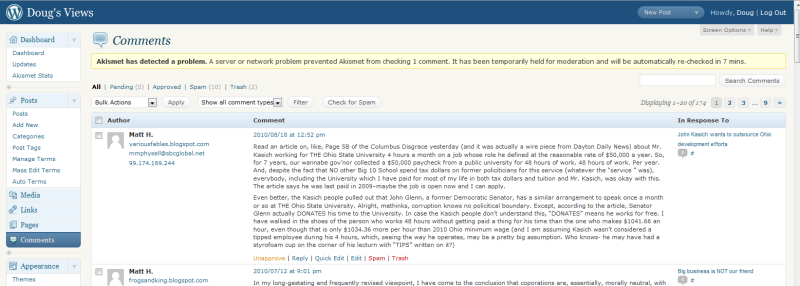
Here is a link to a pict of the notice on comment dashboard page as soon as I got an e-mail saying a comment was being held. Notice even though Akismet says it will retry in 7 mins there is zero pending.
Something that seems might be playing a part is a big spike in spam hits on my site since the update.
Forum: Fixing WordPress
In reply to: 3.0.3 – Sending Comment/Spam Emails, Nothing In QueueI am getting the same e-mails and agree I want to be able to either turn them off or only have an e-mail sent after x number of tries.
The notice on the comment page says about retrying the comment but there is nothing in the queue.
I’ve also notice a huge spike in spam hits like in the hundreds.
YES! That fixed it. It had an old absolute url in that box. It must have caused trouble when 3.0 came out and they changed how the Media part was treated because I have not used the Media part of WP – I usually upload stuff off site to save on bandwidth.
Thanks for the help
Go to Settings-Media then under “Uploading Files” the first box says “Store uploads in this folder” make sure it says the default wp-content/uploads
Yes they are all on Media Temple.
Here is the warnings I get after adding the php_value open_basedir line to the htaccess file of one of the blogs
Warning: is_dir() [function.is-dir]: open_basedir restriction in effect. File(/) is not within the allowed path(s): (/home/50940/domains/ihumanism.org:/home/50940/data/tmp:/var/tmp:/tmp) in /nfs/c03/h01/mnt/50940/domains/ihumanism.org/html/wp-includes/functions.php on line 2037
Warning: file_exists() [function.file-exists]: open_basedir restriction in effect. File(/) is not within the allowed path(s): (/home/50940/domains/ihumanism.org:/home/50940/data/tmp:/var/tmp:/tmp) in /nfs/c03/h01/mnt/50940/domains/ihumanism.org/html/wp-includes/functions.php on line 2028
Warning: is_dir() [function.is-dir]: open_basedir restriction in effect. File(/) is not within the allowed path(s): (/home/50940/domains/ihumanism.org:/home/50940/data/tmp:/var/tmp:/tmp) in /nfs/c03/h01/mnt/50940/domains/ihumanism.org/html/wp-includes/functions.php on line 2037
The difference is in the path
In the original warning it had (/nfs:/tmp:/usr/local:/etc/apache2/gs-bin)
Now is shows (/home/50940/domains/ihumanism.org:/home/50940/data/tmp:/var/tmp:/tmp)
Which is the contents of the php_value open_basedir
It is still trying to resolve File (/)
I have 4 different blogs with the same plugins and they all get the warnings. All are using version .9.9.6.7 On one install I manually installed .9.9.6 and the warnings still came in.
I can make the warnings go away by unchecking the display options from the settings page. Of course it is the same as deactiving it. So I added the ‘<?php if( function_exists(‘ADDTOANY_SHARE_SAVE_KIT’) ) { ADDTOANY_SHARE_SAVE_KIT(); } ?>’ to my single page and the warnings came back.
I didn’t notice it until recently because I have the button show on the posts themselves and not the main page