Blaz K.

Forum Replies Created
-
Forum: Plugins
In reply to: [Rate My Post - Star Rating Plugin by FeedbackWP] Not able to rate@coolph, two instances of rating widget are at the moment unfortunately not possible on a single web page. The plugin will be redesigned to allow this in version 3 which I’m planning to release in the fall.
Thanks for reporting the issue and providing me with the fix. Will do a small update soon.
Regards,
BlazForum: Plugins
In reply to: [Rate My Post - Star Rating Plugin by FeedbackWP] Not able to rateit’s a conflict with wpdiscuz plugin. Both plugins use the same library (https://github.com/js-cookie/js-cookie). You can deregister the library from Rate my Post plugin with this snippet:
add_action( 'wp_print_scripts', 'my_deregister_javascript', 100 );

function my_deregister_javascript() {
  wp_deregister_script( 'rmp-cookie-js' );
}
Then it should work as the other plugin already loads the library.
Regards,
BlazForum: Plugins
In reply to: [Rate My Post - Star Rating Plugin by FeedbackWP] Hide on post edit screensHappy to hear that! 🙂
Forum: Plugins
In reply to: [Rate My Post - Star Rating Plugin by FeedbackWP] Not able to rateHi,
I’ll have to see the website to debug this 🙂
Regards,
BlazForum: Plugins
In reply to: [Rate My Post - Star Rating Plugin by FeedbackWP] Hide on post edit screensUf I read too fast 🙂 So, if you want to hide everywhere but in posts of type post then this should work:
add_action('admin_head', 'my_custom_style');

function my_custom_style() {
  if( get_post_type() != 'post' ) { //post id where to show meta box
    echo '<style>
    #rmp-rate-id {
      display: none;
    }
    </style>';
  }
}
Blaz
Thanks for sharing @bullboy. I’ll see what is the best way to solve this issue.
Blaz
Forum: Plugins
In reply to: [Rate My Post - Star Rating Plugin by FeedbackWP] Hide on post edit screensHi @jonwatson87,
something like this should do the trick (replace the id below with your post id):
add_action('admin_head', 'my_custom_style');

function my_custom_style() {
  if( get_the_id() != 373  ) { //post id where to show meta box
    echo '<style>
    #rmp-rate-id {
      display: none;
    }
    </style>';
  }
}
Regards,
BlazThanks for assistance @livingeasylivecom 🙂
Blaz
Forum: Plugins
In reply to: [Rate My Post - Star Rating Plugin by FeedbackWP] Publish a 5 Star postHi @marcorroma,
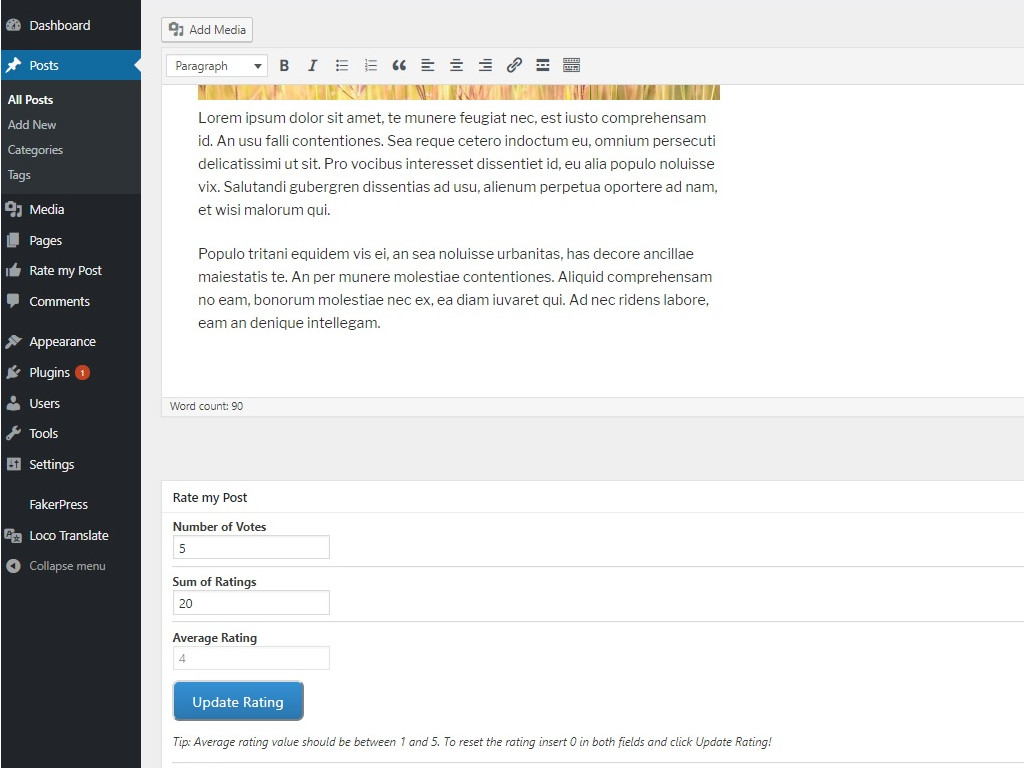
you can update rating in the backend. Open in edit mode and at the bottom you will see rate my post metabox. There you can update rating and read feedback from user in case that you have this feature enabled. https://ps.w.org/rate-my-post/assets/screenshot-7.jpg?rev=2003930
Regards,
BlazForum: Reviews
In reply to: [Rate My Post - Star Rating Plugin by FeedbackWP] Superb!!!!!Thanks @bullboy 🙂
Forum: Reviews
In reply to: [Rate My Post - Star Rating Plugin by FeedbackWP] fantasticoMany thanks @davidebaraldi 🙂
Forum: Plugins
In reply to: [Rate My Post - Star Rating Plugin by FeedbackWP] widget positionHi @forreggbor,
there are three ways you can do this:
1. With the shortcode
2. With the_content filter (https://wordpress.stackexchange.com/questions/49786/add-something-to-beginning-of-the-content)
3. Directly in the post template (https://wordpress.org/support/topic/duplicated-rating/)For the last two options this will output the widget:
echo do_shortcode('[ratemypost]');Regards,
BlazHi @bullboy,
1. I’m aware that in combination with some “custom post type” plugins the structured data is printed on the frontend. I’m investigating this issue, but it’s very likely that the problem is in these “custom post type” plugins – they remove the script tags for structured data from the plugin.
2. Plugin utilizes the_content filter to automatically add widgets to posts which is a bit tricky because other plugins and a theme might also use it – it’s hard to control the order of the outputs. For full control of the widget position I recommend including the widget directly to the post template. More about this here: https://wordpress.org/support/topic/duplicated-rating/
As for the algo rating, that’s a very different concept from my plugin and you will probably need a developer to implement such a system for you 🙂
Regards,
BlazForum: Plugins
In reply to: [Rate My Post - Star Rating Plugin by FeedbackWP] Structured Data Settingsthe plugin uses CreativeWork because it’s the most generic – it encompasses articles, books, courses and even recipes 🙂 More about this here: https://yoast.com/structured-data-schema-ultimate-guide/#creative
Nevertheless, it’s in my plan to add a filter there in one of the future versions, so users will be able to change the structured data.
Blaz
Forum: Plugins
In reply to: [Rate My Post - Star Rating Plugin by FeedbackWP] Bug@tinxtinx is it possible that the error occurs only when you are logged in? If so, try clearing cache in webhost’s configuration panel (cPanel).
Blaz