Blaz K.

Forum Replies Created
-
you can add the Google Privacy Policy and Terms of Service text by utilizing the filter. See example below:
function my_add_after_rating_widgets() {
  echo '<p>Your content here</p>';
}
add_action( 'rmp_after_all_widgets', 'my_add_after_rating_widgets');
Regards,
BlazForum: Plugins
In reply to: [Rate My Post - Star Rating Plugin by FeedbackWP] Hosting CPU usage increaseHi @catshands,
this indeed seems a lot. I haven’t noticed such an increase in CPU load and I use the plugin on live websites as well. Are you sure that it’s the CPU and not the script executions? The plugin “adds” one script execution per pageview (ajax call) and I know that in some cases hosting providers limit these executions to relatively low number for the least expensive plans (10.000 per 24h etc.).
I don’t think caching the output is the right way to go about this because it’ll be a bad user experience. For example, the visitor will see “based on 2 votes” but after rating the post, it will shown him “based on 5 votes”.
Maybe you could rewrite the JS file to load the results only when visitor scrolls down to the widget? I’m not sure how much this would help but it’s a starting point and not too much work 🙂
Forum: Plugins
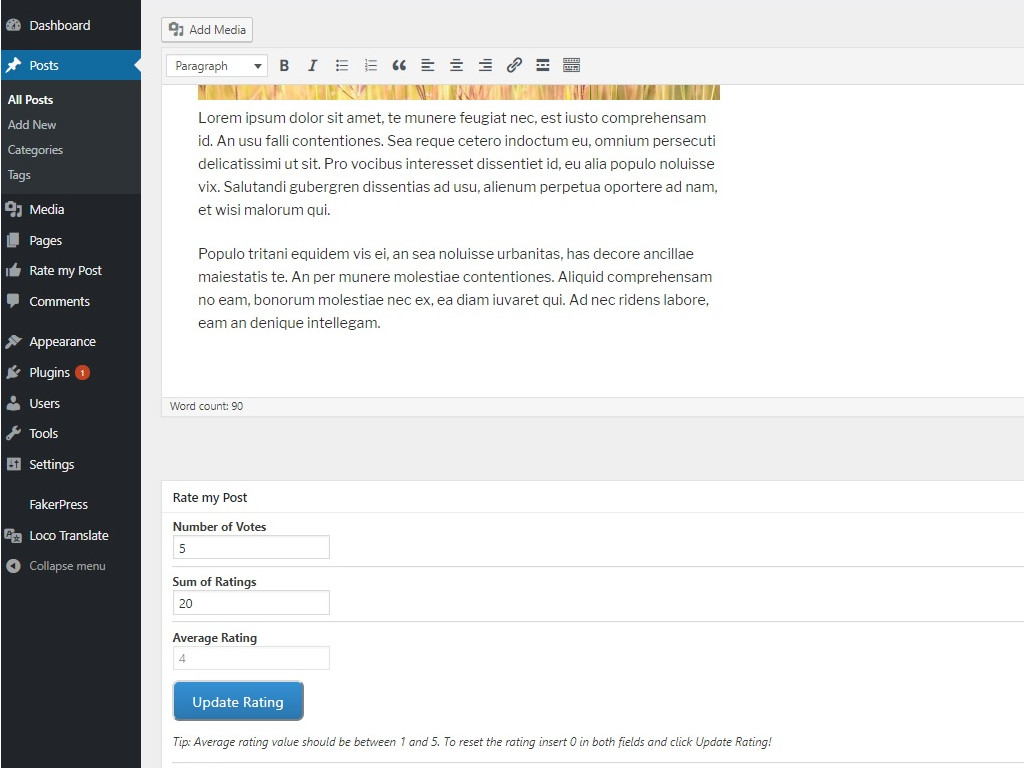
In reply to: [Rate My Post - Star Rating Plugin by FeedbackWP] Manipulate vote counts?Hi @mzwibber,
open a post in edit mode and at the bottom you will see rate my post metabox which let’s you change the rating. See screenshot here: https://ps.w.org/rate-my-post/assets/screenshot-7.jpg?rev=2003930
Regards,
BlazHi @mzwibber,
this depends on how trustworthy the search engines consider you website. The better the quality, the faster you will see structured data displayed in search engines 🙂
Regards,
BlazForum: Reviews
In reply to: [Rate My Post - Star Rating Plugin by FeedbackWP] Very Easy to UseThanks for the review @themukeshpatel! 🙂
Forum: Plugins
In reply to: [Rate My Post - Star Rating Plugin by FeedbackWP] Add LinkedIn Social ShareHi,
I’ll add it in the next update 🙂
Blaz
Hi @feedough,
thanks for reporting the issue. You are right, the migration from KK star ratings is not working with the new version. I assume it’s only working with KK star ratings version 2.X.X.
I’ll add a fix in the next update – probably already this week 🙂
Regards,
BlazHi @pascal707,
you simply enable the option and in case that you use any of the supported plugins (GA Google Analytics, MonsterInsights and Google Analytics by ShareThis), you should see the votes under events.
Regards,
BlazForum: Plugins
In reply to: [Rate My Post - Star Rating Plugin by FeedbackWP] Publish a 5 Star postNo that’s at the moment unfortunately not possible.
Blaz
Forum: Plugins
In reply to: [Rate My Post - Star Rating Plugin by FeedbackWP] reCaptcha blocking ratingsIn your case it’s probably CloudFlare cache. Here are the instructions how to purge it: https://support.cloudflare.com/hc/en-us/articles/200169246-How-do-I-purge-my-cache-
Blaz
Forum: Plugins
In reply to: [Rate My Post - Star Rating Plugin by FeedbackWP] Not able to rateTitle attribute was actually there in the earlier versions but removed after “Show star hover texts” feature was implemented.
That is possible 🙂 Check “Hover Color:” in the customization.
Blaz
Forum: Plugins
In reply to: [Rate My Post - Star Rating Plugin by FeedbackWP] reCaptcha blocking ratingsHi,
you need to purge the cache after the update (minify cache, any other cache and CDN cache in case you use a CDN). More about this here: https://wordpress.org/support/topic/blocked-by-recaptcha-unnatural-interaction-detected/
When checking if it’s working – log out and open an incognito window.
Regards,
Blaz- This reply was modified 6 years, 9 months ago by Blaz K..
Forum: Plugins
In reply to: [Rate My Post - Star Rating Plugin by FeedbackWP] CustomizationHi @pedro-fidalgo,
reCaptcha doesn’t have any impact on the customization. Are you sure you didn’t enable “Multilingual website compatibility mode” in the settings? Multilingual website compatibility mode should be disabled unless you customizing strings via some other plugin.
Regards,
BlazThe button appears beneath the stars once you click on the star. So, basically once you click on a star you don’t yet submit rating – you just select the star/rating. Then you press the submit button (which is visible only once you clicked on a star) and the rating is submitted.
Blaz
Hi Rani,
this is a tricky one 🙂 I just tried again with two different smartphones in Chrome and Firefox and the button showed normally every time. Is it device/browser specific? Android/Chrome/Firefox are for sure not a problem. It’s hard to debug something that I can’t reproduce 🙂
Blaz