averta support

Forum Replies Created
-
Forum: Plugins
In reply to: [Master Slider - Responsive Touch Slider] my two master slides went awayHi,
Thank you for choosing Master Slider.
We need to check out your website to find out the issue.
Could you please provide us with the link of your website?
I will wait to hear from you.
Best,
AvertaHi @dwlorimer,
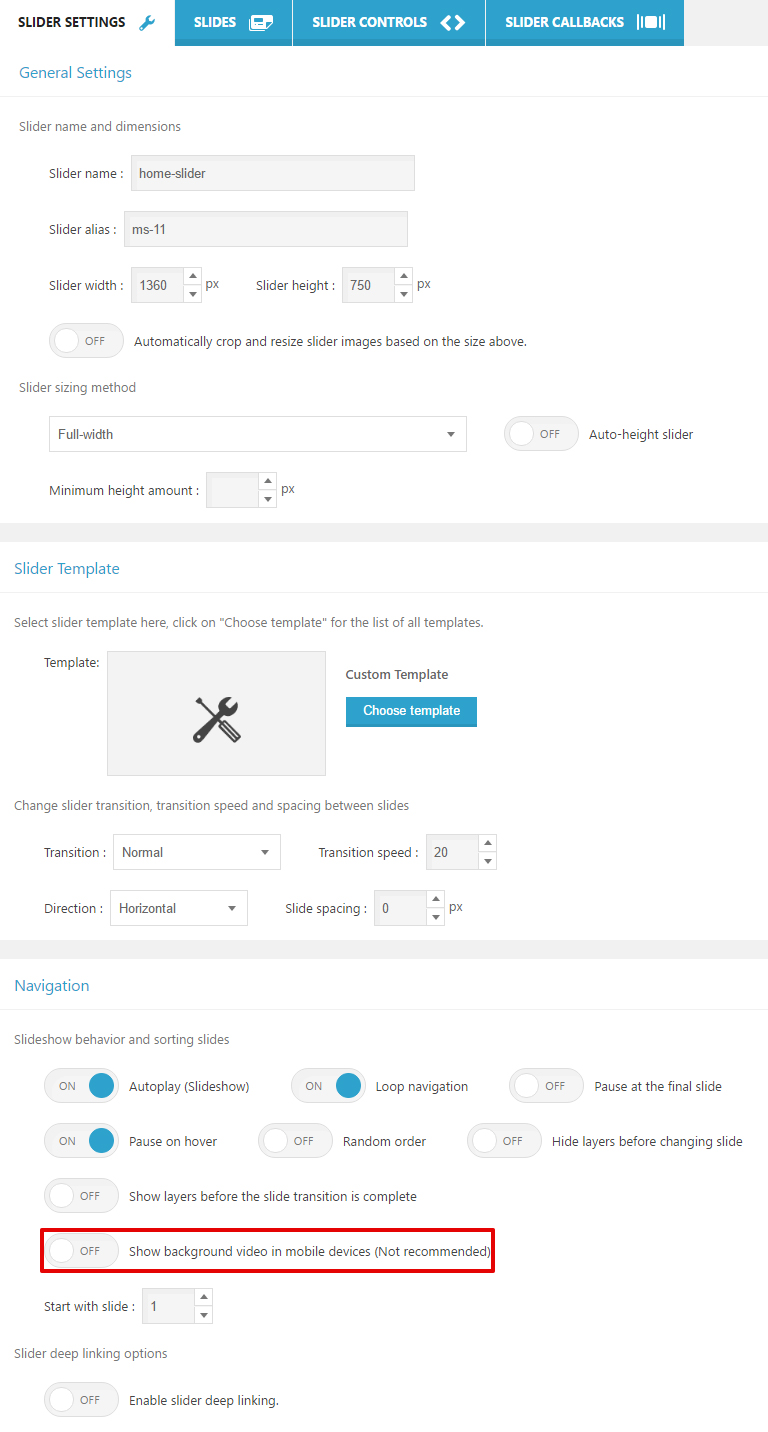
Version 2.15 is old. This option is available for version 3 onwards.
To find this option, please update your Master Slider to the latest version (3.1.3)In this documentation, you can read about updating Master Slider:
http://docs.averta.net/display/mswpdoc/Updating
If you have any further questions, please let me know.
Best,
AvertaHi,
Thank you for choosing Master Slider.
You can use the below code to load Master Slider:
<?php masterslider(5); ?>“5” is slider ID and it can be loaded from saved meta.
If I could be of any further assistance, please let me know.
Best,
AvertaHi,
Thank you for using Master Slider.
Could you please provide me with the link of your website?
I will wait to hear from you.
Best,
AvertaHi @dwlorimer,
This option is on Slider Settings. Please check out the below screenshot:
http://support.averta.net/en/wp-content/uploads/bg-video-in-mobile.jpg
Best,
AvertaHi,
Thank you for choosing Master Slider.
The latest version (3.0.1) has been released. Please update your Master Slider.
If the problem persists, please let me know.
Best,
AvertaForum: Plugins
In reply to: [Master Slider - Responsive Touch Slider] Responsive problem on phonesHi @meganmarie123,
Thank you for your nice comment, but I checked out your link, you are not using Master Slider 🙂
Could you please recheck the link?
Best,
AvertaForum: Plugins
In reply to: [Master Slider - Responsive Touch Slider] Responsive configurationHi Cristina,
Thank you for choosing Master Slider.
Unfortunately, it is not possible to have two different options for one slider, on mobile and desktop.
If I could be of any further assistance, please do not hesitate to ask.
Best,
AvertaHi @rlitts,
Thank you for choosing Master Slider.
Instead of resizing pictures with CSS, trigger thee ‘resize’, or use the below jQuery code:
msCli('update');Also, for images’ size issue after clicking, checkout the below code:
jQuery('.box').click(function(){
    msCli('update');
  });
Please let me know the result.
Best,
AvertaForum: Plugins
In reply to: [Master Slider - Responsive Touch Slider] Flickering with chrome on macHi @mcam22,
Thank you for choosing Master Slider.
It is a common issue and it is possibly related to chrome and its problem with gpu driver. But not all of the mac users face this problem.
Our dev team are working on this to find out a solution.If I could be of any further assistance, please let me know.
Best,
AvertaForum: Plugins
In reply to: [Master Slider - Responsive Touch Slider] slider not showingHi @kristaprojects,
We check out your link with different systems and browsers, we can see Master Slider.
http://support.averta.net/en/wp-content/uploads/Screen-Shot-2017-06-17-at-2.52.14-PM.png
There are two sliders on your page, the second one is Master Slider 🙂
Please try with another system and browser.
Best,
AvertaForum: Plugins
In reply to: [Master Slider - Responsive Touch Slider] Siteorigin PagebuilderHi Thomas,
Thank you for choosing Master Slider.
Could you please create a test page with siteorigin and another one without siteorigin, and provide us with the links of them?
I will wait to hear from you @thomasbaden.
Best,
AvertaForum: Plugins
In reply to: [Master Slider - Responsive Touch Slider] Slider not syncing with the linksHi @jcwproductions,
Thank you for choosing Master Slider Pro.
Our support staff on our pro support forum will help you.
Pro Support Forum (WordPress) :
http://support.averta.net/envato/support/item/master-slider-wordpress-plugin/Registration :
http://support.averta.net/envato/registration/If I could be of any further assistance, please let me know.
Best,
AvertaHi,
Thank you for choosing Master Slider.
You can use the below code:
$args = array(
     'id'                      => '1',     // slider id
     'uid'                     => '',      // an unique and temporary id
     'class'                   => '',      // a class that adds to slider wrapper
     'margin'                  => 0,
     'inline_style'            => '',
     'bg_color'                => '',
     'bg_image'                => '',
     'slider_type'             => 'custom',   // values: custom, flickr, facebook, post
     'width'                   => 300,     // base width of slides. It helps the slider to resize in correct ratio.
     'height'                  => 150,     // base height of slides, It helps the slider to resize in correct ratio.
     'min_height'              => 0,
     'start'                   => 1,
     'space'                   => 0,
     'grab_cursor'             => 'true',  // Whether the slider uses grab mouse cursor
     'swipe'                   => 'true',  // Whether the drag/swipe navigation is enabled
     'wheel'                   => 'false', // Enables mouse scroll wheel navigation
     'mouse'                   => 'true',  // Whether the user can use mouse drag navigation
     'keyboard'                => 'false', // Whether the user can use keyboard navigation
     'crop'                    => 'false', // Automatically crop slide images?
     'autoplay'                => 'false', // Enables the autoplay slideshow
     'loop'                    => 'false', //
     'shuffle'                 => 'false', // Enables the shuffle slide order
     'preload'                 =>  0,
     'wrapper_width'           => '',
     'wrapper_width_unit'      => 'px',
     'fullwidth'               => 'false', // It enables the slider to adapt width to its parent element
     'fullheight'              => 'false', // It enables the slider to adapt height to its parent element
     'autofill'                => 'false', // It enables the slider to adapt width and height to its parent element
     'layout'                  => 'fillwidth',
     'fullscreen_margin'       => 0,
     'height_limit'            => 'false', // It force the slide to use max height value as its base specified height value.
     'auto_height'             => 'false',
     'smooth_height'           => 'true',
     'end_pause'               => 'false',
     'over_pause'              => 'false',
     'fill_mode'               => 'fill',
     'autofill_target'         => '',
     'center_controls'         => 'true',
     'layers_mode'             => 'center',// It accepts two values "center" and "full"
     'hide_layers'             => 'false',
     'instant_show_layers'     => 'false',
     'mobile_bg_video'         => 'false',
     'speed'                   => 17,
     'skin'                    => 'ms-skin-default', // slider skin. should be seperated by space - should be started by ms-skin
     'template'                => '',
     'template_class'          => '',
     'direction'               => 'h',
     'view'                    => 'basic',
     'gfonts'                  => '',
     'parallax_mode'           => 'swipe',
     'scroll_parallax'         => 'false',
     'start_on_appear'         => 'false',
     'scroll_parallax_move'    => 30,
     'scroll_parallax_fade'    => 'true',
     'scroll_parallax_bg_move' => 50,
     'use_deep_link'           => 'false',
     'deep_link'               => '',
     'deep_link_type'          => 'path',
     'flickr_key'              => '',
     'flickr_id'               => '',
     'flickr_count'            => 10,
     'flickr_type'             => 'photos',
     'flickr_size'             => 'c',
     'flickr_thumb_size'       => 'q',
     'facebook_username'       => '',
     'facebook_albumid'        => '',
     'facebook_count'          => 10,
     'facebook_type'           => 'album',
     'facebook_size'           => 'orginal',
     'facebook_thumb_size'     => '320',
     'facebook_token'          => '',
     'ps_post_type'            => '',
     'ps_tax_term_ids'         => '',
     'ps_post_count'           => 10,
     'ps_image_from'           => 'auto',
     'ps_order'                => 'DESC',
     'ps_orderby'              => 'menu_order date',
     'ps_posts_not_in'         => '',
     'ps_excerpt_len'          => 100,
     'ps_offset'               => 0,
     'ps_link_slide'           => 'false',
     'ps_link_target'          => '_self',
     'ps_slide_bg'             => '',
     'ps_exclude_no_img'       => 'false',
     'arrows'                  => 'true',   // display arrows?
     'arrows_autohide'         => 'true',   // auto hide arrows?
     'arrows_overvideo'        => 'true',   // visible over slide video while playing?
     'arrows_hideunder'        => '',
     'bullets'                 => 'false',  // display bullets?
     'bullets_autohide'        => 'true',   // auto hide bullets?
     'bullets_overvideo'       => 'true',   // visible over slide video while playing?
     'bullets_direction'       => 'h',
     'bullets_align'           => 'bottom',
     'bullets_space'           => 5,
     'bullets_margin'          => '',
     'bullets_hideunder'       => '',
     'thumbs'                  => 'false',  // display thumbnails?
     'thumbs_autohide'         => 'true',   // auto hide thumbs?
     'thumbs_overvideo'        => 'true',   // visible over slide video while playing?
     'thumbs_direction'        => 'h',      // direction of control
     'thumbs_type'             => 'thumbs',
     'thumbs_speed'            => 17,       // scrolling speed. It accepts float values between 0 and 100
     'thumbs_inset'            => 'true',   // insert thumbs inside slider
     'thumbs_align'            => 'bottom',
     'thumbs_margin'           => 0,
     'thumbs_width'            => 100,
     'thumbs_height'           => 80,
     'thumbs_space'            => 5,
     'thumbs_hideunder'        => '',
     'thumbs_fillmode'         => 'fill',
     'thumbs_arrows'           => 'false',
     'thumbs_in_tab'           => 'false',
     'thumbs_hoverchange'      => 'false',
     'scroll'                  => 'false',  // display scrollbar?
     'scroll_autohide'         => 'true',   // auto hide scroll?
     'scroll_overvideo'        => 'true',   // visible over slide video while playing?
     'scroll_direction'        => 'h',      // direction of control
     'scroll_align'            => 'top',
     'scroll_inset'            => 'true',
     'scroll_margin'           => '',
     'scroll_color'            => '#3D3D3D',
     'scroll_hideunder'        => '',
     'scroll_width'            => '',
     'circletimer'             => 'false',  // display circletimer?
     'circletimer_autohide'    => 'true',   // auto hide circletimer?
     'circletimer_overvideo'   => 'true',   // visible over slide video while playing?
     'circletimer_color'       => '#A2A2A2',// color of circle timer
     'circletimer_radius'      => 4,        // radius of circle timer in pixels
     'circletimer_stroke'      => 10,       // the stroke of circle timer in pixels
     'circletimer_margin'      => '',
     'circletimer_hideunder'   => '',
     'timebar'                 => 'false',   // display timebar?
     'timebar_autohide'        => 'true',   // auto hide timebar?
     'timebar_overvideo'       => 'true',   // visible over slide video while playing?
     'timebar_align'           => 'bottom',
     'timebar_color'           => '#FFFFFF',
     'timebar_hideunder'       => '',
     'timebar_width'           => '',
     'slideinfo'               => 'false',   // display timebar?
     'slideinfo_autohide'      => 'true',   // auto hide timebar?
     'slideinfo_overvideo'     => 'true',   // visible over slide video while playing?
     'slideinfo_direction'     => 'h',
     'slideinfo_align'         => 'bottom',
     'slideinfo_inset'         => 'false',
     'slideinfo_margin'        => '',
     'slideinfo_hideunder'     => '',
     'slideinfo_width'         => '',
     'slideinfo_height'        => '',
     'on_init'                 => '',
     'on_change_start'         => '',
     'on_change_end'           => '',
     'on_waiting'              => '',
     'on_resize'               => '',
     'on_video_play'           => '',
     'on_video_close'          => '',
     'on_swipe_start'          => '',
     'on_swipe_move'           => '',
     'on_swipe_end'            => ''
    );
add_filter('masterslider_gallery_slider_attrs', $args);
These are all the parameters that you can custom.
If you have any further questions, please let me know.
Best,
AvertaForum: Reviews
In reply to: [Master Slider - Responsive Touch Slider] Quite usefulHi @reinholdmoeller,
Thank you for choosing Master Slider.
I am sorry to hear that! Could you please explain your issue?
Best,
Averta- This reply was modified 8 years, 11 months ago by averta support.