archon810

Forum Replies Created
-
I have gained a lot of insight into how the DISQUS plugin works in the last few months.
Basically, for syncing back to your blog, a wp-cron entry is added every time someone visits your page and loads the comment form (the cron task isn’t overwritten if it already exists) – this is done via an AJAX request back to your site.
When wp-cron runs, it instructs the plugin to initiate sync from DISQUS to your local db, which sucks in the missing comments. The huge problem here is, as I found out, only new comments are going to get sucked in. Not edits to comments, not changes to their moderation status, not deletions – just new comments. So, if you ever turn off DISQUS and as far as search engines are concerned, you’ll end up with comments that are potentially way out of sync.
This is a big problem, and according to the team, it’s the next big (huge) ticket item on their plates. They want to do it right, and that’s going to take time.
Tyler,
This is me, Artem, from AndroidPolice.com btw. Afraid the technical solution would require access to the backend as well (and lots of time to do this right, which I’ll leave to your developers). As this is something that’s not supported right now, what’s the best strategy to sync these from time to time (force overwriting of posts in the local db, let’s assume the local DB won’t be touched otherwise) or to sync up the comments if we ever need to leave DISQUS? I wouldn’t want to be stuck in a situation where I’d have months or years of unmoderated, unedited, uncurated data all over again and be forced to attach to DISQUS.
I do hope for a correct solution to this implemented that’d solve the main issue here retroactively, but in the meantime, could you please answer the above?
Thanks.
Tyler, well, for SEO purposes and for browsers without JS enabled, the cached comments from the local db will be displayed. Then comments that are spammed or asked by people to be deleted (say, their private info was posted by accident), etc – they’re all going to stick around in that form.
I’m not sure why you think it will take a huge amount of processing at all – in fact, the solution is pretty trivial. All edits and moderation is done on DISQUS. So, DISQUS can keep track of comments that are touched in any way and keep a queue that the site would then pull via cron and sync back to the local db. So instead of only new comments, that queue would also support updating old ones, marking them as spam or trashed, as well as unspamming and untrashing. This approach is far more flexible than maintaining a number in the local database of the last post id.
Thoughts on the above?
What about the other way around? Moderated/deleted/edited comments should sync back to the local db, but I don’t think they are, which is a pretty big deal.
Forum: Plugins
In reply to: [Audit Trail] Audit Trail blew up our databaseMore details? What tables? What rows?
Brilliant, it works exactly as described.
It was AMPERSANDSIGNnbsp;
Btw, is displaying as text instead of a single space. This is unrelated to this ticket, but I’m going to tack it on.
This seems to work! Some styling is missing because some other plugin’s css is missing, but that’s up to the plugin author to fix (oh wait, I rewrote that plugin from scratch, so I can fix it too :-]).
I’d still like to give the option to the contributor, so that they can flip between raw html and processed – if at least to see if there are any other shortcodes embedded within any given post snippet. Could be a simple 2-part radio button that defaults to raw html.
UTF-8 fix confirmed.
Think about the others. This is already a great start. Thank you.
Johan,
The initial implementation works. Here are some things that would be great to see in the final version:
– rather than output pure escaped html, output unescaped one, so that you can see exactly what the output looks like (with all the html processed). This is especially valuable for contributors who aren’t tech savvy and don’t want to see HTML. In fact, I’d like to see this in the admin version as well, under the edit textareas – bonus points if it’s updated live via ajax after getting parsed by the server (to resolve other shortcodes and filters, more on that below). Maybe even an ability to switch between processed and raw HTML for contributors – then they could see both if they want to.
– for the processed HTML mode, it’d be ideal to resolve other shortcodes. For example, I have a shortcode called [note] that’s part of another plugin (wp-note) – it’d be perfect to see it do_shortcode()’ed in this processed view so that it looks exactly like the final output
– there seems to be an issue with UTF8 somewhere. Here’s what I see in one of my shortcodes: “This article deals with a couple of advanced topics. If youâ��re unfamiliar with some of the terms, hit up our primers here.” What it reads in the edit mode is: “This article deals with a couple of advanced topics. If you’re unfamiliar with some of the terms, hit up our primers here:”
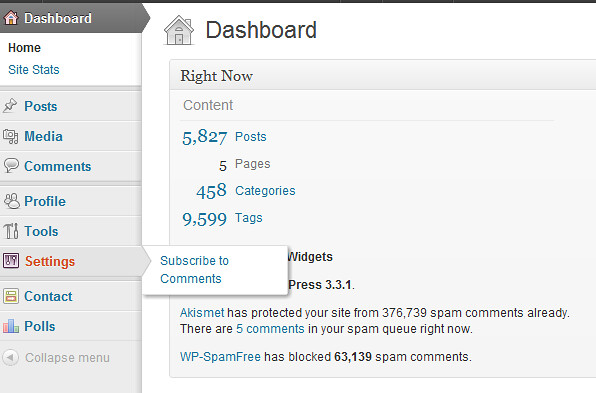
As you can see, the quote is special, not regular, and it’s probably double encoded by mistake or not decoded correctly. Not sure, but here’s your test case.To clarify “Subscribe to comments” is a plugin.
Don’t think you need a filter at all. I think the confusion stems from you thinking users without admin privs can’t view settings, which doesn’t seem to be true.
Here’s an example of what happens when I log in as a low-priv user: http://farm8.staticflickr.com/7261/7000076879_856cea0602_z.jpg
I think you can freely add menus, and as long as the user has privs to access them, they’ll show up. Look into the respective WP API.
Does that sound good?
I’m not sure exactly what you mean by “by using a filter” but if you mean a setting that says show read-only list of shortcodes page to users with less than OPTION1 and greater than OPTION2 privilege, or something like that, then yes, that’s perfect.
I am also using svn trunk of this, so you can push in changes and let me test them before releasing the tagged version. What do you think?
It’s up to you to decide on the right text, but the main thing is you need to understand the issue here. If you don’t use JS comments, using this option could have dire side effects.