Andrei

Forum Replies Created
-
Hey there,
Thanks for reaching out about your problem.
As you mentioned, the problem doesn’t sound like it’s TP related because we don’t make any changes to the default language.
Try deactivating TranslatePress and see if the issue still occurs. You don’t have to worry about losing translations, they are all saved in your database.
Best Regards,
Hey there,
I’m sorry for the long waiting time that you experienced.
Please feel free to open a ticket here mentioning this conversation so we can have a better look at your issue.
Best Regards,
Hey there,
Thanks for contacting us regarding your issue.
Would you mind telling me what changes you tried to make to the Language Switcher without seeing any results?
Best Regards,
Hey there,
Thanks for reaching out to us!
Sorry for the long delay in replying. We were all caught in the seasonal holidays and I didn’t get to answer your question.
Unfortunately I think the automatic detection of the language is the best choice in this case. At first i thought you might make use of the conditional shortcode but you still need to change the language using the switcher.
Let me know if you have any other questions that I might help you with.
Best Regards
Hello there,
Thanks for reaching out about your issue.
Since this looks a lot like a conflict with some other code, the first/next recommended step is the conflict test (ideally in a staging environment):
*Briefly* disable all other plugins and enable the default Twenty Twenty theme. Please also disable all add-ons. If this fixes the problem, enable everything one by one, checking each time to see when the problem returns.
Please let us know when you find the conflict so that we can take a look and see what we can do about it.
Best Regards,
Hey there,
Thanks for reaching out to us!
So far nobody reported such issues regarding the mentioned builder or theme.
I am going to test this on my instance and come back to you.Also, would you mind providing a link to one of those temporary websites so we can have a better look?
Best Regards,
Hello there,
Thanks for reaching out to us about your issue.
Since this looks a lot like a conflict with some other code, the first/next recommended step is the conflict test (ideally in a staging environment):
*Briefly* disable all other plugins and enable the default Twenty Twenty theme. Please also disable all add-ons. If this fixes the problem, enable everything one by one, checking each time to see when the problem returns.
Please let us know when you find the conflict so that we can take a look and see what we can do about it.
Best Regards,
Hey there,
Thanks for reaching out to us about your issue.
The error 403 is usually related to a security plugin.
Can you please disable your security plugin to see if that will solve the problem?
Best Regards,
Hey there,
We deeply apologize for the delayed response.
There has been a great load on our support team in the past few days, but such a long reply time is very uncommon.
Did you have any success using the Conditional Shortcode or Translation Blocks in resolving your problem?
Also if you are not able to translate directly from the Visual Editor try using the String Editor.
Looking forward to your reply.
Best Regards,
Hey there,
We deeply apologize for the delayed response.
There has been a great load on our support team in the past few days, but such a long reply time is very uncommon.
Please feel free to open another ticket here mentioning this conversation so we can have a better look at your problem (if it is still relevant).
Thanks you for your patience so far.
Best Regards,
Hello there,
We deeply apologize for the delayed response.
There has been a great load on our support team in the past few days, but such a long reply time is very uncommon.
Here is an example of some additional CSS to move your language switcher. Just add it to Appearance –> Customize –> Additional CSS.
#trp-floater-ls {

right: 35% !important;

}
Best Regards,
Hello there,
We deeply apologize for the delayed response.
There has been a great load on our support team in the past few days, but such a long reply time is very uncommon.
Please feel free to open another ticket here mentioning this conversation so we can have a better look at your problem (if it is still relevant).
Thanks you for your patience so far.
Best Regards,
Hey there,
We deeply apologize for the delayed response.
There has been a great load on our support team in the past few days, but such a long reply time is very uncommon.
Please try translating your problematic string directly from the backend using the WP Data Access plugin https://wordpress.org/plugins/wp-data-access/
Let’s say for example that your default site’s language is English (United States) and that you want to translate a string to Spanish.
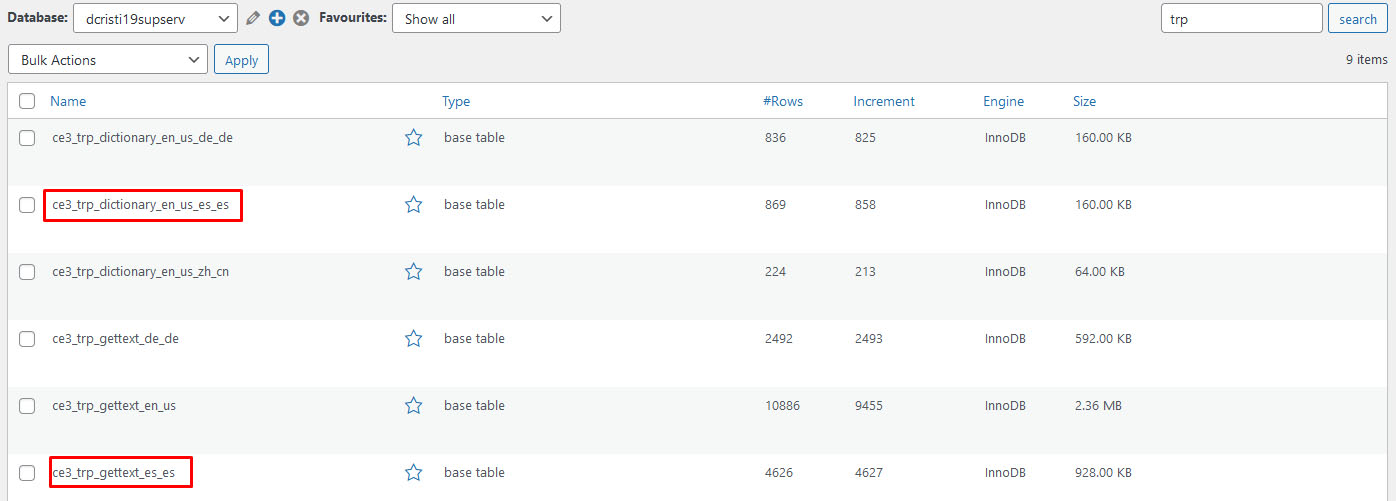
Using WP Data Access, you will have to search for that string either in the wp_trp_dictionary_en_us_es_es table or in the wp_trp_gettext_es_es table.
The gettext table contains all the strings related to plugins or themes, while the dictionary table contains the strings related to your site’s content.Here is an image of how WP Data Access looks when you search for the trp tables: https://www.cozmoslabs.com/wp-content/uploads/2021/05/wp_data_access_search_for_table.jpg
You can never be too sure in which table a string will be, so the best practice is to search for it in both tables. Start with one table and if you are not able to find it there, search for it in the other table.
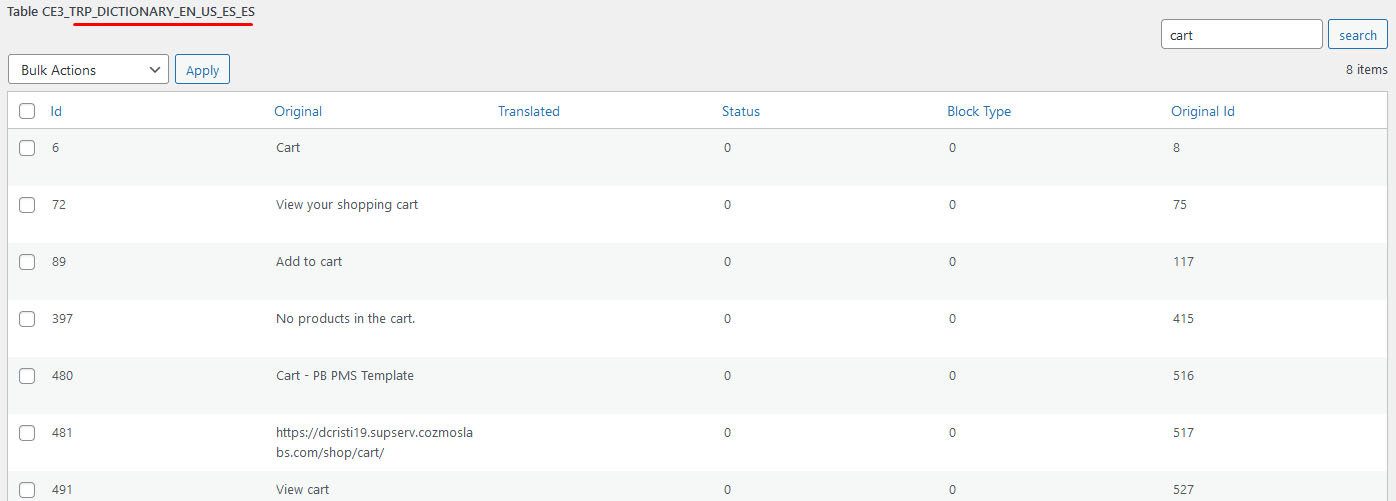
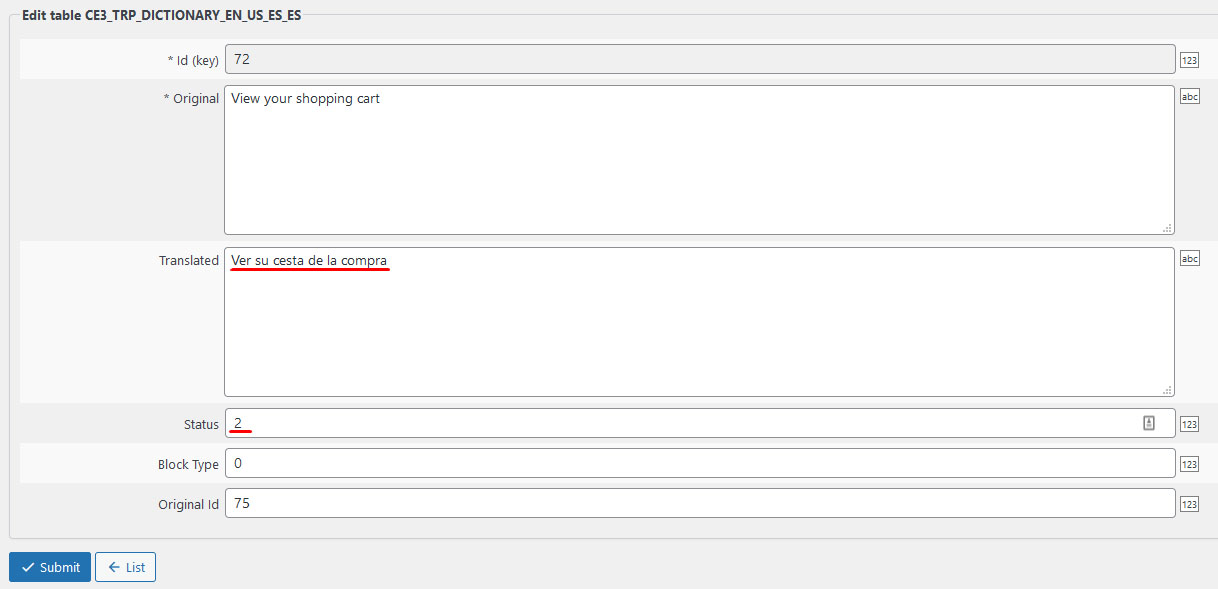
Here is an image of how I was able to search for all strings that contain “cart” in the wp_trp_dictionary_en_us_es_es table: https://www.cozmoslabs.com/wp-content/uploads/2021/05/wp_data_access_search_for_string.jpgAfter you find the string that you want to edit, all you have to do is to edit the row and to add the translation in the Translated column. It is also important to add 2 in the Status column (0 – not translated; 1 – automatic translated; 2 – manually translated).
Here is an image of how to do the translation: https://www.cozmoslabs.com/wp-content/uploads/2021/05/wp_data_access_translate_string.jpg
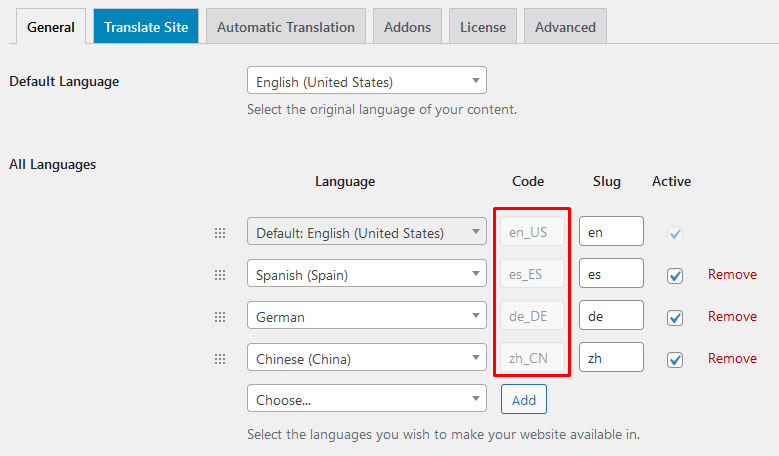
After you have filled the Translation and Status columns, press the Submit button and the translation is going to be saved.In the example I gave above, I used English and Spanish, you can do the same for all languages, just make sure to replace the en_us and es_es language codes with the ones that you are using. You can find the codes for your languages by going to: Settings –> TranslatePress –> General tab https://www.cozmoslabs.com/wp-content/uploads/2021/05/general_langauge_code.jpg
If this doesn’t help either please open a ticket here.
Looking forward to your reply.
Best Regards,
Hello there,
Thanks for reaching out to us.
The WooCommerce emails are actual templates (like theme files) so it means you can translate whatever is localized using gettext in them. https://codex.wordpress.org/Plugin_API/Filter_Reference/gettext
Our plugin doesn’t yet detect these strings because they are not visible in the front-end, only processed. The good news is that most languages already have these translated properly.
Alternatively, you can also use LocoTranslate in order to translate these strings https://wordpress.org/plugins/loco-translate/.
Let me know if you have any other questions.
Best Regards,
Hello there,
I am sorry for the long waiting time that you have been experiencing.
There has been a great load on our support team in the past few days, but such a long reply time is very uncommon.
Please open a ticket here, and mention this conversation, so we can have a better look at your issue.
Best Regards
- This reply was modified 4 years, 6 months ago by Andrei.