Andrei

Forum Replies Created
-
Forum: Plugins
In reply to: [TranslatePress - Translate Multilingual sites with AI Translation] GoogleHey there,
Both google and deepL have their specific price quotas set per character.
The way the automatic translation feature works is a simple one. You can check this article to understand better: https://translatepress.com/automatically-translate-wordpress-site/
Get back to me if you have any further questions.
Best Regards,
Hello there,
Thanks for reaching out to us!
Since this looks a lot like a conflict with some other code, the first/next recommended step is the conflict test (ideally in a staging environment):
*Briefly* disable all other plugins and enable the default Twenty Twenty theme. Please also disable all add-ons. If this fixes the problem, as it probably will, enable everything one by one, checking each time to see when the problem returns.
Please let us know when you find the conflict so that we can take a look and see what we can do about it.
Best Regards,
Hello there,
Thanks for reaching out to us!
It is possible to exclude some words from being translated. You can check out TranslatePress Advanced Settings and choose the method that best suits you. More details here.
Also if you if you do have certain words that can be translated in more than a single way you can make use of our Conditional Shortcode based on language. You can insert it in a text box, shortcode block from your page back-end.
Best Regards,
Greetings,
We deeply apologize for the delayed response.
There has been a great load on our support team in the past few days, but such a long reply time is very uncommon.
I tried replicating this without any success unfortunately.
Please try opening a ticket here so I can further look into this.
Best Regards,
Hello there,
Thanks for reaching out to us!
Do you have by any chance turned on “Use subdirectory for default language”? If you do please turn it off and let me know if you see any improvement.
If you do not please send over a link of your website so I can have a better look at the issue.
Best Regards,
Hello there,
Thanks for reaching out to us!
Unfortunately, for the time being, we don’t have support for AMP.
This is a tracked feature and will be available in the future versions of TranslatePress — but, as there are other features more requested that require prioritization, I can’t give you a timeframe for when will this be implemented.
Thank you for understanding.
Best Regards,
Hello there,
Thank you for reaching out to us!
Do you have any errors in the browser console when you try to save a translation?
It should be working to add all the characters you need to translate your content.
Let me know about this!
Kind Regards,
Hello there,
Thanks for reaching out to us!
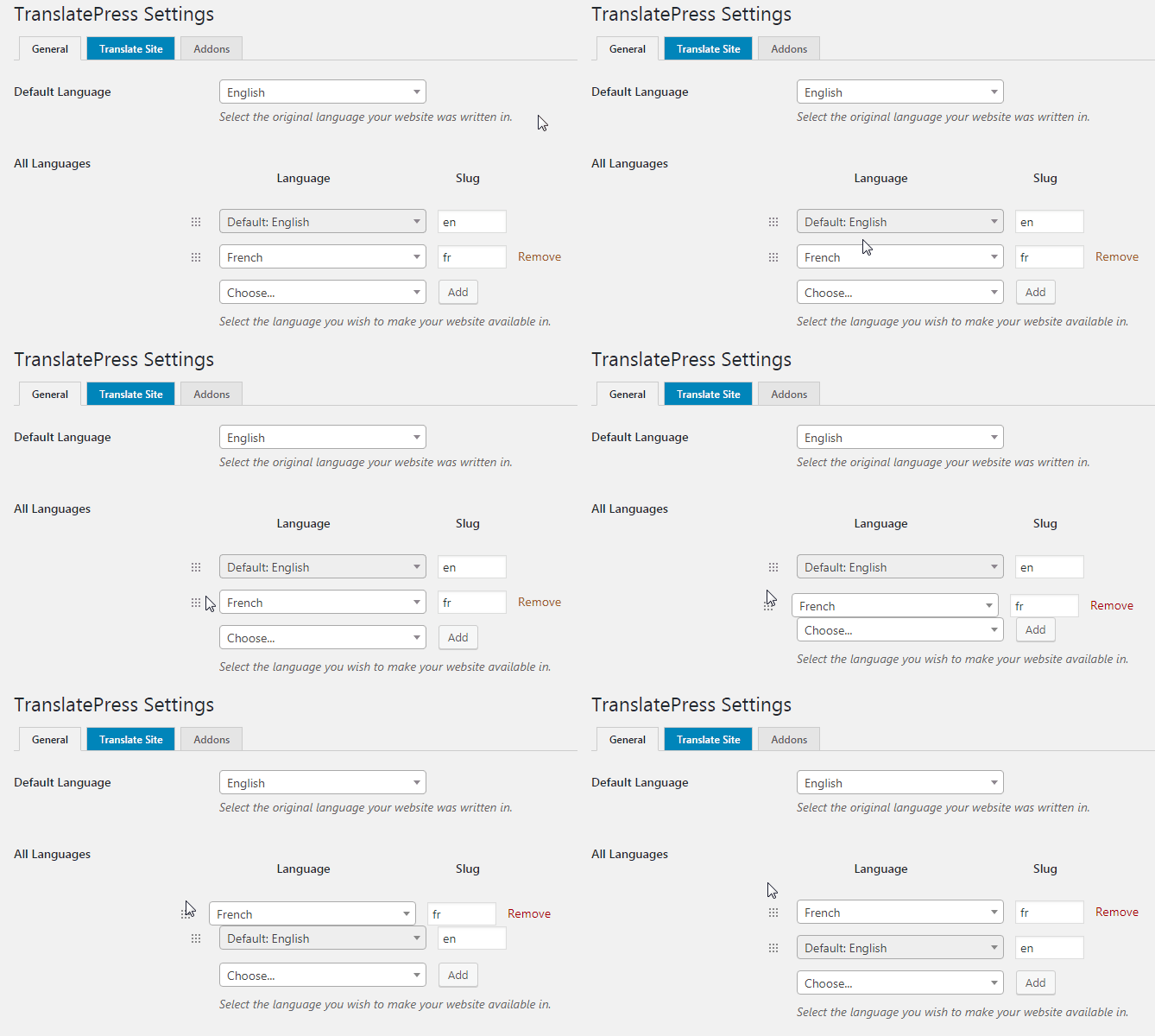
To change the order that the language get to be displayed on the website please follow this steps:
Go to:
Wordpress Dashboard –> Settings –> Translatepress General Tab –>
Activate the following: Use a subdirectory for the default languageThen just drag the secondary language where the default language is.
A visual example:
https://translatepress.com/wp-content/uploads/2018/08/tp-change-default-language.gifLet me know if you have any further questions.
Best Regards,
Hello there,
Thanks for reaching out to us!
This should present no issues with your SEO.
If your default language is english you should be able to get rid of the language code at the end of your URL by deactivating “Use subdirectory for default language”.
Let me know if you have any other questions.
Regards
Hello there,
Thanks for reaching out to us!
This looks like a false positive. The language parameter is set correctly by WordPress as en-GB.
Most likely the accessibility tool doesn’t recognize it correctly.Best Regards,
Hello there,
Thank you for reaching out to us!
Unfortunately not much changed regarding this since you last asked this question and I’m afraid I’ll have to give you the same answer my colleague gave you.
TranslatePress should work well with any of those plugins that you mentioned, we do not have a specific one that is integrated with TP.
We do have a request in place to make SwiftPerformance compatible with TP however not many users have requested this, thus not being prioritized.
I will point out to my colleagues your advice on listing the mentioned issues here: https://translatepress.com/wordpress-multilingual-site-speed/
Thank you for your patience so far!
Best Regards
Hello there,
Thank you for reaching out to us!
Thank you very much for your detailed explanation of the issue at hand, this will be really helpful in replicating your problem.
We apologize for waiting such a long time without receiving an answer, my colleague left on holiday and apparently no one was able to take over.
I will do my best to replicate this on my instance and I will get back to you if I do encounter any issues along the way.
Thank you for your patience so far!
Best Regards
Hello there,
Thanks for reaching out to us!
Please enter in the translation editor an after performing one such action please check out if you have any JS error in your console.
Looking forward to your reply.
Regards
Hello there,
We deeply apologize for the delayed response.
There has been a great load on our support team in the past few days, but such a long reply time is very uncommon.
You can use our Conditional Shortcode Based On Language to display different content for different languages https://translatepress.com/docs/translation-shortcode/, or if your website is built with Elementor, you can restrict the modules based on language using our Restrict by Language integration: https://translatepress.com/docs/restrict-by-language/elementor-integration/.
Also, we have similar integrations with Oxygen Builder, https://translatepress.com/docs/restrict-by-language/oxygen-builder-integration/, and WP Bakery, https://translatepress.com/docs/restrict-by-language/wpbackery-integration/.
Let me know if this method is suitable for your needs.
Regards
Hello there,
Thanks for reaching out to us!
Unfortunately I am not able to acces the links that you sent over. Would you mind providing a couple of screenshots so I can see this problem better?
At a first glance I would recommend deactivating “Use subdirectory for default language”. Let me know if this helps.
Best Regards