ameliabooking

Forum Replies Created
-
Forum: Plugins
In reply to: [Booking for Appointments and Events Calendar - Amelia] Services not ShowingHello Victor,
Please check these points:
1. Are these services visible on the site?

2. If they are, is the employee assigned to these services?
3. If he is, check his working hours. Working hours where services are defined in the intervals will only show the services defined in there. Make sure these two services are also included:
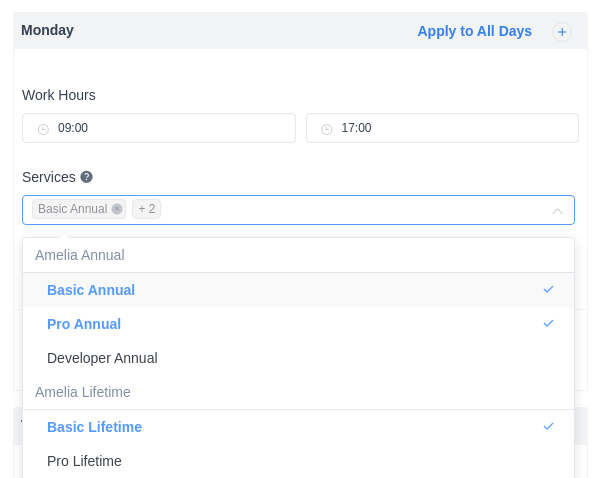
In the example above, the employee is assigned to 3 services, but 2 newly added services are not automatically assigned to the employee’s working hours, even though they may be assigned to him/her in the Assigned Services tab. If you want the employee to work on all services that you have, you should clear this selection, and every new service will be added automatically.
4. Did you assign the employee to another location? If you did, please go to Amelia/Locations, and make sure that the location is visible.
5. Check the shortcode on the front-end – if you (for example) used [ameliabooking category=1], and you added the service to Category with ID: 2, the new service from category 2 will not appear in the front-end.
Hello, thank you for reaching out to us.
There is an option on the Amelia/Services/Settings page called “Minimum time required before booking”.
Forum: Plugins
In reply to: [Booking for Appointments and Events Calendar - Amelia] No Email NotificationHello Lawrence, glad to be able to assist you.
Hello, thank you for reaching out to us.
Can you please create a ticket for your questions on the following page and our support agents will assist you with this?
Forum: Plugins
In reply to: [Booking for Appointments and Events Calendar - Amelia] No Email NotificationHello Lawrence, thank you for reaching out to us.
An issue with email notifications could be caused by several reasons:
- Your hosting provider is blocking all 3rd party settings and only allowing their SMTP (or other) settings.
- Your website has a PHP version of less than 7.
- The credentials are not correct.
- There’s something else blocking the notifications from being sent.
- If you’re using Gmail, please check out this article for detailed setup instructions.
Hello, thank you for reaching out to us.
Unfortunately, there is currently no such option with Amelia’s built-in features. You can suggest that feature on the following link: https://features.wpamelia.com/
We carefully follow suggestions from our customers and the more vote the feature gets, the more priority we put on implementing that feature in one of the future updates.
Forum: Plugins
In reply to: [Booking for Appointments and Events Calendar - Amelia] TranslatesHello Giorgos, thank you for clearing that up.
For that purpose, please disable the “Enable Labels Settings” option on the Amelia/Settings/Labels and let us know if it works or not.
Hi there!
Thank you for your review.
The option to export attendees is blocked in the Lite version of Amelia, but it is available in the full version. When you click on the Attendees button next to the event (in the back-end), you’ll see a button next to the “Find Attendees” field. You can take a look at the screenshot here: https://ibb.co/stkj9rj
This, then, allows you to choose what will be included in the export (first name, last name, email, phone, payment status, payment method, number of people, status, etc).
Let us know if you have any questions about this!
Since you’re using the Premium version of the plugin, please open a ticket on our official support platform, and we’ll gladly help you there.
Premium products are not supported in these forums, as per this comment by WordPress.org moderators.
Thank you for understanding.
- This reply was modified 3 years, 3 months ago by ameliabooking.
Hello,
Unfortunately, there is currently no such option with Amelia’s built-in features. You can suggest that feature on the following link: https://features.wpamelia.com/
We carefully follow suggestions from our customers and the more vote the feature gets, the more priority we put on implementing that feature in one of the future updates.
Hello,
Unfortunately, there is currently no such option with Amelia’s built-in features. You can suggest that feature on the following link: https://features.wpamelia.com/
We carefully follow suggestions from our customers and the more vote the feature gets, the more priority we put on implementing that feature in one of the future updates.
Since you’re using the Premium version of the plugin, please open a ticket on our official support platform, and we’ll gladly help you there.
Premium products are not supported in these forums, as per this comment by WordPress.org moderators.
Thank you for understanding.
- This reply was modified 3 years, 3 months ago by ameliabooking.
Forum: Plugins
In reply to: [Booking for Appointments and Events Calendar - Amelia] TranslatesHello Giorgos,
Words can be changed using POEDIT or Loco Translate for example very easily. I suggest you install Loco Translate and then translate these strings.
If you want to use POEDIT then this is an instruction:
- Download the Amelia plugin from CodeCanyon and save the .zip file on your computer.
- Unzip the downloaded .zip file.
- You need to download and install POEDIT.
- After that open the program and open the file from the extracted folder on your computer ameliabooking/languages/fr_FR/wpamelia-fr_FR.po.
- Translate all the strings that are not translated
- Save the translation.
- Go to ameliabooking/languages/fr_FR/ folder and copy these two files called wpamelia-fr_FR.po and wpamelia-fr_FR.mo back to your website in the location ../wp-content/plugins/ameliabooking/languages/fr_FR/.
This is an example of the French language, but you will choose yours.
Hope this helps If you have any more questions, don’t hesitate to ask.
Thank you for reaching out to us.
For that purpose, you can set the “Period available for booking in advance” option, but the minimal value for this option is 1 day.
Since you’re using the Premium version of the plugin, please open a ticket on our official support platform, and we’ll gladly help you there.
Premium products are not supported in these forums, as per this comment by WordPress.org moderators.
Thank you for understanding.