abwaita a11n

Forum Replies Created
-
Hi @islamfathi,
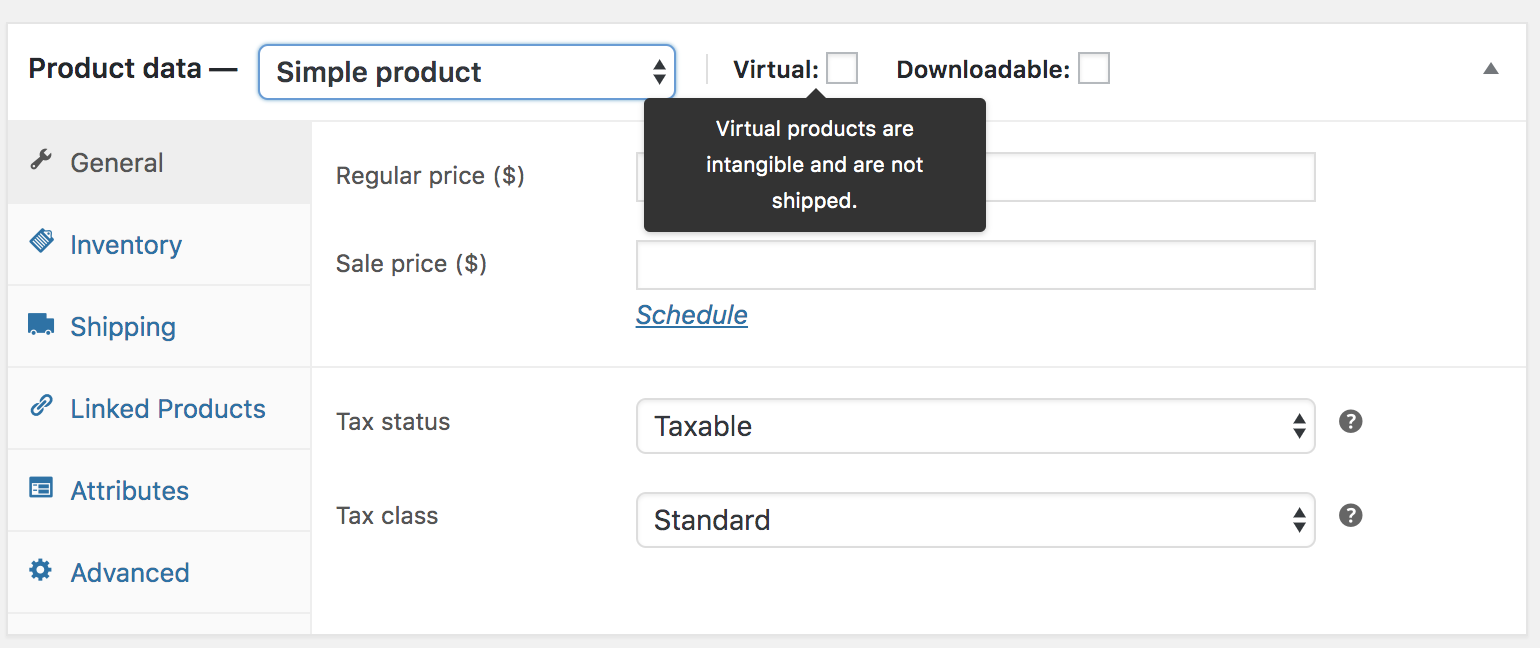
Just to check, since these products appear to be bookings, have you checked the virtual option on the Edit Product page?
I ask because virtual products do not trigger the shipping cost calculator. We’ve explained further in this guide – https://docs.woocommerce.com/document/managing-products/#section-4.
Link to image: https://docs.woocommerce.com/wp-content/uploads/2016/06/simple-product-virtual.pngIf you’ve not enabled the virtual option, please share with us screenshots of some shipping zones as well as their methods and shipping rates so that we can check further.
* I recommend https://snipboard.io for sharing screenshots – please follow the instructions on the page, then paste the URL in this chat. It works with Chrome, Firefox, Safari, and Edge.
Thanks.
Forum: Plugins
In reply to: [WooCommerce] malformated emailsHi @cusumano,
I see that the issue is marked as resolved.
Just to mention, for this issue, please check with the WooCommerce Attach Me plugin support as it seems they’ve explained how to create and format these custom emails on their plugin page.
Thanks.
Forum: Plugins
In reply to: [WooCommerce] Analytics -> ProductsGlad to hear that you were able to find the cause of the issue.
If possible, it would also be good to notify the WooCommerce Multilingual team about so that they can check further. Here’s their forum – https://wordpress.org/support/plugin/woocommerce-multilingual/
If you have any other questions, please feel free to create a new thread.
Thanks.
Forum: Plugins
In reply to: [WooCommerce] woocommerce customers there was an error getting your stats.Hi @cytan,
Kindly try clearing the Analytics cache from WooCommerce → Status → Tools → Clear analytics cache and see if the error persists.
Just to check, do you happen to be using the iThemes Security plugin? There have been reports of the same error by users of the iThemes plugin before, like in this thread. One of the fixes is discussed here – https://www.deviant.media/2021/01/19/solution-woocommerce-there-was-an-error-getting-your-inbox-please-try-again/.
Let us know how it goes when you try the above.
Thanks.Forum: Plugins
In reply to: [WooCommerce] Woocommerce Square suddenly not syncing product descriptionHi @heathervh,
The issue needs to be looked at closely. If you’re using our Square for WooCommerce plugin, kindly get in touch with our Square team on this forum – https://wordpress.org/support/plugin/woocommerce-square/.
Hope this leads to a resolution.
Thanks.Forum: Plugins
In reply to: [WooCommerce] WooCommerce Distance Rate ShippingHi @cristianrico,
Since the query touches on WooCommerce Distance Rate Shipping, a paid extension, please contact us at WooCommerce.com > My Account > Support.
You may need to login to your WooCommerce account before you can access that page.We will be able to help you further there.
Forum: Plugins
In reply to: [WooCommerce] Fatal error: Only variables can be passed by reference in..Hi @100lba,
Kindly note that this thread was resolved by the thread starter. Please check again the thread you’re following up on.
Thanks.
Forum: Plugins
In reply to: [WooCommerce] Fear of mucking it up. How to redesign a live WC site?Hi @npkgrow!
Thanks for your post.
Most importantly, I want to change the header/nav area for the entire site, and the scrolling gallery area for the Home Page.
+
I’m modestly tech-able and have learned a great deal on YT about how to use Elementor Pro, which is how the site was built. I’m comfortable enough with it to start tweaking, but how can I do this safely and not screw everything up if I make mistakes?
As you’re experimenting a lot, feel free to duplicate the page you’re working on and then try changes on the duplicate pages before making them on the main pages.
You could use the revisions feature or take regular backups of your site in case anything goes wrong. You can use UpdraftPlus for backups.
Since you mentioned that you’re using Elementor Pro, you’d be best placed getting in touch with the Elementor team for further guidance on how to modify your site.
Here’s their support page that has documentation, FAQs, and a link to reach their support team – https://elementor.com/support/*On this forum, we mainly assist with the core WooCommerce plugin functionalities.
Thanks.
Forum: Plugins
In reply to: [WooCommerce] New order email not sendingHello!
Just a heads up, I’ll go ahead and mark this thread as resolved in favor of the other one you created on the same topic – https://wordpress.org/support/topic/new-order-email-not-sending-3/.
Thanks.
Forum: Plugins
In reply to: [WooCommerce] New order email not sendingHi @tarmitage,
We’d like to check your issue separately.
Thus, kindly create a new thread here and share with us more info about it just like @maverik22 – https://wordpress.org/support/plugin/woocommerce/#new-topic-0.
Thanks.
Forum: Plugins
In reply to: [WooCommerce] New order email not sendingHi @maverik22,
Thanks for the detailed post.
So my hosting decided to give me a configuration sheet for the SMTP, but I do not know where to configure only the new order emails (with the data the gave me) in Woocommerce.
Just to mention, the SMTP configurations given by your hosts are intended for your SMTP plugin rather than WooCommerce. This is because WooCommerce itself only generates the emails and then PHP via your email server or your SMTP provider does the sending. Here’s a section on our guide explaining more on how emails are sent – https://docs.woocommerce.com/document/email-faq/#section-10
Thus, you could check which SMTP plugin you’re using and get in touch with the authors for assistance with adding the configurations you were given. Alternatively, you could request your host to guide you further on where you should add the configurations.
Let us know how it goes.
Thanks.Forum: Plugins
In reply to: [WooCommerce] Global change for taxable items?Thanks for getting back @dwny.
Since you’re dealing with a large number of products, you could do the exports/imports in smaller bits like certain categories instead of all at once.
Just to add, another approach would be to use plugins that can make bulk updates to your products directly on your site.
You could check out our Bulk Edit Products, Prices, and Attributes extension and try using it to make the modifications. If you have any questions or require support with the extension, please create a ticket with us – https://woocommerce.com/my-account/create-a-ticket/?form=ticket.
Thanks.
Forum: Plugins
In reply to: [WooCommerce] Multiple Items – Different Shipping Costs Help!Hi @tcqc,
While we do not have a phone call option, we’d be happy to assist you with this here.
From your description, you will want to use a plugin designed for creating conditional shipping rules/costs based on:
* shipping class – for the small, medium, and large products
* Item count – for when an order has 2 or more items
* product/product category – for the vehicle being soldI would recommend that you check out our Conditional Shipping and Payments extension. We’ll be happy to discuss the extension further with you if you create a ticket with us – https://woocommerce.com/my-account/create-a-ticket/?form=ticket
Hope this helps.
Thanks.Forum: Plugins
In reply to: [WooCommerce] How can I link stock level for a product with two prices?Hi Maddie,
Yes, in this case, for the given product, you will want to disable stock management at the variation level and only enable it at the product level. That way, if any of the variations are sold, the product stock is reduced.
Disable variation-level stock management:

Link to image: https://snipboard.io/tsO3yX.jpgEnable stock management at product level:

Link to image: https://snipboard.io/OM87fF.jpgHope this helps.
Thanks.Forum: Plugins
In reply to: [WooCommerce] Error: Billing State / County is a required fieldGood to hear you found the cause of the issue on your side.
You can reach the Page and Post Builder plugin authors to check further, especially if you intend to continue using their plugin. Here’s their support forum – https://wordpress.org/support/plugin/post-and-page-builder/.
That said, if you have any questions, we recommend creating a new thread.
Thanks.