JETPACK UPGRADE CAUSING MAJOR PROBLEMS
-
Hi:
I have a website for our senior community in south Florida. I’ve been using the Jetpack plugin for years with virtually zero problems. However, it appears as if your latest upgrade is causing serious issues with my website.
Because of one issue, the critically important Hamburger Menu on phone access stopped working, I was forced to deactivate the plugin, then the hamburger menu started working again.
But after I deactivated the plugin to solve that problem, not having Jetpack created two new problems for me. What in the world is going on?
The page I need help with: [log in to see the link]

-
Hi there,
Because of one issue, the critically important Hamburger Menu on phone access stopped working, I was forced to deactivate the plugin, then the hamburger menu started working again.
Thanks for the explanation. I checked your site, and Jetpack is currently installed and active. I also visited it on mobile (iOS), and the top-right hamburger menu worked as expected on my end.
Could you confirm if the issue is now resolved? If I misunderstood or if you’re still seeing problems, please feel free to share more details—we’d love to help.
Thank you!
Hi Paulina:
Thanks for taking the time to respond and check my website. Nobody replied for almost 2 days, and I was wondering if I would receive one.
I’ve been using Jetpack for years on my three WordPress websites and I’ve been very pleased with the plugin. I only had one minor problem over the years, and it was quickly resolved by someone in technical support like you.
This is the first time I ever had what I consider serious issues with Jetpack. My community website, HPresidents. net, operated flawlessly for the past 3 years. It is a photo centric website with hundreds of photos, all displayed professionally in Galleries. They looked great and our residents loved them.
Suddenly, I had complaints from residents who use their phone to access the site, because the Hamburger menu stopped working. After painstaking trial and error, and help from Divi tech support, we learned the Hamburger menu problem was related to Jetpack. When we removed both Jetpack and Jetpack Boost, the Hamburger menu worked again.
However Paulina, deactivating Jetpack created 2 NEW problems. I’m going to tell you what they were, but I have no idea how or why they were related to Jetpack.
Problem #1: After deactivating Jetpack, the hundreds of photos displayed in professional gallery mode, stopped working. It looked terrible as if each photo was uploaded alone. Yes, residents could still see the photos, but it no longer looked professional, as they do when they are linked together in a gallery.
Problem #2. Once again, I have no idea how or why Jetpack caused this problem. But after deactivating Jetpack, a huge, blank gap appeared above the menu. This is not a major problem, but it looks bad.
As I stated previously, this was the first time I ever had a serious issue with Jetpack. I don’t know if the problems described above were caused by Jetpack, Jetpack Boost, or both.
Here’s What Happened yesterday, which changed everything.
After not hearing from Jetpack for over 36 hours, something told me to re-activate the Jetpack plugin to see what would happen. I did such and suddenly my photo galleries returned to normal professional mode. Instead of seeing hundreds of photos which looked like individual photos, they were all part of nifty looking, professional photo galleries.
However, the ugly looking, large blank area above the menu on the Home Page was still there.
But here is the other great news. When I tried the Hamburger Menu via my phone, after re-activating Jetpack, the menu worked! I called up several residents I know and asked them to try the Hamburger Menu via their phones, and yes, it also worked for them.
I don’t know what changed with the Jetpack plugin, but after I re-activated the plug in, my 2 biggest problems, the Hamburger Menu and Photo Galleries, were resolved, so I was happy.
However, I still can’t figure out why there is a big, ugly blank area above the menu. Is that related to Jetpack? But at least the Hamburger Menu is working again, and my photos are displayed in a much better looking, professional gallery.
I did not re-activate JETPACK BOOST, because I was afraid it might cause the Hamburger Menu and Photo Gallery problem again, Paulina, should I re-activate Jetpack Boost and see what happens?
Paulina, thanks so much for listening and I eagerly await your reply,
Robert T-
This reply was modified 1 year ago by
Robert.
-
This reply was modified 1 year ago by
Steven Stern (sterndata). Reason: format
Hi @pwdeght
Thank you so much for providing such a detailed explanation of what happened. It really helps us understand the situation better.
Problem #1: After deactivating Jetpack, the hundreds of photos displayed in professional gallery mode, stopped working. It looked terrible as if each photo was uploaded alone. Yes, residents could still see the photos, but it no longer looked professional, as they do when they are linked together in a gallery.
Regarding the first issue with images that stopped working, it’s due to your site using Jetpack’s image optimization features a part of Jetpack boost that you can find through Jetpack > Performance > Site Accelerator. Here’s a screenshot of it:
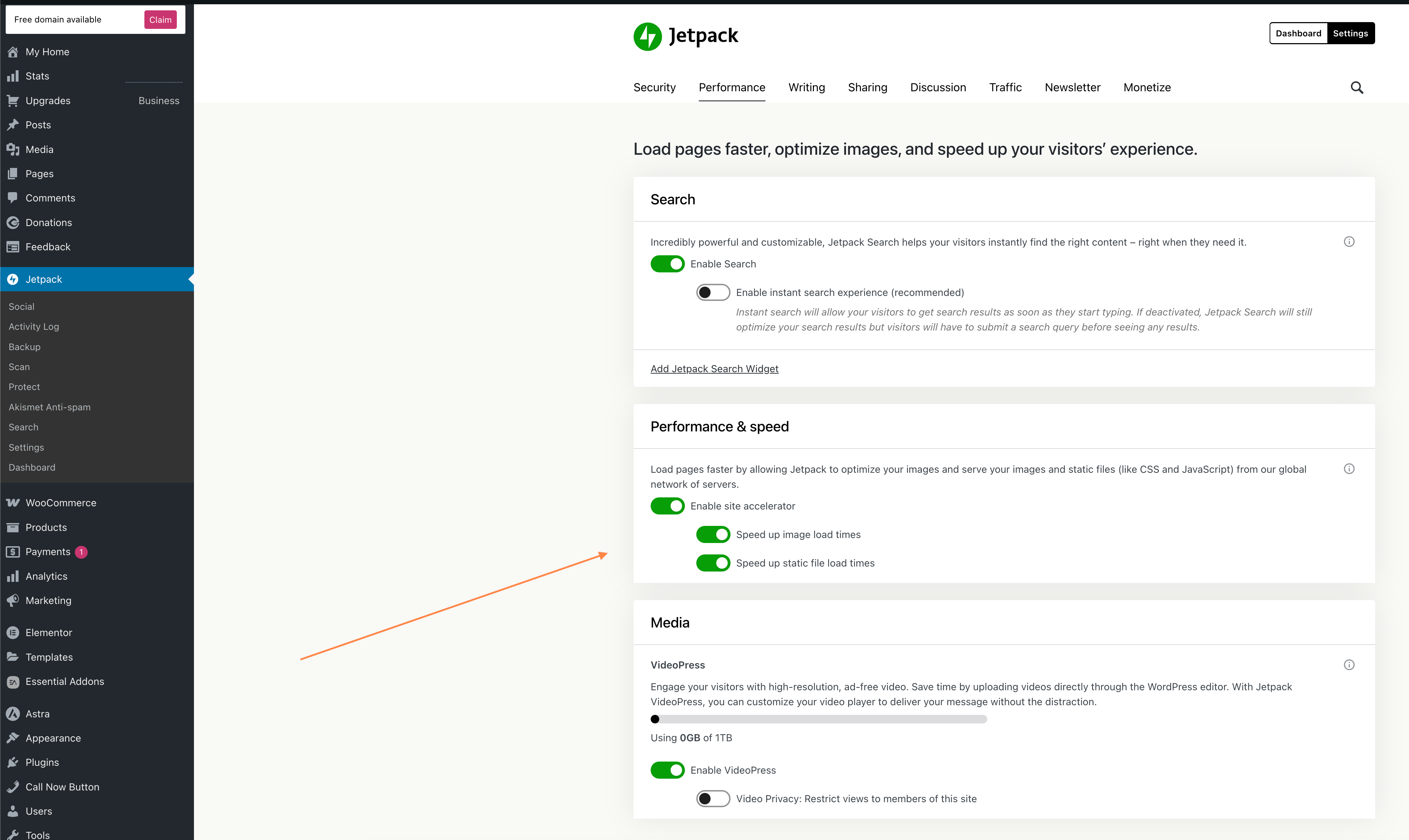
If activated, this means your images were cached on our servers to load faster, it will have a different URL like seen here: https://cloudup.com/c1KTkoMGt-h. When Jetpack was disconnected, your browser likely could not find this cached connection.
If your images are still in the Media Library, they should reappear after refreshing your browser cache. However, if you don’t intend to remove Jetpack, I would advise against turning off the site accelerator feature since helps enhances site performance & speed. You can learn more about site accelerator here: https://jetpack.com/support/site-accelerator/
Apart from image optimization, one reason why the professional looking gallery looked distorted after deactivating Jetpack was because you were using the tiled gallery block which can help display images in a tiled mosaic, circular grid, square tiles, or tiled columns. It’s a block available through the Jetpack plugin.
You can learn more about the tiled gallery block by visiting this link: https://jetpack.com/support/jetpack-blocks/#media
Problem #2. Once again, I have no idea how or why Jetpack caused this problem. But after deactivating Jetpack, a huge, blank gap appeared above the menu. This is not a major problem, but it looks bad.
For the header issue, could you please provide a screenshot of what you see on your end, specifically?
If you were talking about the green area shown in the screenshot (https://cloudup.com/ivoNg6-NAUA), it doesn’t seem to be connected to Jetpack. It looks more like it has to do with the page container and padding, which you can probably change in your theme settings.
I did not re-activate JETPACK BOOST, because I was afraid it might cause the Hamburger Menu and Photo Gallery problem again, Paulina, should I re-activate Jetpack Boost and see what happens?
As for the Jetpack Boost, feel free to reactivate it it should help improve the site’s performance. If the Hamburger Menu or Photo Gallery issues reappear, let us know with more details about what changes you’ve observed, and we’ll work through it together.
Hello @pwdeght,
Do you have updates about that, do you still need help? We usually close inactive threads after one week of no movement, but we want to make sure we’re all set before marking it as solved. Thanks!
I apologize for failing to update the issues. After waiting one or two days, I reinstalled Jetpack, and the critically important Hamburger Menu, for those residents who access the website via their telephone, started working again. In addition, my serious issues with Photo Galleries was also resolved.
I thought all was well until early this morning, when I decided to re-activate JETPACK BOOST. After the re-activation, the phone related HAMBURGER MENU stopped working again!
I then de-activated JETPACK BOOST, but so far, the Hamburger Menu still is NOT working! What should I do? Should I give it some time or is there something I can actually do?
UPDATE: About 2 hours after I deactivated JETPACK BOOST, my phone HAMBURGER MENU is working again.
Hi again,
Thank you for testing. So it looks like that the mobile navigation menu is not fully compatible with Jetpack Boost.
This does not necessarily means that you cannot use Jetpack Boost. The next step would be to detect which feature is causing issues. If you are open to further testing, could you please follow this steps:
- Reactivate Jetpack Boost. From what you reported earlier, the mobile Menu will no longer work.
- Toggle off all features under Jetpack > Boost. Does the menu work?
- Start to toggle on features one by one. Check the menu at each step to detect the culprit.
Please let me us know how it goes.
Thank you!
Hi Paulina:
I truly appreciate you taking the time to offer another valuable, insightful reply. However, even though I love Jetpack, I do not believe “Jetpack Boost” is that important to me and our website. In other words Paulina, I would love to work with you, but going through all the steps you listed, just isn’t worth my time and effort.
For example, when I initially re-activated Jetpack Boost the other day, the Hamburger Menu worked properly, and I thought everything was fine. However, about 1-2 hours later, the Hamburger Menu stopped working again.
Paulina, the same thing happened after I realized I had to de-activate Jetpack Boost a 2nd time. After the 2nd de-activation, the Hamburger Menu still was not working. However, after approximately 1-2 hours after de-activating Jetpack Boost, the Hamburger menu was once again working properly.
Paulina, if I could go through the checklist you gave me and instantly see if the Hamburger Menu was working, I would probably give it a shot. But I don’t have the patience to wait 1-2 hours every time I make a minor change.
Therefore, I’m going to delete Jetpack Boost from my list of Plugins. Maybe later in the year, I’ll give it another try.
As for Jetpack, for the past week, it has performed flawlessly. As I mentioned previously, I’ve been using Jetpack for years and love the program. This was the first time I was ever faced with something other than a minor issue with Jetpack.
Thanks again Paulina for your excellent support, but for now, I’m moving on without Jetpack Boost.
Robert T
Hi there, @pwdeght,
Thank you so much for your kind words and for taking the time to explain your experience in such detail. We appreciate it!
We completely understand your decision and your reasoning. Troubleshooting something that appears inconsistent and takes a while to show results can be incredibly frustrating, especially when time is limited and your site is otherwise working well.
It’s perfectly okay to step away from Jetpack Boost for now. Your website’s stability and your peace of mind are what matter most. If you ever decide to revisit it later in the year, we’d be more than happy to assist, hopefully with a smoother experience next time around 🙂
We are truly glad to hear that Jetpack itself continues to perform reliably for you.
Thanks again for your thoughtful message. I’m going to mark this thread as solved. If you have any further questions or need more help, you’re welcome to open another thread here. Cheers!
Thanks so much Stef!
-
This reply was modified 1 year ago by


The topic ‘JETPACK UPGRADE CAUSING MAJOR PROBLEMS’ is closed to new replies.
