How to remove https://stats.wp.com/
-
My page is loading
<script data-wp-strategy="defer" defer id="jetpack-stats-js" src="https://stats.wp.com/e-202623.js"></script>
but I have the traffic options disabled under /wp-admin/admin.php?page=jetpack#/traffic. It’s problem for us because this is not implemented with the Subresource Integrity protocol in mind.
I have seen https://wordpress.org/support/topic/how-do-remove-this-stats-js-code/ but it seems a bit different.-
This topic was modified 2 months, 1 week ago by
Olivier Tassinari.
-
This topic was modified 2 months, 1 week ago by
-
This topic was modified 2 months, 1 week ago by

-
Hi there, @oliviertassinari,
I’m sorry to hear about the trouble, but thanks for reaching out.
Could you please post your site URL here so that we can have a look? If you want it to remain private, you can also contact us via contact form. If you choose to reach out directly, please include a link to this thread. Thanks!
This should allow to reproduce the issue:
curl https://store-wp.mui.com/.I took a look at the URL you provided, but I’m not currently seeing that script in the page source, so I’d like to gather a bit more information before drawing any conclusions.
Could you share the following please?
- A screenshot showing where you’re seeing the script.
- Whether you’re viewing the page as a logged-in or logged-out user.
- The Jetpack version you’re running.
- Confirmation that Site Stats is disabled under Jetpack → Settings → Traffic.
Also, are you seeing the script in the page source itself, or in your browser’s Network/Developer Tools?
Once we have that information, we’ll be happy to investigate further. Thanks!
If you are using a browser, you have to open the page in an iframe (so the browser doen’t set Sec-Fetch-Dest: document). It’s simpler to use a
curl https://store-wp.mui.com/.> A screenshot showing where you’re seeing the script.

> The Jetpack version you’re running
15.8
> Confirmation that Site Stats is disabled under Jetpack → Settings → Traffic.
Proof: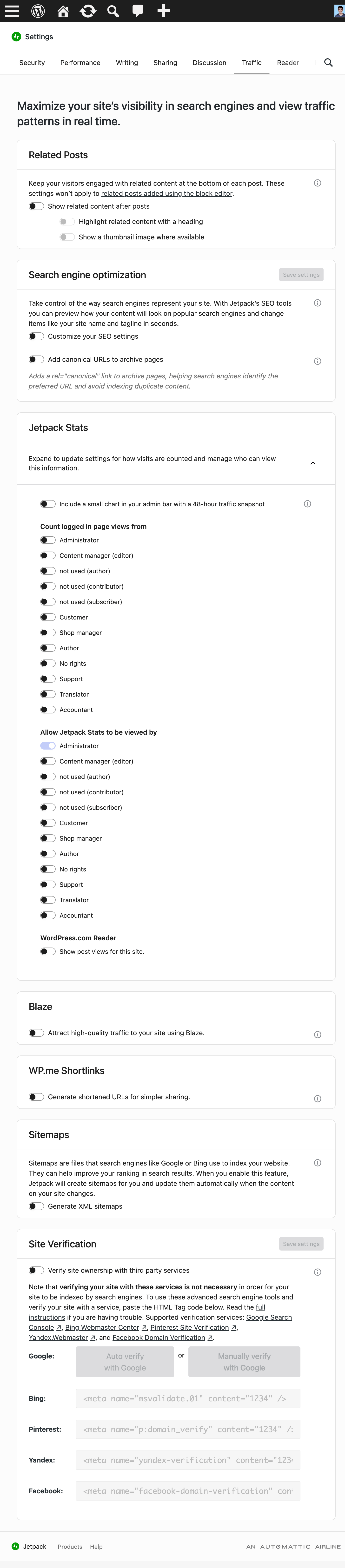
-
This reply was modified 2 months, 1 week ago by
-
This reply was modified 2 months, 1 week ago by
Hi there, @oliviertassinari,
Thanks for the additional info. I checked the Jetpack connection right now for
store-wp.mui.comand I can confirm it’s working well. I can also see that the Jetpack Stats feature is toggled on, so it’s strange that you see it deactivated on your dashboard.I deactivated it completely from my end, so now you should not see that anymore. Can you flush your cache and check again? The only features active at the moment are:
- Contact Form
- JSON API
- WooCommerce Analytics
- Notifications
- Markdown
- Account Protection
- Blocks
Let me know how you get on!
I have tried to flush the cache, but it didn’t work. There are no cache enabled.
We could solve the issue with this logic:// We have disabled the WordPress / WooCommerce / Jetpack analytics, but them keeps
// injecting a script in the page for some reason. This logic forces it out.
// See https://wordpress.org/support/topic/how-to-remove-https-stats-wp-com/
add_filter('jetpack_active_modules', 'force_kill_jetpack_tracking', 999);
function force_kill_jetpack_tracking($modules) {
if (is_array($modules)) {
return array_diff($modules, ['woocommerce-analytics', 'stats']);
}
return $modules;
}-
This reply was modified 2 months, 1 week ago by
Thanks for the follow-up and the code sample. Your filter is the right approach, and I want to explain what’s actually going on here because it’s more nuanced than it looked at first.
There are two separate Jetpack modules that independently load scripts from stats.wp.com:
- The Stats module, which enqueues
stats.wp.com/e-YYYYWW.js(handlejetpack-stats). This is what the toggle under Jetpack → Settings → Traffic controls. - The WooCommerce Analytics module, which enqueues
stats.wp.com/s-YYYYWW.js(handlewoocommerce-analytics). This one auto-activates whenever WooCommerce and Jetpack are both active and connected. There’s no toggle for it in the Jetpack settings UI.
So when you disabled Stats under Traffic, that stopped the
e-script, but thes-script from WooCommerce Analytics kept loading because it’s a completely independent module. That’s why your filter targets both'woocommerce-analytics'and'stats'and that’s the correct way to handle it.On the discrepancy where Stats appeared disabled on your end but was still active on the backend; I’m not sure what caused the mismatch there. It may have been a settings sync issue between the UI and the server-side module state. I’ve deactivated it from the backend for you, and your filter covers both modules regardless, so you should be good either way.
Regarding the SRI concern, that’s valid feedback 🙂 I’ve logged it internally so the team is aware of the use case. For now, the
jetpack_active_modulesfilter you’re using is the most reliable way to ensure zero requests to stats.wp.com.Hope that’s all clear! Let me know if you have any other questions.
(Internal ref for the feedback: JETPACK-1721)
-
This reply was modified 2 months, 1 week ago by
Stef (a11n).
Ok, thanks
Actually, I could find a way to disable the analytics without needed a custom PHP logic. WooCommerce Analytics was enabled under the hidden /wp-admin/admin.php?page=jetpack_modules page even though it was disabled under the WooCommerce settings. Disabling it there solved the issue.
-
This reply was modified 2 months, 1 week ago by
-
This reply was modified 2 months, 1 week ago by
Hey @oliviertassinari,
Thanks a lot for sharing your solution to disable the analytics! This is great info for whoever will be around having the same issue. We’ll consider adding it in our official documentation.
You should be all set now 🙂 I’m going to mark this thread as solved. If you have any further questions or need more help, you’re welcome to open another thread here. Cheers!

You must be logged in to reply to this topic.
