How to email admin when orders get canceled?
-
So I’ve been losing orders lately because they are getting timed out and canceling.
Is there a way for me to get an email alert notifying me that an order was canceled or timed out so I can address it immediately and hopefully save the order?
Thanks!

-
I understand you would like to get an email when an order gets canceled due to “time out” problem on your site.
What was the status of those orders before it was canceled? You should get an email notification if the order status changes from pending payment to failed or on-hold orders to canceled status from WooCommerce > Settings > Email.
Link to image: https://d.pr/i/nws2iDIf your orders are canceled automatically without any other status on your orders, you might want to use AutomateWoo extension. You can create a workflow to send a custom email whenever an order gets canceled. There are many more features in this extension, you can check the following link if you are interested:
I do suggest troubleshooting why your site is timed out as there seems to be a problem with your site and it shouldn’t behave like this.
You can check WooCommerce Self-Service Guide to help you troubleshoot your problem:
https://docs.woocommerce.com/document/woocommerce-self-service-guide/
Hmm after reviewing that section, my admin email was already attached to Canceled & Failed Orders, yet I’ve never gotten a single email for either.
And yes I also closely monitor my spam box as well.
Any idea why I wouldn’t be receiving them even though my admin email is entered correctly?
Hi @johnnyscience,
There are a couple of factors that can contribute to you not receiving email notifications. If emails are enabled, it could likely be an issue with the email delivery caused by a spam blocker. Can you check with your hosting provider to see if they are blocking these emails? The best way to resolve this issue is to consider rerouting your email through a WP-SMTP server: https://wordpress.org/plugins/wp-mail-smtp/
Also, I would recommend installing something like WP Mail Logging. This will allow you to see if the emails are even being triggered in the logs.
Here is some more information regarding email troubleshooting with WooCommerce that explains things in a little more detail: https://docs.woocommerce.com/document/email-faq/
Let me know if you have any questions!
Ok so I’m continuing to miss orders because I am not getting these emails and this is really starting to become a problem.
My email is Microsoft Office 365 through godaddy and my website hosting is with hostgator.
Both of them have confirmed that everything with my email passes all tests and checks and neither saw any issues.
Hostgator suggested I contact Microsoft since my email is technically through it.
I’ve disabled and enabled the email for Canceled and Failed orders settings, but I doubt that will help anything.
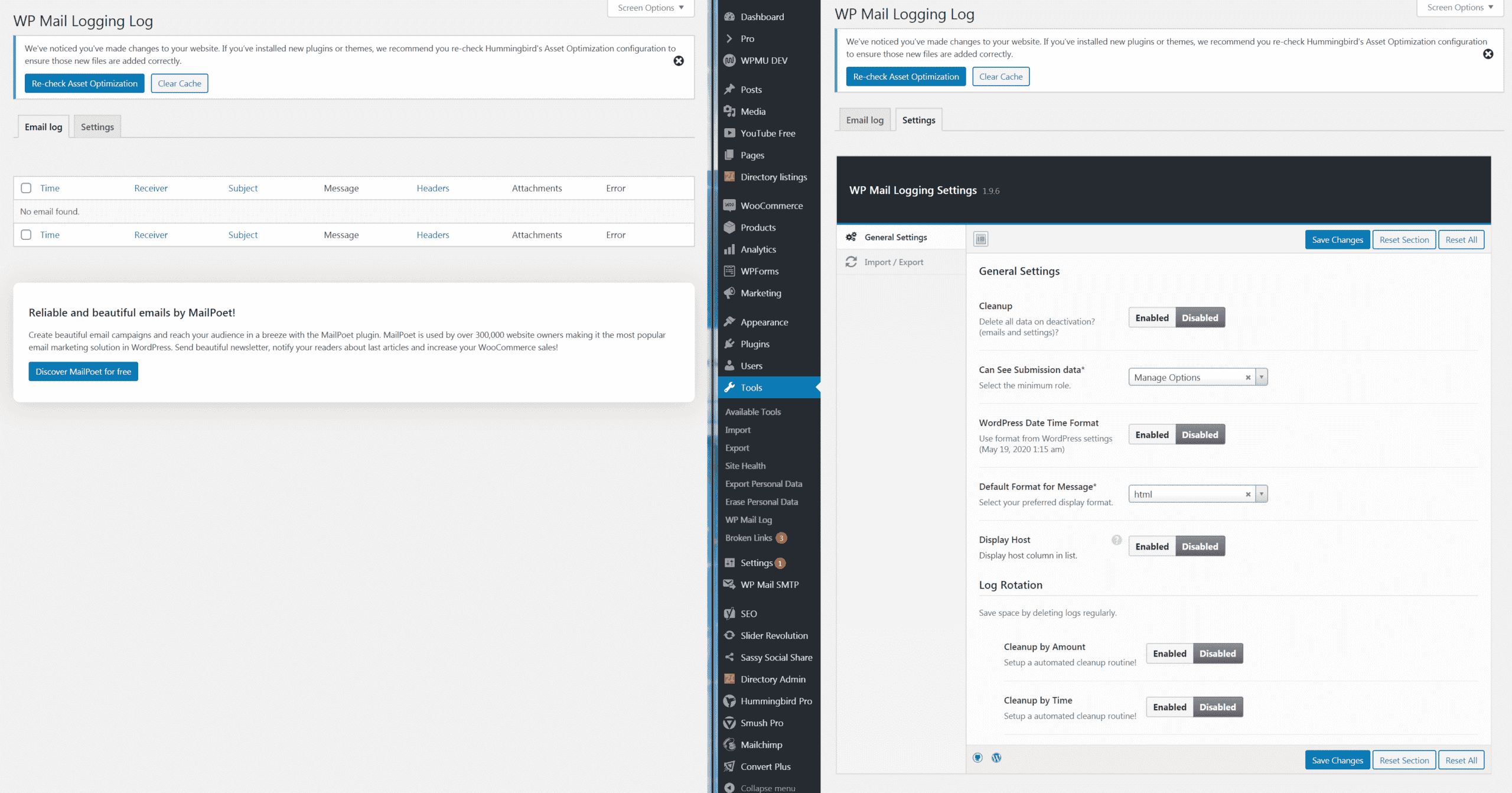
I downloaded the WP Mail Email logger but it’s not logging any emails? But as far as I can tell, it is setup right.
Here’s a screenshot:
https://www.ohiocannabis.com/wp-content/uploads/2020/05/WP-email-logger.png
I haven’t tried installing the WP Mail SMTP plugin yet, that’s my next step.
Based on the WP Logger not logging anything since Woocommerce/Wordpress isn’t dispatching these notifications emails properly, the SMTP Plugin probably wouldn’t help would it?
Now I’m running into another problem with the app and not being able to turn on any type of notifications. The Woocommerce app does not show up under Notifications on my iPhone 10s. I also can not see to find any notifications options in the app itself.
Any idea what I’m missing?
Hi there,
I downloaded the WP Mail Email logger but it’s not logging any emails? But as far as I can tell, it is setup right.
As a heads up, the plugin won’t show a log of emails from before the installation. Have you tried placing a test order and cancelling it to see if the email is then logged? If nothing is being logged, it’s possible this is being caused by a theme or plugin conflict. WooCommerce sends mail by using the
wp_mail()function, so perhaps something is interfering? In this case, I’d recommend testing for conflicts by taking the following troubleshooting steps: https://docs.woocommerce.com/document/woocommerce-self-service-guide/If you place a test order and cancel it and you find the email is actually logged just not received, then I would chat with Microsoft to see if they are blocking the emails. Using a WP Mail SMTP plugin would be a next best step if that’s the case.
The Woocommerce app does not show up under Notifications on my iPhone 10s. I also can not see to find any notifications options in the app itself.
Any idea what I’m missing?
Hmm, I wasn’t able to reproduce this. The notifications should be turned on/off in your device itself, not via the app. When checking my own iPhone, I could see the app in the notifications. Have you tried restarting your device? Or even deleting the app and reinstalling it?
-
This reply was modified 6 years, 2 months ago by
laceyrod.
Yes I had tried placing an order after I had the log installed and did not receive any notification by email or the log showing an email was triggered.
However, since then I have received other emails from my WordPress for comments on articles or New Entries via WP Contact Form and these are in fact showing up in the log.
So it has something specifically to do with Woo-commerce I would imagine.
Do you still think it’s worth contacting Microsoft support?
Or now that we’ve determined WP is sending me other emails, we need to go deeper on Woocommerce?
Regarding the app:
Weird, I was logged in and able to view my store, but after deleting and reinstalling it I can no longer login as it is requiring a Jetpack account, which I do not have because I offer CBD products on my website and Jetpack shut me down.
There seems to be another app available by MonkeyData called “Order Alert for WooCommerce”
This is all I’m really in need of, but I’m not sure if it offers notifications for Canceled or Failed orders, but I’m going to look into it.
Any other ideas or options?
Thank you for all your help!
Yes I had tried placing an order after I had the log installed and did not receive any notification by email or the log showing an email was triggered.
If the log wasn’t even showing that the email was triggered for your test order, then I would recommend further testing for conflicts by taking the following steps: https://docs.woocommerce.com/document/woocommerce-self-service-guide/
I’m not sure if the other emails you are receiving are sent via the same function, so let’s see if you can place a test order with just WooCommerce and Storefront theme active and see if the email notification is at least logged at that point. If it is, then I would recommend you reach out to Microsoft.
Weird, I was logged in and able to view my store, but after deleting and reinstalling it I can no longer login as it is requiring a Jetpack account, which I do not have because I offer CBD products on my website and Jetpack shut me down.
I gotcha. And this was probably also the reason why the Store page wasn’t working even when you were logged in, as it requires an active Jetpack connection.
There seems to be another app available by MonkeyData called “Order Alert for WooCommerce”
This is all I’m really in need of, but I’m not sure if it offers notifications for Canceled or Failed orders, but I’m going to look into it.
That one looks promising, but I’ve also found another third-party plugin that might do the trick if you need it:
– https://wordpress.org/plugins/pushover-for-woocommerce/
Hope this helps!
-
This reply was modified 6 years, 2 months ago by


The topic ‘How to email admin when orders get canceled?’ is closed to new replies.