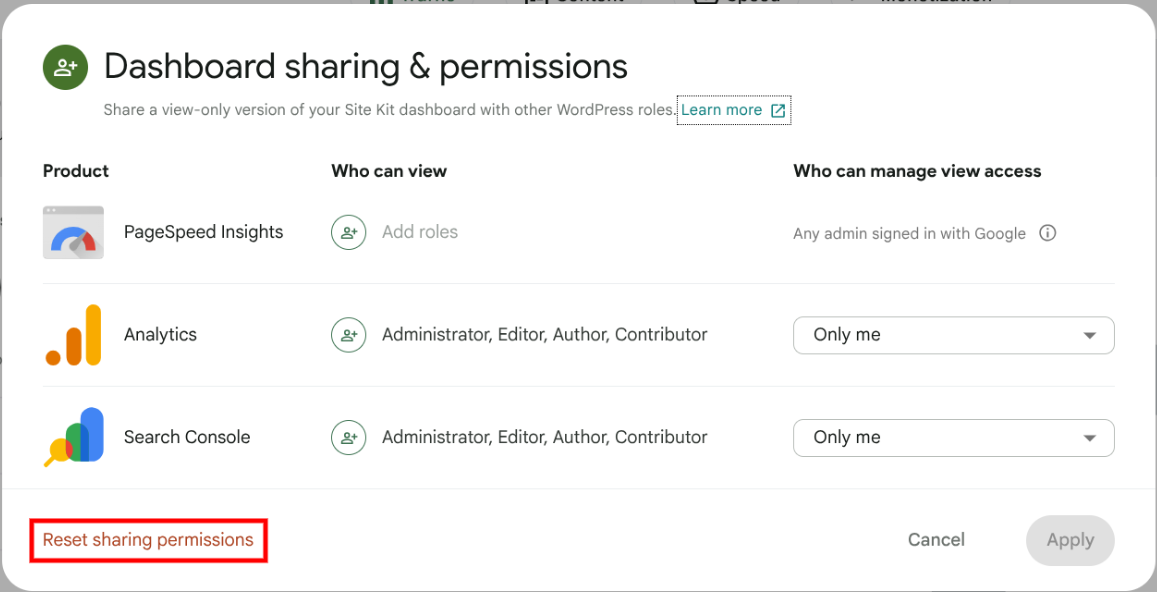
Thanks for reaching out @jcollier. Rather than logging into Analytics to review who the owner of a property may be, the dashboard sharing feature within Site Kit allows any administrator role within WordPress to configure dashboard sharing, as opposed to the Analytics role. Are there multiple administrator who may have set up Site Kit for your site, because if so one of these may have configured dashboard sharing? I ask as they would likely be the one who connected with a Google account that does have access to that Analytics property.
How do we find that person/account?
To find that contact, you can review the other administrators. Rather than reviewing administrators, does your own administrator account have access to view Analytics data within Site Kit? If so, the Google account you have connected may be able to configure dashboard sharing, but you will need to reset dashboard sharing first. After doing so, you can set up the view-only dashboard for others.
Let me know if you have any questions with the above. Thank you.
Hi, James. Thank you for your thorough response.
However, although I am the WordPress administrator for the site, I am unable to assign permissions and am the one seeing the “Contact managing user to manage view access” message for Analytics and Search Console. I also do not see a “Reset sharing permissions” link.
Neither myself nor the other WP administrator set up Site Kit or the GA property — it may have been someone before our time — and we do not know what that account is. That’s why I asked for ways to identify it.
Thanks for the update @jcollier. Does the other administrator see the reset sharing permissions link? If so, they can reset all permissions. Regardless of this, what this sounds like is more an Analytics permission issue that you’re facing.
Neither myself nor the other WP administrator set up Site Kit or the GA property — it may have been someone before our time — and we do not know what that account is. That’s why I asked for ways to identify it.
That’s a tricky one in that case. You’ll know if you or the other administrator has access to that property via clicking on the Source: Analytics link within the Site Kit dashboard. Can you check this and see if either of you can view the property from Analytics directly by checking this? If not, unfortunately it’s not possible for us to review ownership of an Analytics account or property. This is not an uncommon issue whereby users who may have setup Analytics didn’t share ownership. See a related thread from the Google Analytics Help Centre. Was it a shared or company Google account/email maybe that a previous administrator set Site Kit up with? If so you can check for access using that email.
Do let me know if you can determine whether you or the other administrator can view that property in Analytics directly, or if you encounter permissions errors when clicking on the Source: Analytics link.
The other WP admin has no access at all, and we have tried accessing all the gmail accounts that might have set up the Analytics account with no success.
Unfortunately in that case, if you don’t have access to the Analytics property, it may be best to connect Site Kit to a new one. It’s not possible to grant access from our side. If you have view access, in that you can see Analytics data on the Site Kit dashboard, this will remain as long as the property remains active, but you won’t be able to grant others access or manager the property without reaching out to the owner.
Sorry we can’t be of more assistance with this, but do ask if you have any further questions.
We found the administrator’s account (finally!) and are now all set.
Nice work! Glad you were able to get it sorted, and appreciate sharing the update. With that I’ll close this support topic, but do reach out should you have any further queries on this or anything else.
Best of luck.