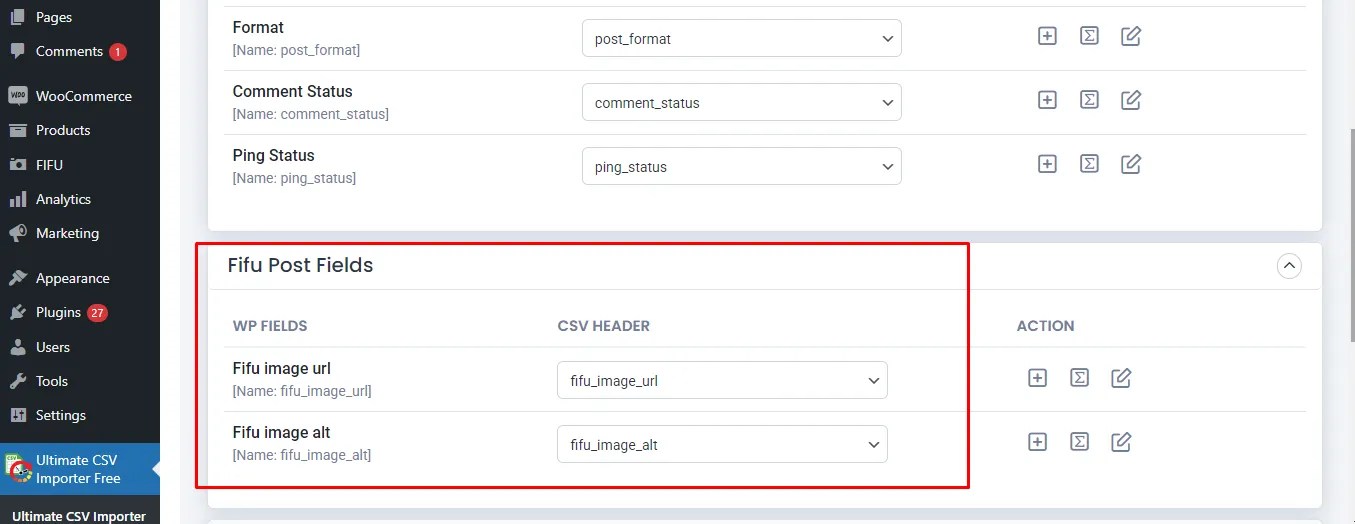
Hello! I am trying to follow the steps in this article (https://www.smackcoders.com/blog/add-external-urls-to-featured-images-wordpress.html) to bulk import posts and external URLs to featured images. I have properly prepared a CSV file and installed the Fifu plugin, but after uploading the CSV through WP Ultimate CSV Importer, I don’t see the Fifu Post Fields section like the screenshot in the article (step 5 of the section “Importing bulk External URLs to featured Images in WordPress Posts, Pages, and Custom Posts”). Therefore, I’m unable to upload posts with a featured image from an external source.
The page I need help with: [log in to see the link]
Hello there! Thank you for reaching out. To troubleshoot the issue, kindly ensure that both FIFU and our CSV Importer plugin are correctly installed. The Fifu Post Fields section should appear in mapping section after a successful installation of both plugins while you import. Feel free to comment on your progress, and we’ll be happy to assist you further!
Could you try adding a featured image manually for one post in the FIFU featured image field? This will help us assess if the problem persists with manual additions. Let us know the outcome so that we can provide further assistance.
I’ve identified the issue. The Fifu post fields appear when I import each record as a post but I’m trying to import as a custom post type (created with the plugin CPT UI). How do you suggest solving this?
This reply was modified 2 years, 3 months ago by stephyamu.
Thank you for bringing this to our attention. We appreciate your diligence in identifying the issue. Good news! We’ve addressed this concern in our latest version. Kindly update to the latest version of our plugin, and the Fifu post fields should now function seamlessly when importing as a custom post type created with CPT UI. After the update, please give it a try, and let us know if the issue persists or if you have any further feedback. We’re here to assist you!