Hi again,
Sorry to hear you’re still facing this issue.
Assuming it’s not a problem with the browser, you can switch browsers or try incognito mode, since Analytics is part of WooCommerce Admin it is recommended to download and install the standalone WooCommerce Admin plugin – https://wordpress.org/plugins/woocommerce-admin/.
If that doesn’t help either, you could open up a Github issue and bring this straight to the attention of core developers:
https://github.com/woocommerce/woocommerce-admin/issues/new/choose
For now, I will close this thread as it’s not a general issue with core WooCommerce itself. You can open a new topic if you have any other questions.
Cheers.
I’ve just installed the Woocommerce Admin plugin. Even now, there is no analytics section. I give up, I guess.
Hi @cutu234!
Could you please confirm if the Analytics section is enabled in your WooCommerce settings?
You can check this in WooCommerce > Settings > Advanced > Features.
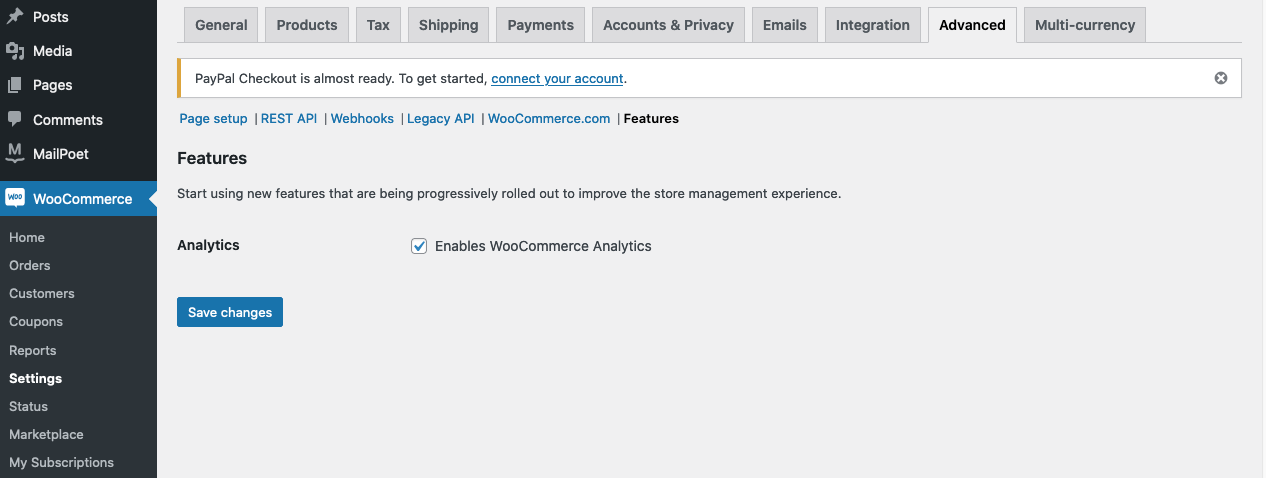”)
Thank you!
Oh boy, this is embarrassing! I didn’t even know this setting, and I’ve never had to enable it after installing Woocommerce. I have absolutely no idea why it was disabled on this site.
This is probably my most stupid mistake in over 10 years with WordPress.
You saved my day!
Thank you so much for your patience!
-
This reply was modified 4 years, 5 months ago by
 cutu234.
Hi @cutu234!
Do not worry, it happen to us all. Sometimes what seems to be complex problems often need simple solutions.
I’m glad that it worked out for you. 🙂
I’ll mark this thread as resolved now. If you have any further questions, I recommend creating a new one.
Cheers!


”)
