

Description
People now ask ChatGPT, Gemini, Perplexity and Google’s AI Overviews what to buy, which service to use and who to trust. Those answers are built from websites, and the AI companies send bots to read them.
RankRaft AI Analytics shows you that hidden side of your traffic: which AI bots visit your site, which pages they read, whether they are who they claim to be, and how many real people click through to you from an AI answer. Normal analytics tools miss almost all of this, because AI bots don’t run JavaScript.
What you’ll see in your RankRaft dashboard
- Which AI bots visit: GPTBot, ClaudeBot, PerplexityBot, Google-Extended, Applebot, Bingbot and more, grouped by company and by purpose (training, search, live answers).
- What they read: your most-read pages and page types — products, blog posts, docs, pricing — so you can see what AI actually learns about you.
- Real or fake: every bot is checked against the IP ranges its company publishes, so a scraper pretending to be GPTBot is flagged rather than counted.
- Visitors from AI answers: people who arrive from ChatGPT, Perplexity, Gemini, Claude or Copilot, and the pages they land on.
- Your AI share of traffic: AI activity next to your ordinary traffic, day by day.
- Problems to fix: pages AI bots can’t reach, and sites that block AI crawlers by accident in robots.txt or a firewall.
RankRaft also tracks how AI assistants talk about your brand — whether ChatGPT, Gemini and Google’s AI answers mention you, how you compare with competitors, and which sites they cite — with recommendations on what to do next. This plugin is the piece that connects your WordPress site to it.
Why a plugin and not a tracking script?
AI bots don’t run JavaScript, so tracking scripts never see them. This plugin notes each visit on your server instead — the only place bot visits can be seen — and it works even when your pages are served from a cache.
Simple to set up
- Install and activate the plugin.
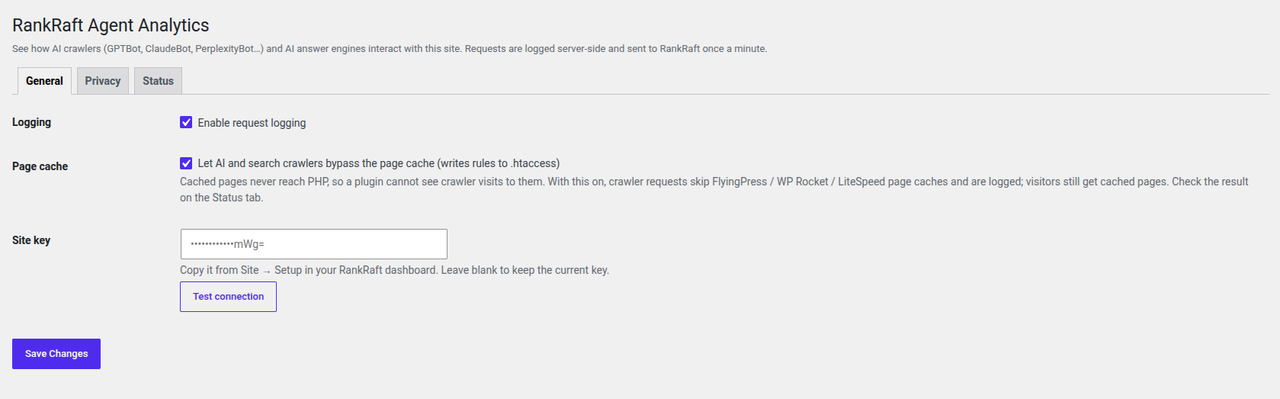
- Paste the site key from your RankRaft dashboard.
- Click Test connection. That’s it — data appears in your dashboard within a minute.
Private by design
- Nothing is sent until you add a site key and switch it on, and you can switch it off at any time.
- Admin pages, logins, checkouts, carts and account pages are never recorded — this cannot be turned off.
- Passwords, tokens, email addresses and similar values in links are blanked out before anything leaves your site.
- No cookies, no JavaScript and nothing added to your pages. Your visitors see no difference.
- Visitor IP addresses are used only to check that bots are genuine and are stored as one-way hashes.
Fast
Visits are noted after the page has been sent, so visitors never wait. The data goes to RankRaft in small batches in the background about once a minute. If RankRaft can’t be reached, nothing is lost: the plugin keeps the data and sends it later.
You’ll need a RankRaft account
The plugin sends data to RankRaft, where your reports live. Start a free 7-day trial — no credit card needed.
Documentation
Setup, caching, privacy and troubleshooting guides: RankRaft WordPress plugin docs.
External services
This plugin sends data to RankRaft (https://rankraft.ai), the analytics service it is built for. Nothing is sent until you enter a site key in Settings RankRaft AI and test the connection. A successful test confirms the key and switches request logging on; the Enable request logging tick box on the same screen turns it off again at any time. Freshly activated and not yet set up, the plugin does nothing: it makes no network requests and changes nothing on your server.
- What is sent: for each public page request — the time, hostname, path, HTTP method, response status and size, the visitor’s IP address and browser identification (User-Agent), the address of the referring page without its query string, and the page’s query string with sensitive values blanked out. No cookies, form data, page content or information about logged-in users.
- When: in batches, about once a minute, from your server to
https://ingest.rankraft.ai. The Test connection, Send test event and Check cache bypass buttons also contact the service. - Why: RankRaft sorts the requests into AI bots, search engines and visitors referred by AI assistants, checks bots against the IP ranges their companies publish, and shows the results in your dashboard. IP addresses are used for that check and stored only as salted hashes.
- Terms of service: https://rankraft.ai/terms
- Privacy policy: https://rankraft.ai/privacy
Screenshots
Installation
- In WordPress, go to Plugins Add New, search for RankRaft AI, then click Install Now and Activate.
- Go to Settings RankRaft AI and paste the site key from your RankRaft dashboard (your site Integrations).
- Click Test connection. You should see “Connected to” your site’s name; the key is saved and logging switches on.
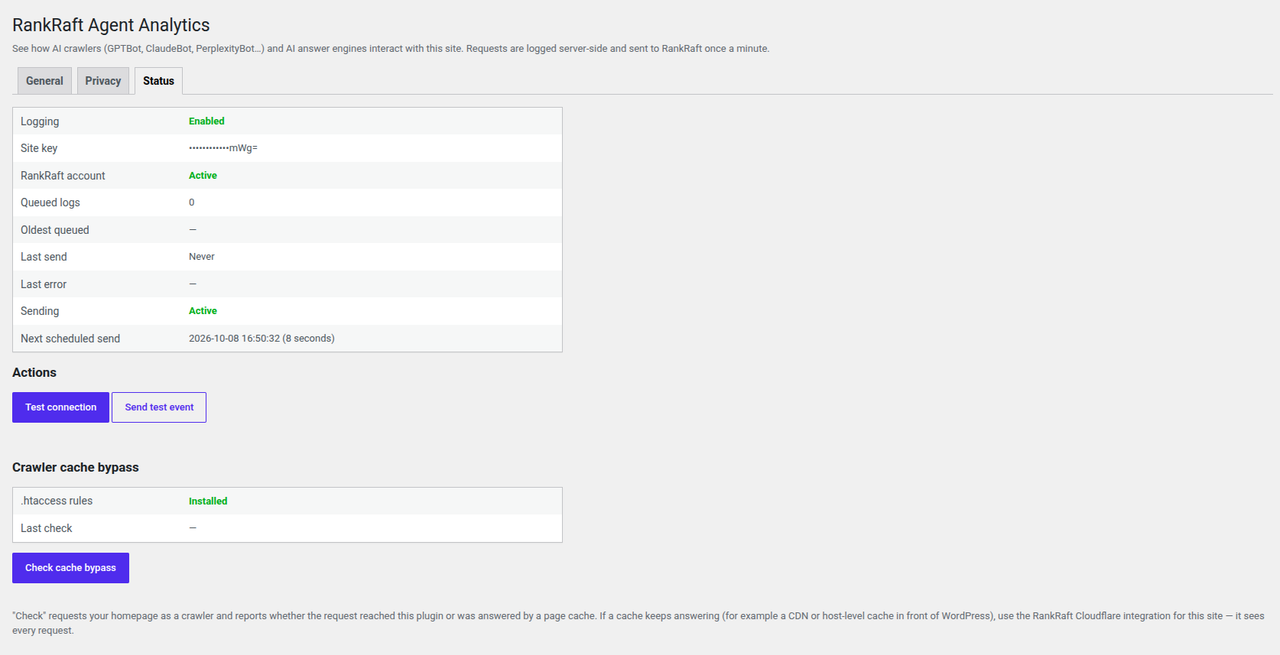
- Optional: click Send test event. It appears in your dashboard within a minute.
Developers can keep the key out of the database by adding it to wp-config.php instead:
define('RANKRAFT_SITE_KEY', 'rr_live_…');
Step-by-step guide with screenshots: docs.rankraft.ai.
FAQ
-
Do I need a RankRaft account?
-
Yes. The plugin collects the data; your reports are in the RankRaft dashboard. You can try RankRaft free for 7 days, no credit card needed.
-
Why can’t Google Analytics show me AI bots?
-
Google Analytics and similar tools count visits by running JavaScript in a browser. AI bots read your pages without running JavaScript, so those tools never see them. This plugin notes visits on your server, where every request arrives.
-
Will it slow down my site?
-
No. Each visit is noted after the page has already been sent to the visitor, and data is sent in the background about once a minute.
-
Does it work with caching plugins?
-
Yes. With WP Rocket, FlyingPress, LiteSpeed Cache or WP Super Cache, the plugin makes sure AI bots still reach WordPress so their visits are counted, while your visitors keep getting fast cached pages. Use Check cache bypass on the Status tab to confirm it’s working. If a service in front of your site (such as Cloudflare or your host’s own cache) answers before WordPress does, connect the RankRaft Cloudflare integration instead — it sees every visit.
-
What data is collected? Is it GDPR-friendly?
-
Only technical details of each public page request: the page address, time, response status, browser identification, the referring page and the visitor’s IP address. Logged-in areas, checkouts and account pages are never recorded, sensitive values in links are blanked out, and IP addresses are stored only as one-way hashes. No cookies are set. The plugin also adds suggested wording to WordPress’s privacy policy guide (Settings Privacy). See the External services section for the full list.
-
Can I stop some pages being recorded?
-
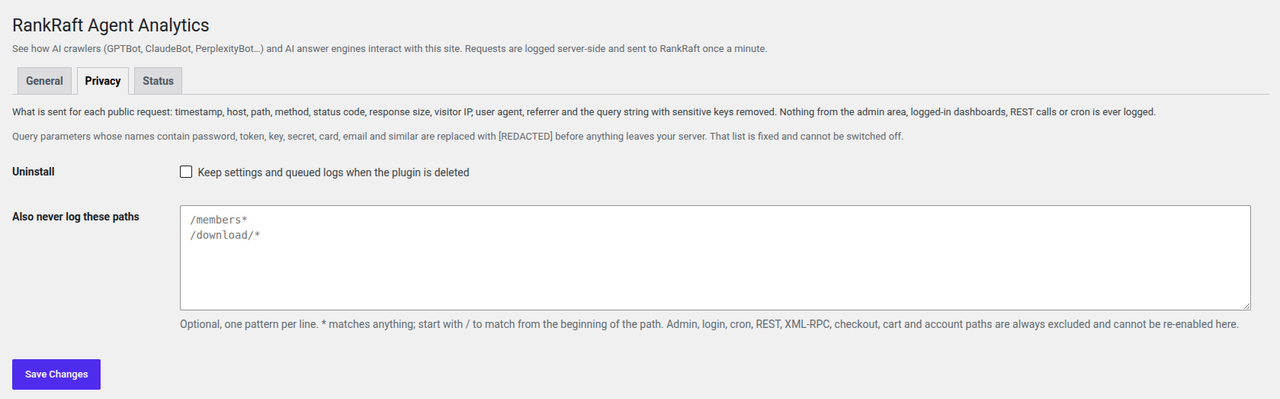
Yes. On the Privacy tab, list any extra paths you never want recorded, for example a members area. Admin, login, checkout, cart and account pages are always excluded.
-
What happens if RankRaft is down?
-
Nothing is lost. The plugin keeps the data on your site and sends it when RankRaft is back, for up to seven days.
-
What happens if my RankRaft subscription ends?
-
The plugin pauses — nothing is recorded or sent — and shows a notice in your WordPress admin. When billing is sorted out it resumes by itself.
-
WP-Cron is disabled on my host.
-
Point a server cron job at
wp-cron.phpevery minute. The Status tab shows the exact command. -
Does it work on multisite?
-
Yes. Each site in the network is set up separately with its own site key.
Reviews
There are no reviews for this plugin.
Contributors & Developers
“RankRaft AI Analytics” is open source software. The following people have contributed to this plugin.
Contributors
Translate “RankRaft AI Analytics” into your language.
Interested in development?
Browse the code, check out the SVN repository, or subscribe to the development log by RSS.
Changelog
1.2.4
- The plugin’s links now point to its documentation at docs.rankraft.ai.
- A clearer description in the plugin directory.
1.2.3
- Security: bot visits can no longer be faked by a visitor sending a made-up proxy header. The visitor’s address is read from a proxy header only when the request came through a proxy the plugin trusts — Cloudflare, your host or local network, or addresses you add with the
rankraft_aa_trusted_proxiesfilter. Sites behind another CDN or load balancer should add its addresses there. - Privacy: the referring page is now sent without its query string, so private links (such as password-reset or order-confirmation pages) are never passed on.
- Fixed: data is kept and retried, not dropped, when RankRaft asks the plugin to slow down.
- Fixed: the cache-bypass rule no longer affects real folders on your server, and works with the site’s own httphttps redirect.
- Fixed: turning off logging now removes the cache-bypass rule from .htaccess.
- Other small reliability and security fixes.
1.2.2
- Fixed: backslashes in page addresses were being removed from some recorded requests.
1.2.1
- The settings screen is down to five controls. Delivery tuning (batch size, flush threshold, queue size, retention, timeouts, circuit breaker) is now fixed at the tested values, because none of them has an answer that differs per site and every one of them could be set to a value that broke delivery.
- Admin, cron, AJAX and REST requests are now skipped unconditionally, and the query-string redaction list can no longer be emptied. Both were switches that could silently turn off the privacy guarantees described above.
- “Never log these paths” is now additive: your patterns are added to the built-in list (admin, login, checkout, cart, account) instead of replacing it.
- Developers can still override the fixed values with the
rankraft_aa_*filters; every filtered value is clamped to a safe range. - Activating the plugin no longer writes the .htaccess cache-bypass rules. They are written when you turn logging on, so a freshly activated plugin touches neither the network nor your server configuration until you ask it to.
- Hardening: the admin notice links and every settings field name are escaped at the point of output, and
$_SERVERvalues are unslashed and sanitised before use. - Test connection now checks the key you have just typed, saves it once the API accepts it, and switches request logging on. Setting up is paste the key and press Test; it used to fail with “No site key configured” while the key was visibly on screen, because it only ever read the saved one.
- The Status tab drops Clear queue, Send queued logs now, Refresh and Re-schedule. Scheduling repairs itself on every page load, so the button could not normally appear, and clicking it would have pushed the next send a minute further out. Clearing the queue destroyed unsent logs with no way back and nothing needed it; the other two duplicated the once-a-minute background send and the browser’s own reload. Write .htaccess rules now appears only when the rules are actually missing and the file is writable.
1.1.0
- The ingest address is now fixed at https://ingest.rankraft.ai and is no longer an editable setting, so a mistyped address can no longer silently stop reporting.
1.0.1
- A resume notification that arrives before RankRaft’s API has caught up now schedules one delayed re-check instead of leaving the site paused.
1.0.0
- First public release.
- Cache-bypass self-test now verifies the site certificate; clearer message when the server cannot verify itself.
- Uninstall also removes the .htaccess rules and all plugin options and transients.
- Suggested privacy-policy text for site owners (Settings Privacy Policy Guide).
0.3.1
- AI and search crawlers now bypass full-page caches (FlyingPress, WP Rocket, LiteSpeed, WP Super Cache) automatically via rules the plugin writes to .htaccess, so their visits are logged. Visitors keep getting cached pages.
- Status tab: “Check cache bypass” self-test and “.htaccess rules” status.
- Fixed: saving the General tab no longer resets Privacy settings.
0.2.0
- Rewritten delivery pipeline: retries with exponential backoff, circuit breaker, send lock, daily cleanup.
- Query-string redaction and full input sanitisation.
- Encrypted site key storage;
RANKRAFT_SITE_KEYconstant support. - Status tab with Test connection, Send test event, Send now and Clear queue.
- Glob patterns for excluded paths.
- Uninstall cleanup.
0.1.0
- Initial release.