
Description
People now find stores and services by asking ChatGPT, Perplexity, Gemini, Claude and Copilot. Arbling Beacon shows you that traffic in your Arbling dashboard:
- Visits from AI assistants. You see which assistant sent each visit and which pages they landed on.
- AI crawlers. You see which AI crawlers read your pages and which pages they read. Add the crawler reporting key to turn this on.
- WooCommerce products. On a WooCommerce store, product pages also tell Arbling which product was viewed. WooCommerce is optional: the plugin works on any WordPress site.
The plugin respects your visitors’ privacy choices:
- Nothing loads until you save your Arbling site key.
- It follows the visitor’s consent through the WP Consent API when your consent banner supports it.
- Visit counts made on your server carry no personal data.
You need an Arbling account to see the numbers. You copy the site key from your Arbling dashboard; the crawler reporting key is optional (see Installation).
External services
This plugin connects your site to Arbling (https://arbling.com), the service that shows you the numbers. It sends nothing until you save a key on its settings page (Settings Arbling Beacon).
1. The Arbling beacon script, once a site key is saved.
- What loads: your pages load
https://api.arbling.com/ati-beacon.js, tagged with your public site key. - What it sends for every page view: the page’s path, the host name of the site the visitor came from, and whether that site is an AI assistant. This carries no identifier.
- What it adds only when the visitor’s consent allows it and your Arbling account has this turned on: for a visit that arrives from an AI assistant, it sends that visit with a random identifier kept in the browser’s local storage. Arbling uses the identifier to connect the visit to what the visitor does next. With a WP Consent API banner, the visitor must allow both statistics and marketing.
- What it never does: set a cookie.
- Where:
https://api.arbling.com/api/ati/visits.
2. Visit counts, once a crawler reporting key is saved.
- What it sends: once a minute, your server sends how many requests each kind of page received in each closed minute. The kinds are home, product, collection and other. Each count says whether the visit came from a browser or something else, and which AI assistant referred it, if any.
- What it never sends: IP addresses, browser strings or page addresses.
- Where:
https://api.arbling.com/api/ati/v1/crawl-events.
3. AI crawler reports, once a crawler reporting key is saved.
- When: only when a request comes from a known AI crawler, such as GPTBot or ClaudeBot.
- What it sends: the crawler’s user agent, its IP address (Arbling uses it to verify the crawler is genuine) and the kind of page. Requests from people are never reported this way.
- Where:
https://api.arbling.com/api/ati/v1/crawl-events.
Arbling’s terms of service: https://arbling.com/terms
Arbling’s privacy policy: https://arbling.com/privacy
Screenshots
Installation
- Install the plugin from Plugins Add New, or upload the zip, and activate it.
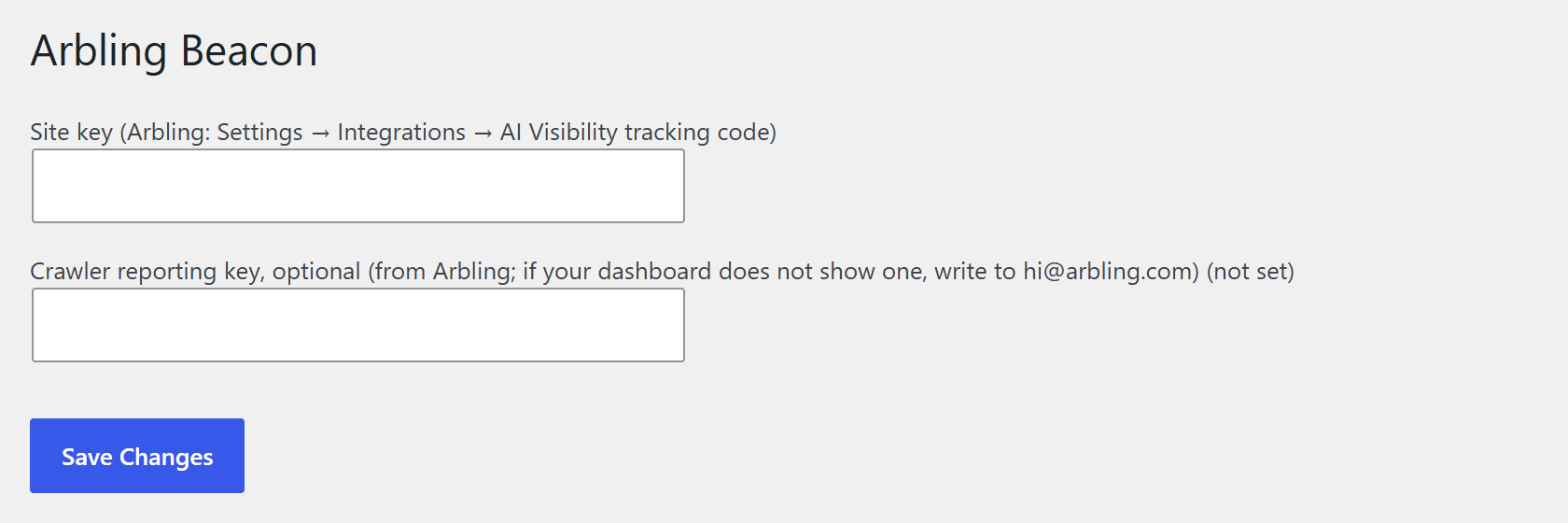
- In your Arbling dashboard, open Settings Integrations AI Visibility tracking code and copy “Your site key”.
- In WordPress, open Settings Arbling Beacon, paste the site key and save.
- Optional: AI crawler reports and server-side visit counts need a WordPress connector key from Arbling. If your dashboard does not offer one, ask us at hi@arbling.com. Paste it into “Crawler reporting key” on the same page and save.
- Open one of your pages, then check your Arbling dashboard. If your Arbling account limits which site addresses may send visits, visits from an address that is not on that list are refused. If no visits appear, write to hi@arbling.com with your site’s address.
FAQ
-
Do I need WooCommerce?
-
No. The plugin works on any WordPress site. On a WooCommerce store it also reports which product a visitor viewed.
-
Does it store personal data?
-
The plugin stores your two keys and per-minute visit counts in your WordPress database. The counts carry no IP address, browser string or page address. Each closed minute’s counts are deleted from your database when they are sent to Arbling.
-
If your banner supports the WP Consent API, the beacon follows the visitor’s choice. The page-view count carries no identifier and is sent for every visit. The identifier that connects a visit from an AI assistant to what happens next is kept only when your Arbling account has it turned on and, with a WP Consent API banner, only when the visitor allows both statistics and marketing.
-
I don’t see any visits in Arbling
-
Check that the site key is saved under Settings Arbling Beacon. If your Arbling account limits which site addresses may send visits, visits from an address that is not on the list are refused; write to hi@arbling.com with this site’s address.
-
Will it slow my site down?
-
No. The beacon script loads with
defer, and the server-side calls do not wait for an answer.
Reviews
There are no reviews for this plugin.
Contributors & Developers
“Arbling Beacon” is open source software. The following people have contributed to this plugin.
Contributors
Translate “Arbling Beacon” into your language.
Interested in development?
Browse the code, check out the SVN repository, or subscribe to the development log by RSS.
Changelog
0.3.2
- The settings screen names the current Arbling dashboard paths.
0.3.1
- WordPress now prints the beacon tag itself, deferred.
- Request headers are sanitized before use, and addresses are parsed with WordPress’s own function.
0.3.0
- Counts visits on your server: browser and other requests, with the AI assistant that referred them, sent once a minute with no personal data.
- The list of AI assistants is updated.
0.2.0
- Works on any WordPress site; WooCommerce is optional.
- Reports AI crawlers when a crawler reporting key is saved.
0.1.0
- First release: the Arbling beacon on WooCommerce stores, with consent support.