Rodrigo

Forum Replies Created
-
Forum: Plugins
In reply to: [WPeMatico RSS Feed Fetcher] Json file readingHello @etruel,
I need to collect data from an API (RSS or XML) with titles, images and full texts, plus other information (author, tags, …) and create posts on my website and publish them separately.
From what I saw in your https://www.youtube.com/watch?v=N9wuKSbp1AE video, the plugin captures several posts from an RSS feed and mounts those posts on a single page (one post underneath the other). But what I would like is to capture the RSS or XML post and create a post on my site in full (title, image, full text, …) individually, and not insert the posts collected from RSS on a single page.
Is it possible with this plugin?
If it is possible, then would you have a demo to see how it works?
Thank you,
RodrigoForum: Plugins
In reply to: [WP Ghost (Hide My WP Ghost) - Security & Firewall] Hide ip from commentsHello @johndarrel
Yes, I do not want to disable the detection of the IPs, I just want to not display the IPs the users comment on my site for those who have no administrator level. Only the administrator can see the users’ IPs in the comments section.
Could you explain how I get this?
Thank you,
Rodrigo CarlosForum: Plugins
In reply to: [Super Progressive Web Apps] SuperPWA 1.8 – Push Notifications with OneSignalHello guys,
Is the SuperPWA + OneSignal plugin already supported in multisite?
My site is in multisite and I have OneSignal in a subdomain, and I would like to use SuperPWA in this subdomain along with OneSignal, and I would also like to use SuperPWA on the main site (without OneSignal).
Thank you,
RodrigoForum: Plugins
In reply to: [Custom Post Type UI] Substitute for “GD Custom Posts And Taxonomies Tools”Hello Michael,
Is the plugin compatible with PHP7.2?
Forum: Plugins
In reply to: [Edit Author Slug] Error 404 in author pageHello guys,
Again the error 404.
I do not know what happens, but suddenly the pages of authors begin to give error 404.
As I already know how to solve, then I go straight into the plugin settings and without changing anything, I simply click save (https://screenshot.net/pt/xk03dh4?) and the problem is solved.Why does it happen?
The solution to the problem is simple, but when the pages of authors begin to give 404 error, it may take days, weeks and even months for me to notice.Forum: Plugins
In reply to: [Gutenberg] Editor widthI agree. The width of the publisher was smaller compared to the site. This disrupts the look a bit.
Hello @mbrsolution,
Yes, I removed the code and the plugin works normally.
I just asked to know if inserting the code would be safer.Thank you for your attention.
Stop Wizard is not enabled. I activated it here and I see the sidebar. Thanks.
Hello Thomas,
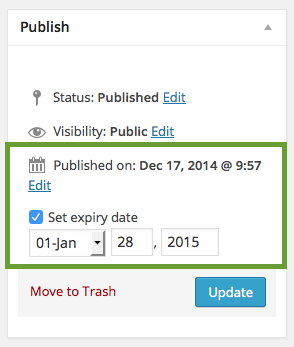
I do not see this screen https://wpadvancedads.com/wp-content/uploads/2015/01/publish-box.png in the ad settings.
No sidebar appears in ad settings.Thank you.
Hello Thomas,
I auditioned now and selected the other Top Content and End Content positions, and it worked normally. But when I created a position to appear in the middle of the content, it did not work:
https://screenshot.net/pt/k76zdcj
https://screenshot.net/pt/96q05f6So the plugin is reading the Elementor shortcode normally. The problem is in the “middle of content” position that does not show the ads.
And taking advantage of the contact … when will the plugin offer the possibility of putting the start and end date of an ad?
Thank you.
RodrigoHello Slava,
Any news about upgrading to version 1.4.0?
Thanks,
RodrigoHello Janis,
The problem is that the plugin does not work if WP_DEBUG is disabled.
I tried to leave WP_DEBUG_LOG enabled and WP_DEBUG disabled, as well as below, but it did not work:define ('WP_DEBUG', false); define ('WP_DEBUG_LOG', true); define ('WP_DEBUG_DISPLAY', false);It only works if I activate WP_DEBUG, that is, the plugin does not display PHP error logs without using the debug.
We can also imagine that the plugin is only showing the warnings generated by the debug, but not the php errors.It would not be recommended to keep the plugin always enabled, as it would generate many php error logs for days and days, correct?
The right thing would be to activate the plugin only when there are errors in my site and need to know where the errors are, and after checking, the right thing would be to disable the plugin, correct?Even with the plugin disabled, would it be bad to leave WP_DEBUG enabled?
- This reply was modified 7 years, 10 months ago by Rodrigo.
Hello
I realized that it only works when I put the line down in wp-config.php
define('WP_DEBUG_LOG',true);Even in wp-config.php I leave the codes like this below:
define('WP_DEBUG', true);
define('WP_DEBUG_LOG',true);
define('WP_DEBUG_DISPLAY',false);
Is there any problem?
Hello guys,
Do you have any answers to my question?
Thank you.
Hello @slaffik
As I said before, on my main site the submissions work perfectly.
I have the following code inserted into the wp-config.php file:define (‘WPMS_ON’, true);
define (‘WPMS_SMTP_PASS’, ’email password 1′);But on my sub website it is not working. And as on my sub website the email and password are different, so I think I should also put the line:
define (‘WPMS_SMTP_PASS’, ’email password 2′);
In wp-config.php I put it this way:
define (‘WPMS_ON’, true);
define (‘WPMS_SMTP_PASS’, ’email password 1′);
define (‘WPMS_SMTP_PASS’, ’email password 2′);Is correct?
Anyway, it did not work, it still does not send.