toniem

Forum Replies Created
-
Hi Kokomo,
thx a lot for the fix!
BR, Toni
Hi @kokomoweb: thx a lot!!!
Yeah that’s the reason why I “hacked” the elementor gallery – it provides all the features I wanted (lightbox, …).
Difficult to help with little information 😉 is the script+html widget not working?It doesn’t matter where exactly on the page you put the html widget – it won’t show content anyway as there is no content but only the script in it. It just needs to be on the page, where also the gallery widget is.
If anyone else needs similar functionality, this is how I solved my problem:
Add a html code widget and paste following code in it:
<script>
document.addEventListener("DOMContentLoaded", function(event) {
    var onMobile = jQuery('#dummy_element_that_gets_hidden_on_mobile').is(":visible");
    if (onMobile) {
		// get the gallery id from the browser's dev tools and remove the gallery class (results in columns on mobile as defined in elementor)
        jQuery('#gallery-2').removeClass("gallery");
    }
});
</script>
If you want to change also the image size and column count, use following code:
// ...additionally reduce the column count from 5 to 3 and specify a different image size jQuery('#gallery-2').removeClass("gallery gallery-columns-5 gallery-size-onepress-blog-small").addClass("gallery-columns-3 gallery-size-onepress-small");Thx for the answer! For columns I can control width in elementor for mobile – I know that. But there is no such settings for the gallery widget. In my opinion on my mobile phone, two or three columns in the gallery do look fine and better then having to scroll down for 30 images or more (http://666kb.com/i/dvort3b8mv4xhgemz.png).
I achived the view in the screenshot by using columns and adding just images, one by one – but that’s of course more work for adding additional images in the future and you loose the previous/next image feature of the lightbox. So if there’s probably a hack to disable responsive mode just for the gallery, I’d be very happy.
- This reply was modified 7 years, 11 months ago by toniem.
Use the upper left three horizontal dashes and choose “Exit to dashboard” from the resulting menu!
Forum: Plugins
In reply to: [Product Customer List for WooCommerce] Refunded Products shown in ListThx a lot!!! Rated ***** of course!
Forum: Plugins
In reply to: [Product Customer List for WooCommerce] Refunded Products shown in ListHi Thierry,
took me some while (vacation 😉 to test the version from your previous post and it works nicely!!! 🙂
Thank you!!!!
Will you release it in your next version?
Again, thx a lot!
Forum: Plugins
In reply to: [Product Customer List for WooCommerce] Refunded Products shown in ListGreat, I’m looking forward 👍 thx!
Forum: Plugins
In reply to: [Product Customer List for WooCommerce] Refunded Products shown in ListHi Thierry,
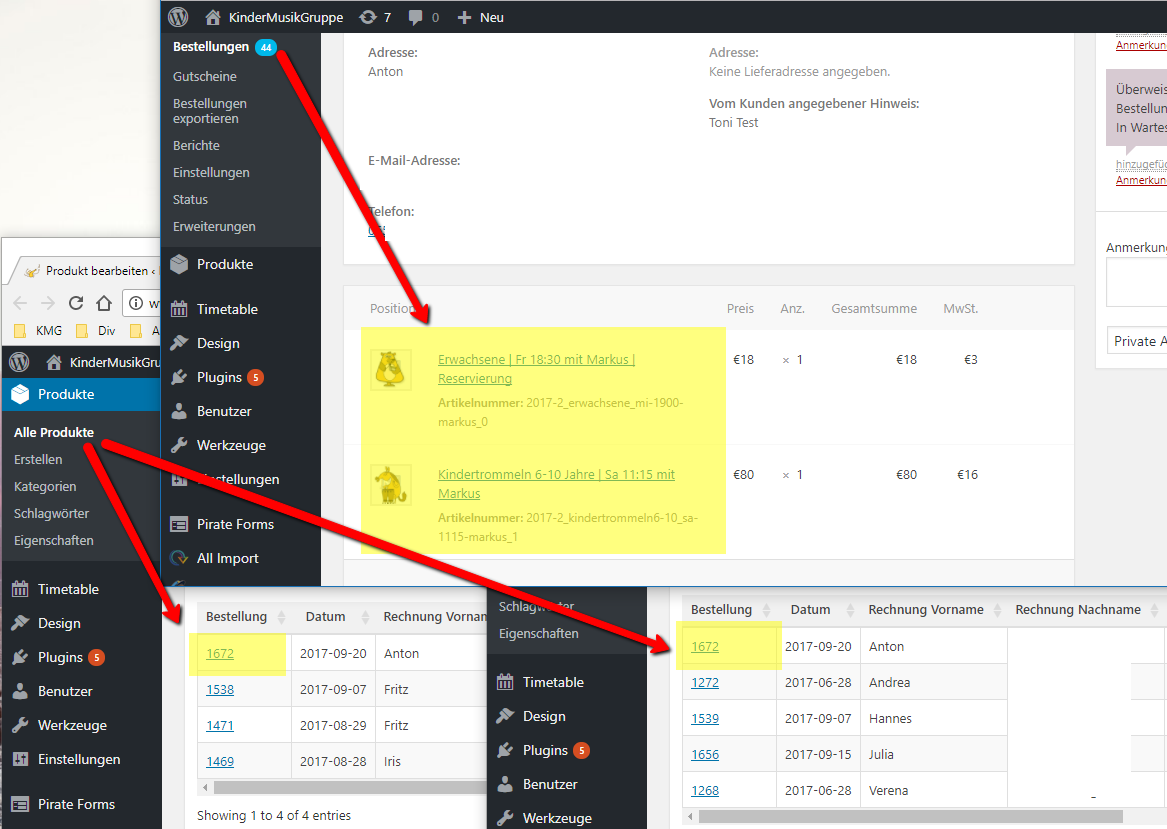
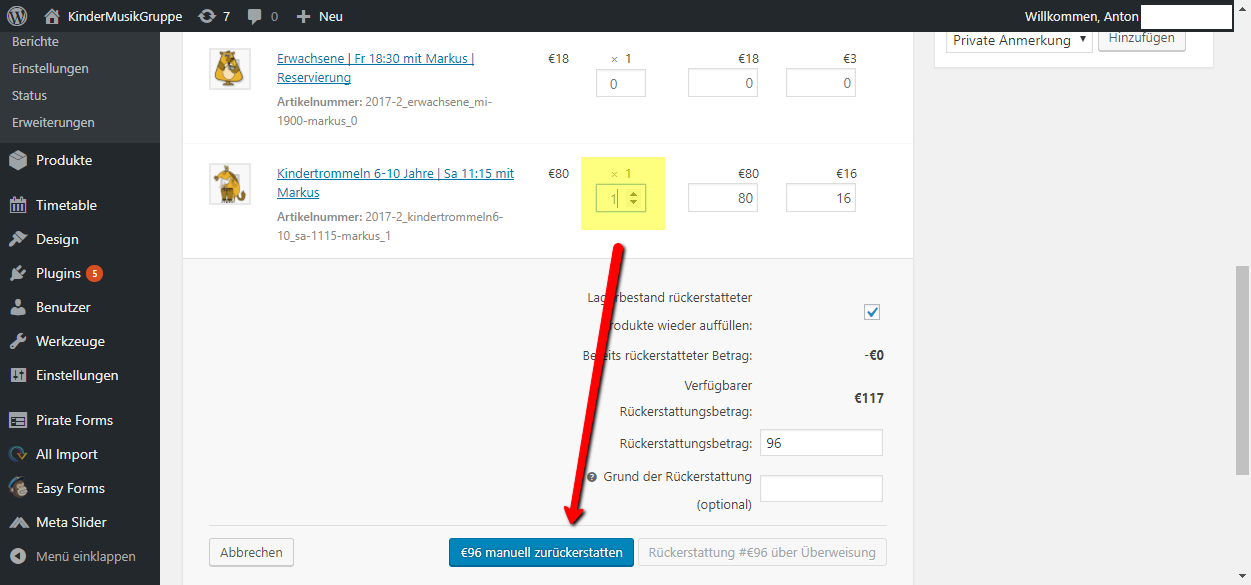
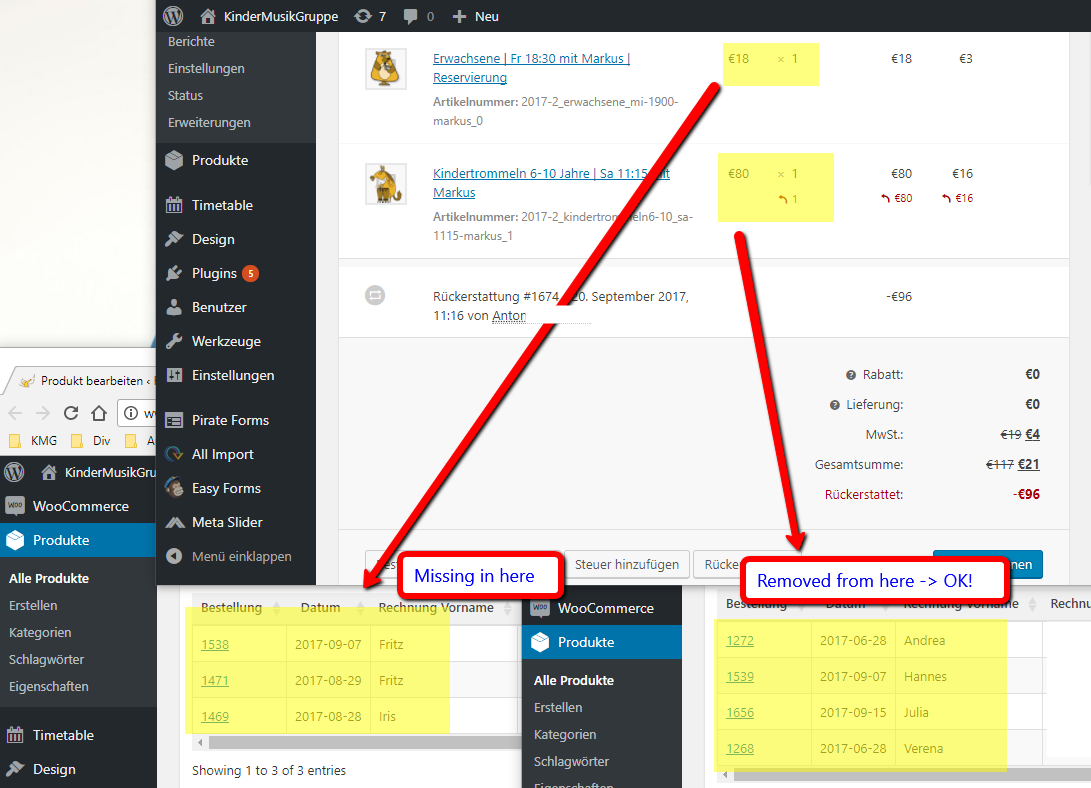
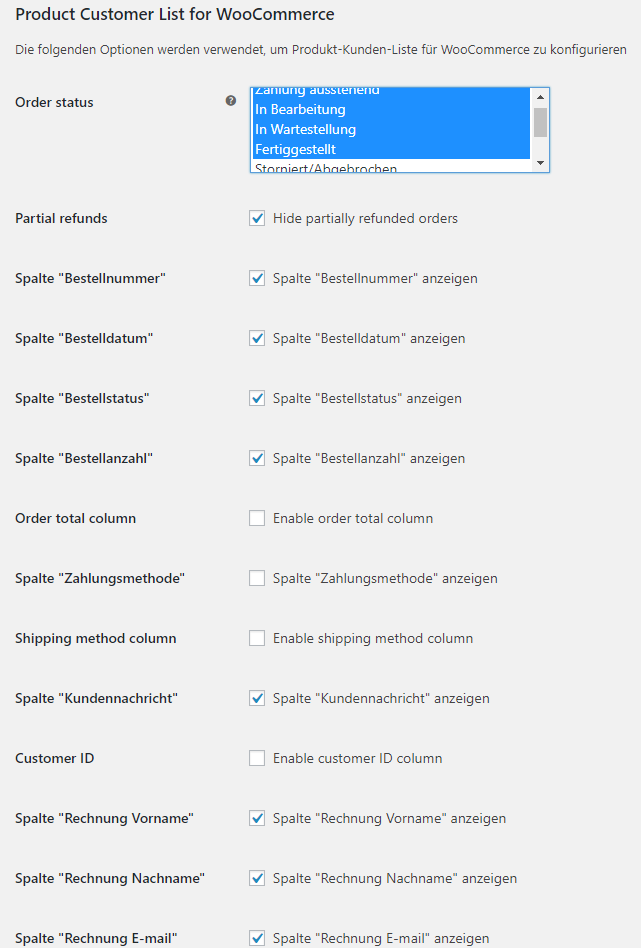
it took me some while to generate the screenshots (sorry, they are partly in German – but I guess you can figure out the structure). I hope they explain it better:
1.) I created one order with two order positions – the orders are listed correctly at both products: http://666kb.com/i/dmu6kuh02pm2x87e4.png
2.) I refund one of the order positions: http://666kb.com/i/dmu6lbfelwdb6412k.png
3.) After the refund the order is removed from both products. Instead I would like to see the order only in the product, where there still exists an open (, non-refunded) order position: http://666kb.com/i/dmu6n0gfmwkkcfass.png
4.) My settings: http://666kb.com/i/dmu6nckyav6siife4.pngMy requirement is to see in step 3 in the left product the order, while the order should not be shown in the right product.
I hope this explains everything better!? 🙂
Cheers, Toni
Forum: Plugins
In reply to: [Product Customer List for WooCommerce] Refunded Products shown in ListHi Thierry,
thx for the update. It seems, that I have not been 100% clear of my requirement.
If I enable the checkbox, my order is gone from all the product lists, if I refund one of the products.
My use case is the following:
* I’d like to see all the orders in the list below the product, that “successfully” bought one of the products. I don’t care about the orders, where people wanted to buy it, but canceled it later. More in detail: I use this functionality to let people book music courses and I use your plugin to get a participation list 🙂1. I buy two items in one order
2. I refund the second items=> I would like to see the order in the list of the first item
=> I would like to not see the order in the list of the second itemIn the previous release, the order always appeared in the lists, regardless of refunds of single items.
In the current list (with the new option check), the order is removed from all product lists, if I refund on of the items.BR,
ToniForum: Plugins
In reply to: [Product Customer List for WooCommerce] Refunded Products shown in ListNP! Thx for the update! Looking forward… 🙂
Forum: Plugins
In reply to: [Product Customer List for WooCommerce] Refunded Products shown in ListHi Kokomo,
when do you think I can expect the update 🙂
BR, Toni
Forum: Plugins
In reply to: [Product Customer List for WooCommerce] Refunded Products shown in ListWow, this sounds terrific. Thx for your good work 👍👍👍