tinuzz

Forum Replies Created
-
Forum: Plugins
In reply to: [Trackserver] Shortcode infobar templateYou’re right, I found that out earlier today. The database tables are removed, the settings are cleaned up, but the user metadata is not. I will fix that in a future release.
Forum: Plugins
In reply to: [Trackserver] Shortcode infobar templateHm 🙁
For me, it still works, even with weird characters in the template.
Can I have a look at the page where the map is shown? You can send the URL to me privately if you prefer: m@rtijn.net.
Forum: Plugins
In reply to: [Trackserver] Shortcode infobar templateI just released v4.0.2 with fixes for unescaped values in printf() format strings.
This should allow you to use ‘%’ charachters in the infobar template, and it should prevent problems when ‘%’ characters are used in other inputs.
Can you confirm that v4.0.2 fixes your problem?
Thanks,
Martijn.Forum: Plugins
In reply to: [Trackserver] Shortcode infobar templateHi, I have reproduced and found the problem. The issue is with printf() placeholders in usermeta values. I will create a fix ASAP. For now, you should be able to fix the problem by removing all % characters from the template string.
Thanks for the report.
Martijn
Forum: Plugins
In reply to: [Trackserver] Shortcode infobar templateHi,
That is quite strange. Removing and reinstalling the plugin should normally undo any local modification. “Reset to factory settings”, so to speak. A 500 internal server error is likely to be caused by a syntax error in the PHP code. Maybe you can find in the PHP error log what was causing the 500 error.
Is the 500 internal server error gone now that you’re running v4.0.1?
The infobar template string, along with other user profile data, is saved in WordPress’ wp_usermeta table (if you don’t use a custom table prefix). There should be a row for your user id with ‘meta_key’ set to ‘ts_infobar_template’, with your template in the ‘meta_value’ column.
If the value of the template is the problem, this indicates a HTML escaping problem in Trackserver. I will investigate.
For the rest, I’m not sure what to tell you, since a reinstall doesn’t seem to help. Just to be sure, you could download the main plugin file from here:
https://github.com/tinuzz/wp-plugin-trackserver/blob/master/trackserver.php
and overwrite it on your server. Removing the ‘ts_infobar_template’ from wp_user_meta could also help.
Please let me know how it goes.
Cheers,
Martijn.- This reply was modified 8 years, 2 months ago by tinuzz.
Forum: Plugins
In reply to: [Trackserver] Shortcode infobar templateWhere I now see that the {distance} tag is missing in the text 😉
Forum: Plugins
In reply to: [Trackserver] Shortcode infobar templateYes, that’s the place, along with the text:
“With live tracking, an information bar can be shown on the map, displaying some data from the latest trackpoint. Here you can format the content of the infobar. Possible replacement tags are {lat}, {lon}, {timestamp}, {altitude}, {speedms}, {speedkmh}, {speedmph}, {userid}, {userlogin}, {displayname}.”
Forum: Plugins
In reply to: [Trackserver] Shortcode infobar templateI’m not sure if I understand you correctly. Did the edit field disappear in the release version of Trackserver, or after you changed the PHP source code?
If it’s the former, I have no idea what is wrong. Maybe you can send me the HTML source code of the user profile page?
If it’s the latter, you can always get the released code from Github, see what the differences are and fix the problem. Otherwise, just download ‘trackserver.php’ and replace the file in your installation. A full uninstall / reinstall might cause you to lose data, so I would be careful with that.
Best regards,
Martijn.Forum: Plugins
In reply to: [Trackserver] wordpress other users and passIf you need other ways of user management in the context of Trackserver, please create a feature request issue on Github:
Forum: Plugins
In reply to: [Trackserver] How to track with osmandClosing due to lack of response.
Forum: Plugins
In reply to: [Trackserver] Locus Maps instructionsHi,
Thank you! I will try to find a good place in the docs for this!
Best regards,
Martijn.Forum: Plugins
In reply to: [Trackserver] Not working on 000webhost & question USER nameSorry for the late response, I was on holiday.
I am not familiar with 000webhost.com, so I can’t say if it works, but if you can host WordPress on it, I don’t see why not?
‘User’ or ‘Username’ in Trackserver context is always the WordPress user, isn’t that obvious?
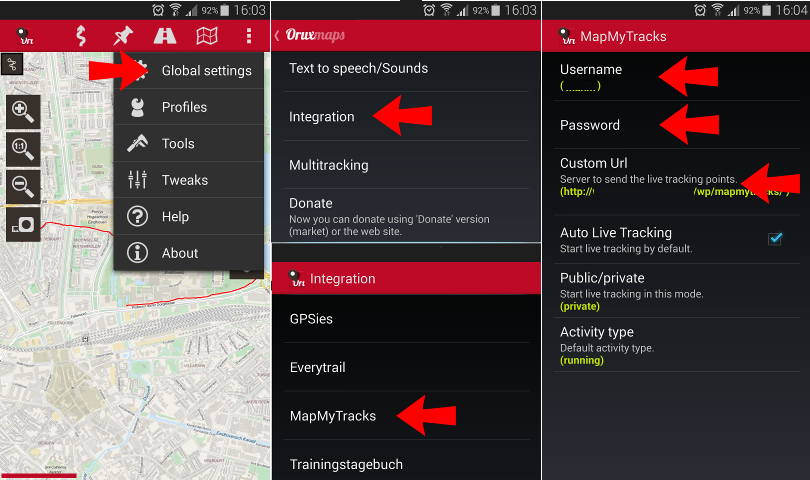
To use Oruxmaps’ MapMyTracks integration with Trackserver, you need 3 pieces of information, as shown here:
https://raw.githubusercontent.com/tinuzz/wp-plugin-trackserver/master/img/oruxmaps-mapmytracks.png
– Username (your WordPress username)
– Password (your WordPress password)
– Custom URL, as displayed on the Trackserver settings pageGood luck,
Martijn.Forum: Plugins
In reply to: [Trackserver] Could I use this for Dog Walking Tracker?Hi,
Trackserver can store your location when you are underway, and publish it (in near-real time) on a map on a WP page using a shortcode.
If you need users to login before they can see the map, you have to make the page private somehow, but that is beyond the scope of Trackserver. There are other WP plugins that can help you with that, but I have no recommendation.
Best regards,
Martijn.Forum: Plugins
In reply to: [Trackserver] All user tracks plus liveHi stki,
You aren’t doing anything wrong. There is no way to get all tracks of a user in Trackserver just yet.
I have two things on the roadmap that will make this possible:
* select track by regular expression or some kind of wildcard matching. This is not hard to do, so this will probably end up in the second next release.
* “collections” or “folders” that will allow you to treat a group of tracks as a single entity. This is a much bigger piece of work, so I have no ETA for it.
For now, I’m afraid changing the comma-separated list is the only way, without changing the code. Sorry about that.
Best regards,
Martijn.Forum: Reviews
In reply to: [Trackserver] This gem works.Hello Eligoo,
Thank you very much for your kind review. I’m glad you like Trackserver.
Cheers,
Martijn.