ThreeToedCrow

Forum Replies Created
-
Forum: Plugins
In reply to: [Sermon Browser] Updates are coming very soonGREAT! Really need to fix the FLASH issues …
One now with the latest WP update on CHROME browsers and other on all mobile devices (cannot see MP3 player), that’s been for a long time now since FLASH is no longer supported.THX
Forum: Plugins
In reply to: [Contact Form 7] contact form 7 not sending emailsFIXED – MX record error in CPANEL
Forum: Themes and Templates
In reply to: [Hueman] Hueman Demo ContentAlso looking for content….
I read your theme documentation (http://demo.alxmedia.se/wp-content/themes/hueman/functions/documentation/documentation.html#install-import), but in step #5 you don’t say where the .xml file is located.
I see here in the forum one other person tried asking that same question and got one useless answer… with no followups
Can anyone point me to where that file is located? THX
Forum: Plugins
In reply to: [Social Media Followers Counter] How do I change iconsI see the various themes folders within this plugin, but do not see how to access them for usage.
How can I use/view these other theme looks?
THX
man …..
I can’t believe as many times as I’ve looked at that page, i never saw that “button” at the top …Time to pull my head back into the page :>
THX guys!
nothing ever comes up under that area.
Just wanted to have certain events set as recurring. Under “Add New Event” there is no option there for recurring events, even if I look in the WP screen options tab, no additional selections there for a recurring option.
Is there maybe a shortcode or something to add within the fields located under Settings > Formatting > Events?
THX
sarasustainabletourism
Just wondering how did you fixed the issue with recurring events?
THX
anything! Again I am only addressing the drop-downs in the events admin area (“when/Event starts at”)
Install fresh copy. Ck the “add event page” / “when/Event starts at”, everything looks and works fine.
Now if I go to “Settings” and make ANY setting change anywhere or even just press an update button without making any changes, the “Event starts at” times change to a 24 hr time format, which makes it confusing for the client to select the correct event times.On the live end, everything seems to be working and appears fine. It’s just within the events admin area is the bug
THX
[ Please don’t bump, it’s not permitted here. ]
already tried that. I also have a new install going on another domain without any modifications done to the plugin.
Works perfect but once you try to change any settings, the time settings on the add event page goes to 24hr clock. Only way to fix is to do an overall reset
“Use 24h Format” is worthless.
I’ve tried h:i a, g:i a, uppercase, etc – nothing changes
Is there a way to force it to always read out in normal time?
NOTE: now this is for person setting up the event in admin area. I’m trying to make it more user friendly to the customer so they don’t always have to change over from military time to normal time when creating an event.
(viewable mode on site is appearing as it should be)
THX
You may find this useful. Just went thru the process myself (I found this link in an older forum post).
Themes are found here: http://webdesignerwall.com/tutorials/css-decorative-gallery
BUT READ THIS FIRST! Very helpful info …
http://www.ajwan.net/wordpress/?page_id=844You may find this useful. Just went thru the process myself (I found this link in an older forum post).
Themes are found here: http://webdesignerwall.com/tutorials/css-decorative-gallery
BUT READ THIS FIRST! Very helpful info …
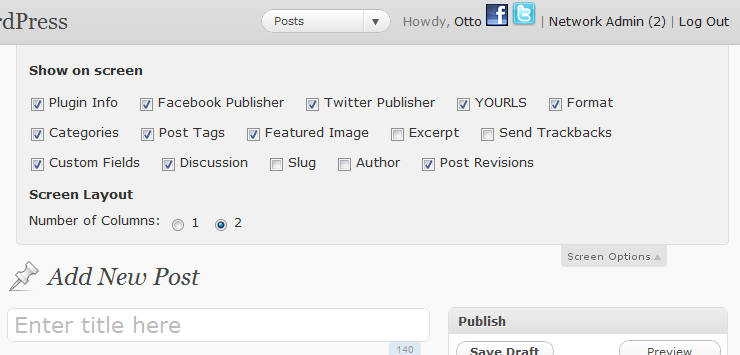
http://www.ajwan.net/wordpress/?page_id=844Just found this on a post from Otto Destruct at http://ottopress.com/2011/wp-quickie-metaboxes/
Just go to your “Edit Post” page, then click on the “screen options” tab near the top right of the WP admin area. There you’ll see several tic boxes to turn on and off ALL features for that page.
Screen shot from Otto’s site: http://ottopress.com/files/2011/02/metabox-dropdown.png
This also works on ALL other pages throughout you WP admin area.