Themonic

Forum Replies Created
-
Forum: Themes and Templates
In reply to: [Iconic One] blog description/name problemLogo branding is meant to replace title and tagline.
Normally, the Logo itself has a title and tagline. See this very site wordpress.org do you see a logo or title+tagline.
Forum: Themes and Templates
In reply to: [Iconic One] Languages supportCould you please send this request via contact page with all details. We will look into it for sure.
Forum: Themes and Templates
In reply to: [Iconic One] images are not displaying until full post is openedIconic One uses thumbnail function to generate homepage images from featured images, it means they are resized once during upload to fit along with the excerpt.
Featured images are not displayed on single pages to give manual control to the blogger to place images where ever they like for eg. after the first paragraph.
Auto display for featured images on single posts is answered here for anyone who is looking http://wordpress.org/support/topic/how-to-display-the-featured-image-below-the-title?replies=9
Forum: Reviews
In reply to: [Iconic One] Left to right elementsPot file along with tutorial for worldwide translation is already bundled. Check out the “language” folder inside theme.
Yes, it does support RTL out of the box.
Forum: Themes and Templates
In reply to: [Iconic One] images are not displaying until full post is openedThe theme will display the images on homepage only if you have selected featured image.
Refer: http://wordpress.org/support/topic/why-i-cant-veiw-my-image-on-homepage?replies=4
Thank you for diving in.
Forum: Themes and Templates
In reply to: [Iconic One] How to add date to postsHi DJ,
To display meta( author and date ) on category pages:Open content.php
go to line 25
<?php if ( is_single() ) : //for date on single page ?>
Replace the above line with
<?php if ( is_single() || is_category() ) : //for date on single page ?>Let me know if it works.
Forum: Themes and Templates
In reply to: [Iconic One] How to edit the navigation bar colorsTry this
.themonic-nav ul.nav-menu, .themonic-nav div.nav-menu > ul{
    border-bottom: 5px solid #157D92;
}
Forum: Themes and Templates
In reply to: [Iconic One] How to edit the navigation bar colorsUnlimited colors using a color picker is available in Pro version already without touching any code http://themonic.com/iconic-one-pro/
Supporting members will also get priority support.——-
to change the blue line paste this in custom.css.themonic-nav div.nav-menu > ul { border-bottom: 5px solid #157D92; }Forum: Themes and Templates
In reply to: [Iconic One] Post dont work?Hi unpah,
Please use WordPress forum for WordPress questions, this forum is for Iconic One theme support only.
Forum: Themes and Templates
In reply to: [Iconic One] Post dont work?@deerop
please create a separate thread.
Forum: Themes and Templates
In reply to: [Iconic One] Post dont work?Try activating the default twentythirteen theme and check if the problem persists.
WordPress related help is here:
http://wordpress.org/support/forum/how-to-and-troubleshootingForum: Themes and Templates
In reply to: [Iconic One] Social linkRemove whatever you have done and use this simpler method.
Add this code after line 43 in header.php file, make sure it is inside the socialmedia div container.
<a href="http://IMGlink" target="_blank"><img src="http://IMG.png"/></a>replace IMGlink with linked page url and img.png with linkedin png image, it must be full image URL.
Forum: Themes and Templates
In reply to: [Iconic One] had default theme, deleted it, want iconic oneHi Amanda,
I am sure what’s the problem, but I will give you a sureshot solution 😀
1) Go to themes page – delete iconic one if present, else follow below:
2) Download the theme http://wordpress.org/themes/download/iconic-one.1.2.3.zip
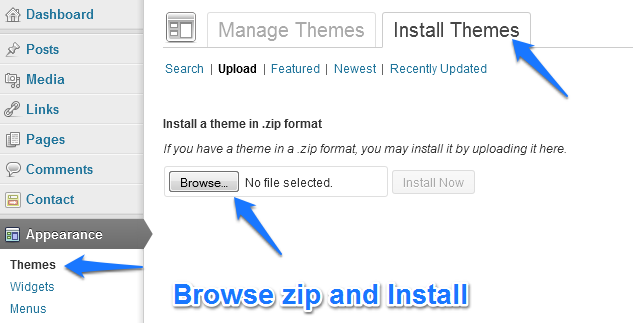
3) Install it manually, follow the steps outlined in this image
http://themonic.com/wp-content/uploads/2013/07/installation-upload-steps1.pngAlso, please note that Iconic One is for self hosted WordPress blogs only. If you have a blog at WordPress.com it won’t work unless you request them to include this free theme.
Forum: Themes and Templates
In reply to: [Iconic One] Post dont work?try the following:
Disable all plugins and then check.
Go to permalinks and click save settings, check again.
However, it doesn’t appear to be a theme related problem.
Forum: Themes and Templates
In reply to: [Iconic One] How to remove tags??to remove the tags from home,
Remove the following code from line 65 in content.php
<span><?php the_tags(); ?></span>To display author, use:
<?php echo the_author_posts_link(); ?>