thegreatest1

Forum Replies Created
-
Forum: Plugins
In reply to: [LiteSpeed Cache] Cache all posts in a categoryHello, thank you for your answers. I cannot enable private cache för logged in users because the plugin Memberpress doesn’t work with it enabled. so it only caches public pages and that is why i want to do it manully. Ive tried ESI also.
So if I change my permlink to https://www.website.com/%category%/%postname%/ i will be able wo make it work, with this URI: /category/?
Forum: Plugins
In reply to: [LiteSpeed Cache] Cache all posts in a categoryYes but it doesnt cache logged in users. Ok Ill try without the plugin.
But if my domain is:
https://domain.com/post1.How can I cash specific categories?Forum: Plugins
In reply to: [LiteSpeed Cache] Cache all posts in a categoryHi, no I have the plugin No Category Base activated, so it is: https://domain.com/post1.
It is because I have memberpress and I cannot cache logged in users. I have tried ESI and it works but by forcing caching it gets a bit faster (the initial page load is faster).
Forum: Fixing WordPress
In reply to: Invalid default value for ‘post_date’Ok thanks, i’ll try that but is there another way to sort the swedish letters åäö so that e.g. å and ä dont appear after a and ö after o?
Forum: Fixing WordPress
In reply to: Invalid default value for ‘post_date’I tried to change both of them but it doesn’t work. When I tried to optimize wp_post, i get same error message, invalid default value post_date
Forum: Fixing WordPress
In reply to: Invalid default value for ‘post_date’I’m trying to change the allocation to sort the swedish letters correctly åäö, that should be at the end in the alphabet.
Anyway i have 0000-00-00 00:00:00 and when I tried to change it I get error again and it says invalid default value for post_date_gmt.
Now iam stuck
Forum: Fixing WordPress
In reply to: Illeagal string offsetIm sorry it should be: Warning: Illegal string offset for ‘for_not_logged_in’ in /srv/…on line 5. This is line 5: if($atts[‘for_not_logged_in’] == “yes”) {
Could I change this to make it work?
Forum: Fixing WordPress
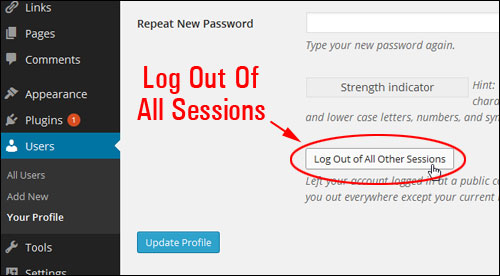
In reply to: Log out of all sessions-linkBut this is a logout link? Will this kill all the sessions, i.e. log out the user from all of their devices? I have some users that want that function.
The functions is in the backend like this: https://wprev.s3.amazonaws.com/img/wpt/WPT-0013-004.jpg
But my users cannot get to the backend, so I want them to be able to have this button on the frontend via a simple page?
Forum: Plugins
In reply to: [Relevanssi - A Better Search] Search only titles and and specific divsThanks for the answer. So this should be used in single.php? The specific div is in the beginning of the post so it will hard to divide it or am I thinking wrong?
Forum: Fixing WordPress
In reply to: Showing more than one authorSo I was wonder if there is a way to to add more than one author on a post, by adding code to single.php.
Like this:
Author: some name
Editor: some nameSo that the other author (“Editor”) can be added in the post by choosing from the list. And if there is no “Editor” it should be a dash (-) instead. Like this:
Author: some name
Editor: –Forum: Fixing WordPress
In reply to: Showing more than one authorNo it is not plugin specific, it is a general question
Forum: Fixing WordPress
In reply to: Showing more than one authorThanks for your answer. I tried those plugins but can’t figure out how to put an “Editor” or just to put a dash instead when there is no “Editor”.
I tried this in single.php with co-authors plus:
<font color=’#494949′><b>Author</b></font>: <?php the_author_posts_link(); ?>
<font color=’#494949′><b>Editor</b></font>: <?php
if ( function_exists( ‘coauthors_posts_links’ ) ) {
coauthors_posts_links();
} else {
echo ‘ – ‘;
}
?>But it still shows the author when there is no “Editor”, because in the post I cannot remove all on the authors, there has to be an author. It only works when there is an “Editor” and in the post I choose the “Editor” name and remove the “Author” name and it will give me this (which is correct when there is an “Editor”):
Author: it shows the authors name, even though I removed him from the post
Editor: it shows the editors name, which is the only author the post[ No bumping please. ]
[ Still no bumping please. ]Forum: Themes and Templates
In reply to: Pre-made HTML-snippets or FormsI got it!
Forum: Themes and Templates
In reply to: Pre-made HTML-snippets or FormsHaha I’m also the greatest on something else.
I’ll create a child theme. So what do I change in search.php, archives.php and so on?
Forum: Themes and Templates
In reply to: Pre-made HTML-snippets or FormsYOU ARE THE GREATEST!!!! THANKS
Btw, do you know how to only show post titles – when searching, clicking on categories, archives and so on?