Sutweb

Forum Replies Created
-
Forum: Plugins
In reply to: [Disqus Comment System] New comments not syncingI’m still unable to sync comments from Disqus to WordPress and continue to get the message:
There was an error downloading your comments from Disqus.
Unable to connect to the Disqus API serversAll other aspects of the plugin are working fine.
Forum: Plugins
In reply to: [Disqus Comment System] New comments not syncingI have the same problem but only noticed it once I upgraded to PHP7. I’m starting to think that was just a coincidence now.
If I try and sync the comments manually, I get the following:
There was an error downloading your comments from Disqus.
Unable to connect to the Disqus API serversDoesn’t matter what I do, it won’t work – have even tried resetting the Plugin but that resulted in me not being able to re-enable it due to API issues again – had to revert to a backup of the site/db to get it back to this state.
The plugin is working ok otherwise from a user point of view – see http://www.epinionated.net/
I’ve tried using on a virgin WP install with no plugins, same issue so it’s either my VPS / PHP7 or a problem with the plugin.
And that my friend concludes this little journey.
Everything is now fixed.
Thank you again for your time and effort on this.
Something to add also is that when I’m logged onto WP – the bottom part of the widget looks fine – the text is gone and the spacing looks right, showing my email address in the input field.
Hey,
Yep that’s how my file looked but I updated again anyway.
There are two issues here:
1) Top spacing between title and text, this isn’t altered by the updates.
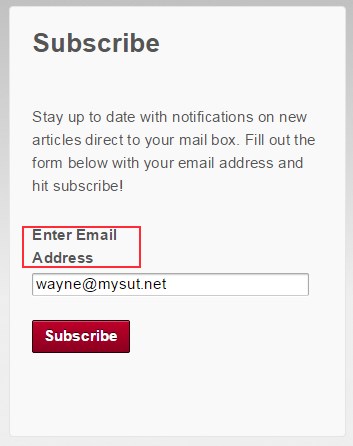
2) Text above input field “Enter Email Address” – this appears OK in IE and FF on one line above the input field (would be better hidden in my opinion as this is a duplicate of the default overwrite text already in the input field), in Chrome there appears to be a line break after the word Email.This is still the case after the update above.
Hope this helps – I feel like a Jetpack UX tester 🙂
Yay! Success.
I believe what started the plugin showing again was putting some text in the ‘Sharing Label’ field. I’ve had this blank on the live site since installing and for some reason, putting text in there and saving the settings refreshed the icons – I then reset it back to blank and voila.
Thank you very much for your assistance with this Jeremy.
As for the css change, this resets the behavior to the sentence ‘Enter Email Address’ being split across two lines again in Chrome. In FF and IE it puts the text inside the field which is nice. There is still too much white space in between the widget title and the widget text through.
I’ve just edited the subscription.php file and it’s completely removed the label.
The line spacing in the widget still seems out (extra space between the header and text) and now there is a big gap under the text where the label used to be.
Hey, thanks again for the response.
The level of support you guys provide for this plugin is staggering 🙂
Ok so something weird has happened.
I switched to Responsive instead of Responsive pro on http://dev.sutweb.net and although not immediately, after a refresh the icons started showing properly. I switched back to Responsive Pro and they are now fixed. I reset the theme to custom static page and then visited the Articles page – still working, even in a private mode browser and refreshed.
I tried the same thing on my live site http://www.epinionated.net/ (installed Responsive and temporarily switched to it) but unfortunately it didn’t fix anything so I’ve turned the buttons back off on the /articles page.
Thank you for the amount of effort you’re spending on this Jeremy.
In terms of plugins, I am using nothing other than Jetpack on the dev site.
I have tried every option for config / home page choice and currently the site is set with the custom home page disabled. This makes the front blog list look fine again but the minute you click into either /articles or /test-page (which I’ve tried with numerous custom layout options, the icons break again).
It’s not just the icons that are broke by the way, the ‘more’ button for other sharing options is also broken.
Interestingly, if I choose either icon + text or official buttons in sharing options, they load more of the styling but the more sharing button still doesn’t work.
I’ve logged a support request with Cyberchimps also – please see it here:
http://cyberchimps.com/forum-topic/jetpack-update-and-responsive-pro/I know the focus has been on the sharing buttons, but please don’t overlook that the styling for the Subscription Widget box has also changed for Chrome as per my original report.
Thanks
Thanks for the update, I’ve spun up a test site using my theme and the problem persists.
However when I change back to the default theme the button styling returns to normal on the front page.
I’ll discuss with the theme devs, but please bear in mind this is the Responsive theme from Cyberchimps which is very popular and the issue only occurred once Jetpack updated so please don’t just put this on ‘its the theme’. Surely you test your plugin on more than just the default themes which very few people stick with?
The dev site is here: http://dev.sutweb.net/
Any update on this please?
Any update on this please?
Have disabled the buttons again – don’t really want a live site looking like that.
Let me know when you’d like me to try something again.
Thank you for the quick answer.
That has the same effect as ticking the CSS overrid option in the plugin which is something I’ve already tried:
http://www.epinionated.net/_images/sharing-nostyle.jpg
I’ve left the icons enabled for now, so you can take a look live.
Hey and thanks for the reply.
It looks ok because I disabled the offending icons on the index page (/articles). Have turned them back on to take the screenshots then disabled again.
I’ve refreshed the caches a number of times both wp, server and client browser it’s not a caching issue.
Please see the following screenshots:
Chrome:
http://www.epinionated.net/_images/sharing-chrome.jpg
http://www.epinionated.net/_images/subscribe-chrome.jpgFirefox:
http://www.epinionated.net/_images/sharing-firefox.jpg
http://www.epinionated.net/_images/subscribe-firefox.jpgIE:
http://www.epinionated.net/_images/sharing-ie.jpgThanks