sikatzonline

Forum Replies Created
-
Forum: Plugins
In reply to: New plugin – UsermetaI hope this works in 2.0 because I need the features of USERMETA and USEREXTRA…
Forum: Plugins
In reply to: Plug-In Suggestions pleaseUPLOAD AND DISPLAY AUTHOR IMAGE
for one thing, I hope you could help me out… I’ve been searching for the best way to create an “upload_author_image” plugin, and I’ve seen a lot of articles.. (I will still start to code the plugin this week if I have the time).
The uploaded picture will be stored as a value in a new field within wp_user table. That’s what I am trying to do right now. But I sure hope someone could help me out with this…Also, we have the existing Userextra plugin which currently does not work with the new version. The pre-requisite plugin of the plugin (usermeta) conflicts with the functions.php. Error says that there is a missing function.
I hope someone could just make a plugin that has these features:
1. uploads and stores user’s image/avatar
2. creates new user fields (Interests, Hobbies, slumbook stuff which could help advertiser’s determine how to go about the content of your site)
3. display user info. globally on any page within the siteForum: Plugins
In reply to: Get Author Profile pluginthanks, Guff…
Forum: Plugins
In reply to: User Profilesyou have to code for this. It’s no no longer possible as a plugin alone. WHAT I DID: redirected users to another admin panel that has the current theme.
Forum: Fixing WordPress
In reply to: separating categories on one pageand don’t forget to add the end_while after every section then repeat the code… you should get it by now…
Forum: Fixing WordPress
In reply to: separating categories on one pageREAD THE LOOP TUTORIAL on THE CODEX. Just do same thing as the example. It worked for me. My site has two sides, displays “n” entries per category.
kuwaderno.net/makathahere’s the sample code if you can’t find it:
<div class=”sidea”>
<?php $my_query = new WP_Query(‘category_name=design-06&showposts=1’);
while ($my_query->have_posts()) : $my_query->the_post();
$do_not_duplicate = $post->ID; ?>
<div class=”makathasidea”>
<div class=”centered”>
<div class=”design06″>
<?php the_content(); ?>
</div>
</div>
<div class=”postlinks”>
<ul class=”postlinks”>- <?php the_category(‘, ‘); ?>
» “><?php the_title(); ?>
</div>
Just change the category name
Forum: Fixing WordPress
In reply to: images wont appear on templateYou can if you want to. Sorry. I’m not hijacking… I’m just being off-topic.
Forum: Fixing WordPress
In reply to: images wont appear on templateSuggestion: maybe you should reupload the JPG. I’m not sure what the problem is, really.
Forum: Fixing WordPress
In reply to: images wont appear on templateThis is my site: http://www.kuwaderno.net/makatha
Just updated to 2.0 a while ago.Forum: Fixing WordPress
In reply to: images wont appear on templateOh, my. That’s totally weird. Haven’t encountered any errors on wp 2.0 yet.
Forum: Plugins
In reply to: Edit AUTHOR PROFILE outside administration panel
if ( !get_settings('users_can_register') )

	$action = 'disabled';
header( 'Content-Type: ' . get_bloginfo('html_type') . '; charset=' . get_bloginfo('charset') );
switch($action) {
case 'register':
$user_login = $_POST['user_login'];
$user_email = $_POST['user_email'];/* checking that username has been typed */
if ($user_login == '') {
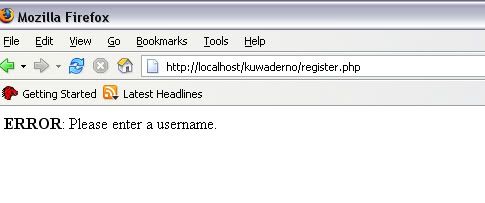
die (__('ERROR: Please enter a username.'));
}/* checking e-mail address */
if ($user_email == '') {
die (__('ERROR: Please type your e-mail address.'));
} else if (!is_email($user_email)) {
die (__('ERROR: The email address isn’t correct.'));
}/* checking the username isn't already used by another user */
$result = $wpdb->get_results("SELECT user_login FROM $wpdb->users WHERE user_login = '$user_login'");
if (count($result) >= 1) {
die (__('ERROR: This username is already registered, please choose another one.'));
}I have tried inserting those form validation statements on the last case ‘register’ which is a WRONG move. How do we improve the wp-register.php to display the error messages on HTML format?
Forum: Plugins
In reply to: Edit AUTHOR PROFILE outside administration panelHere’s another thing I hope some CODERS out there would help me out with.
As I said, register.php works well. It’s the validation errors that annoy me.
This is the preview of the site’s registration page:
http://i21.photobucket.com/albums/b296/sikatzonline/registerpage.jpgThis is the UGLY error you get:
http://i21.photobucket.com/albums/b296/sikatzonline/ugly_error_message.jpg
Is there a way to change the
die {‘message’to return a error_message.php instead?
Forum: Plugins
In reply to: Edit AUTHOR PROFILE outside administration panelYes, I’m trying. If I get to figure out how to make a plugin/hack for this, maybe I could contribute something to creators of this really great CMS.
Regarding that topic you posted, I think it’s easy to DISPLAY the author’s information, picture and everything. The GET_AUTHOR image hack works well, but it does not have an UPLOAD IMAGE function. You have to FTP. I’m also trying to figure out HOW to allow users/authors to upload their image via web browser.Forum: Fixing WordPress
In reply to: Is it possible to display only one topic per categwow those inlines/pullins are cool. I guess you’re still developing it, right? Really cool plugin. I’ll wait til its release. You’re a genius, man. You’re gonna beat the King! (Alex King).
- <?php the_category(‘, ‘); ?>