Senff - a11n

Forum Replies Created
-
And if there any other pages where you’d like to see the button, let me know 🙂
Hey @flarere, appreciate your review!
I’ve added the toggle button in the next version, which you can download here: https://github.com/senff/WordPress-Bordered-Blocks/archive/refs/heads/main.zip
Could you check if that’s working well (and that it doesn’t break any functionality elsewhere)?
Thanks!
Hey @fishmi – the JS error about the
addTogglefunction was indeed something I missed — I’ve updated it now and if you have version 1.1.6, you shouldn’t be seeing it anymore. Let me know if that’s good now!As for adding a toggle button back — since the editor is now within an iFrame, it’s made it very difficult to have this functionality again. I’ll be looking into it, but it’s definitely not an easy one so it might take a while.
- This reply was modified 1 year, 3 months ago by Senff - a11n.
Hey @fishmi, I’ll be looking into this soon. It sure is a tricky one!
Just to make sure, what’s the exact error message you see on your end in the console?
Hey @rueidnes ! Sorry to hear it’s not working right away. Do you have a link to the site/page so I can take a look a maybe see what’s going on?
Forum: Plugins
In reply to: [Smooth Page Scroll Up/Down Buttons] Is it possible only enable backend?Thanks for explaining. That functionality is not included with the plugin, sorry — it’s only meant to be used on the front end.
Forum: Plugins
In reply to: [Smooth Page Scroll Up/Down Buttons] Is it possible only enable backend?Hey @alexli126
I’m not entirely sure what you mean, could you explain that a bit more? Do you want it to work only in the wp-admin section, or do you mean it should only work for admins, or…..?
Hey @chihi108 ! It looks like this is due to some properties that the parent block has. This is not specifically due to the Sticky Block itself, but would be applied to anything in the right column (so it’s how your theme handles that by default) and make all content in that column be centered vertically.
I believe you can avoid that by adding this code:
.wp-block-uagb-container.uagb-is-root-container.alignfull.uagb-block-34a1aa7a > .uagb-container-inner-blocks-wrap {align-items: flex-start}I will probably have to open a ticket with Kadence, because it is obviously a mistake in their implementation, especially since it does not happen with the other headlines.
I wouldn’t necessarily call it a mistake, but rather a different way of doing things! 😉
A screenshot cannot be added here. Apparently only with an Imgur account and they want my phone number, which is a no-go.
I believe that if you put the image on any server (not just Imgur), you should be able to use the
/imageblock. I generally recommend using https://snipboard.io for making/sharing screenshots, which is free and doesn’t ask you for your email address or phone number.Not needed anymore though! Since you mentioned:
However, the phenomenon occurs with the “Advanced Text” block of the Kadence blocks, not with the normal WordPress headline block. But it is definitely new.
I took a look at that block and it does things a little different than the standard H1 block. There is some detailed explanation here, but in short, my plugin currently only supports the default Blocks that come with WordPress and WooCommerce.
As a workaround, you can change the last line of /wp-content/plugins/bordered-blocks/assets/css/bordered-blocks.css to:
.editor-styles-wrapper h1.wp-block:before {content:"H1 Title";}(I will update this in the next version.)
- This reply was modified 1 year, 7 months ago by Senff - a11n.
- This reply was modified 1 year, 7 months ago by Senff - a11n.
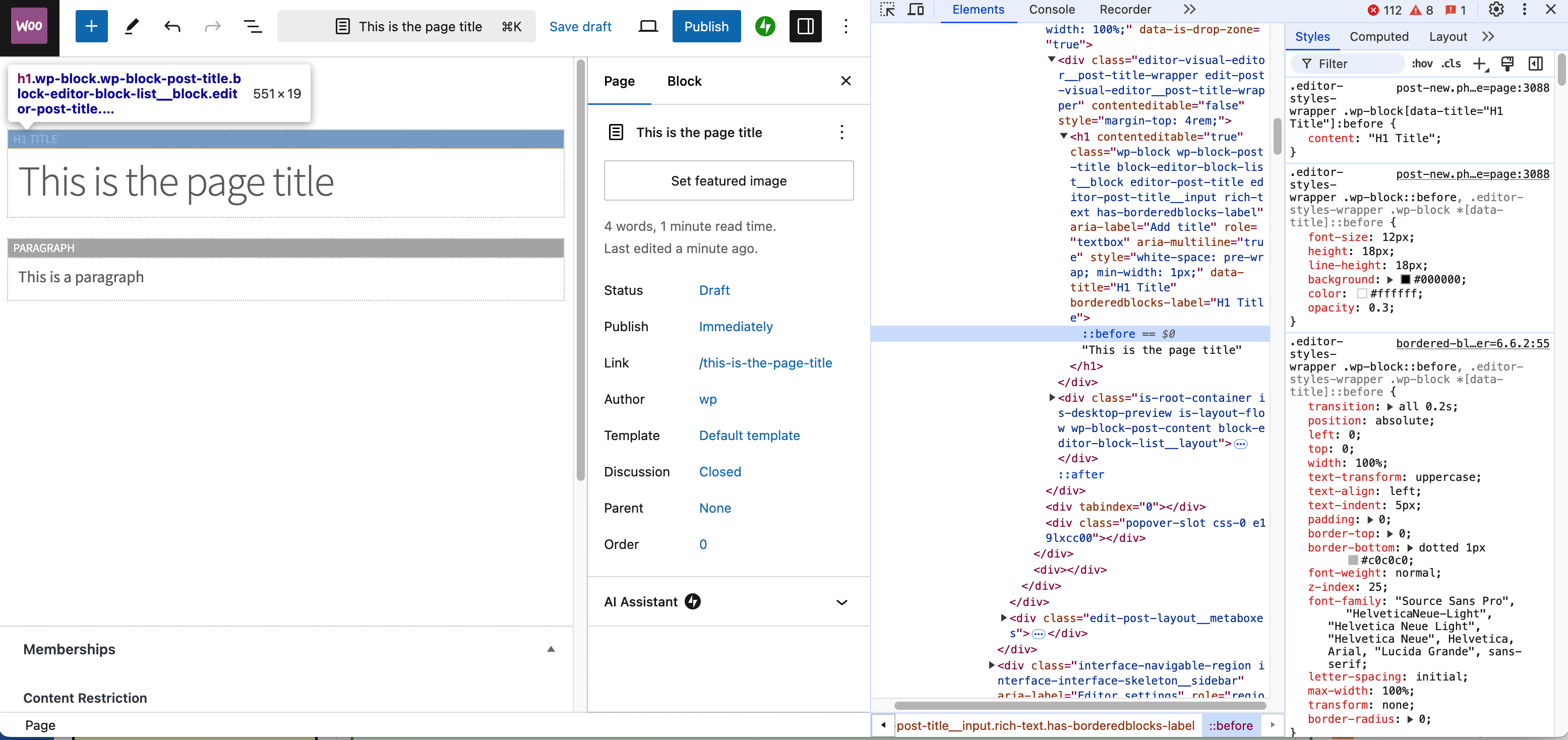
Hey @fishmi, I’m not seeing the same in my editor:
Can you share a screenshot (with inspector, highlighting the H1) of what you see on your end?- This reply was modified 1 year, 7 months ago by Senff - a11n.
Forum: Plugins
In reply to: [Sticky Block for Gutenberg Editor] Spacing due to sticky elementHey @katrienmaes22 ! Could you share a link to your site where this happens so I can take a look and see what might be going on there? Thanks!
@fishmi In version 1.1.4 that I just released, the borders should show again now, though for the time being, the ON/OFF toggle has been removed. I’m going to look into that and hope I can get it back in the next version.
- This reply was modified 1 year, 7 months ago by Senff - a11n.
Hey @fishmi , thanks for letting me know! This is going to take a bit of work to fix, but I’ll release an emergency fix within the next 24 hours.
Forum: Reviews
In reply to: [Sticky Block for Gutenberg Editor] ExellentIt’s definitely not dead! 🙂