scud

Forum Replies Created
-
Forum: Fixing WordPress
In reply to: Search results showing 404 errorI know there’s not a night crew per se, but I do know a lot of times the people who could help have different hours and if it’s not near the first page it may not get found.
However I did actually solve the problem. It was Ultimate Tag Warrior. Guess it doesn’t play nice with 2.2.1 and was causing a conflict as soon as I enabled it.
So out the window it goes and now things are working fine.
Forum: Fixing WordPress
In reply to: Search results showing 404 errorBump for possible night crew help?
Forum: Fixing WordPress
In reply to: Page entries disappearingI’ve spent the past week looking at everything I could for .htaccess issues and I think I found one.
For some reason wordpress doesn’t actually attempt to ‘update’ my .htaccess file, even though it’s in my root folder and CHMOD’d.
I deleted all my wp pages since I only tried overwriting them before and re-uploaded 2.2 and it looks like this when I change something.
However I’m still getting the issue and I think it’s my permalink page.
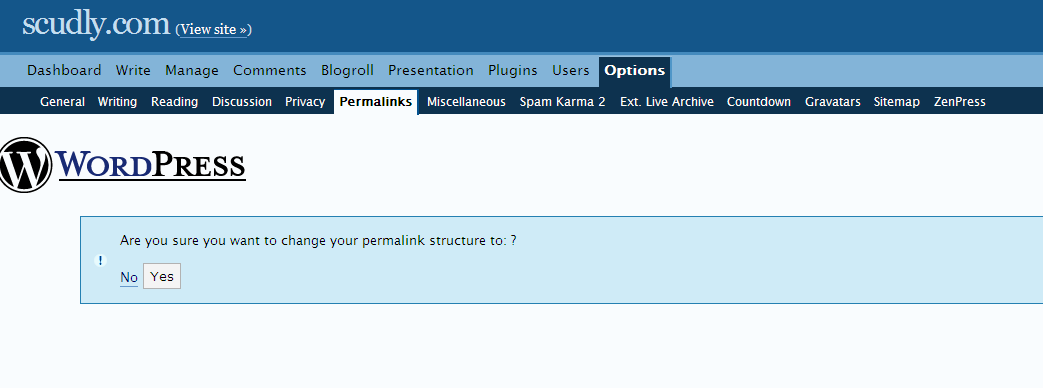
I notice when I go to ‘change’ my permalink it looks different than a friend who’s WP install I helped setup today. His doesn’t give an option to ‘confirm’ the permalink page, it just does it.
This is what mine shows.
Anyone have an idea why it would be happening?
Forum: Fixing WordPress
In reply to: Fancy permalinks not showing upI have a similar issue where all my older ‘pages’ give 404 errors now. Only even links coming from my Manage > Pages list look like they’re linking ok however they give me 404 errors.
If I put the permalink structure back to default the pages show up, but anything other than that and they’re broken.
I don’t know why they’d suddenly change after doing the upgrade to 2.2 but that’s the only thing that’s changed recently.
Forum: Fixing WordPress
In reply to: Theme editing redirectingWow I finally found the culprit and I didn’t quite believe it. It turned out that the Theme Switcher plugin was the reason. As soon as I disabled that plugin I was able to load up my editor page within the Theme section and change the files as I saw fit.
I have no idea why the theme switcher caused the problem, but it’s nice to finally find a solution to my problem.
Forum: Fixing WordPress
In reply to: Theme editing redirectingOk now I’m really confused. I can to go the ‘Plugin Editor’ in my admin section and edit a plugin fine, but still the Theme Editor area is broken and redirects.
On a subdomain it works fine as well. I’ve looked in my .htaccess file and removed anything that wasn’t necessary [ie, different from what was in the subdomain’s htaccess file] and it still does it.
This is the oddest error I’ve seen in ages
Forum: Fixing WordPress
In reply to: Theme editing redirectingBump, any help?
Forum: Themes and Templates
In reply to: I know it’s degraded but please helpWell I’m not 100% positive what you’re looking for but I know that you can use tables in your layout and say define properties in a enclosed style-sheet if you want. If you want check out my site http://scudly.com and look at my Girls-Suck theme, I use tables to get a bunch of the layout things done because if I use stylesheets to define widths and whatnot each browser handles it differently. All you’d have to do is strip some of it away and possibly make your own ‘page’ within the wordpress system and use that as your index. I think something like that would work but I’m not 100%. But I do know you can use tables easily enough for your layout things.
Forum: Themes and Templates
In reply to: Girls-Suck ThemeYes if you look at the bottom I credit where I got it, which is from Girls-suck [which like I said in the beginning I write at] and we had it made for us by Sam at explodingdog.com
Forum: Themes and Templates
In reply to: Link description as title tag?Oh, wow I’m a dummy, for whatever reason they weren’t working before I swear. Sheesh I feel real dumb.
Forum: Themes and Templates
In reply to: Link description as title tag?Yep sure am, I thought it might’ve been beacuse i had
in my ‘between link and description’ but now that I’ve deleted that line it shows both the link description as the title tag, and then as normal text next to the link. Take a look at http://scudly.com/main.php