rob33

Forum Replies Created
-
Forum: Themes and Templates
In reply to: [GeneratePress] Logo left but navigation centerYes – just updated to GeneratePressVersion: 3.0.2
Under Customizing -> General I do not see that.
Forum: Themes and Templates
In reply to: [GeneratePress] Logo left but navigation centerUpdated but don’t see flex, I just see:
Font
Combine CSS
Reduce the number of CSS file requests and use a lite version of our grid system.
Cache dynamic CSS
Cache CSS generated by your options to boost performance.
Smooth scroll
Initiate smooth scroll on anchor links using the smooth-scroll classForum: Themes and Templates
In reply to: [GeneratePress] Logo left but navigation centerSorry – thought it was. Activated now.
Forum: Themes and Templates
In reply to: [GeneratePress] Logo left but navigation centerOh, just one thing. Enabling the Search has it appearing center – is it possible for search to align right?
Cheers on the navigation css.
Forum: Themes and Templates
In reply to: [GeneratePress] Logo left but navigation centerThanks Leo – nearly – navigation juts out at the bottom – pls take a look.
Edi – thanks – height my end – looks good – Thanks for that Leo.
- This reply was modified 5 years, 5 months ago by rob33.
Forum: Themes and Templates
In reply to: [GeneratePress] Logo left but navigation centerOk – have switched.
Forum: Themes and Templates
In reply to: [GeneratePress] Logo left but navigation centerOk – it’s back up – thanks Leo.
Forum: Themes and Templates
In reply to: [GeneratePress] Logo left but navigation centerhave removed logo for now as it’s sending header off balance.
Navigation is set to below header.
There is a logo uploaded in Customizing ▸ Layout Header which appears in tablet and phone view.
It doesn’t appear in desktop hence I upload the same logo to Customizing Site Identity which is where we are at at the beginning with logo choosing to drop bottom far left below navigation as you previously saw before I removed it.
Why may I ask do you have 2 separate places to upload a logo to?
It pops up fine in responsive modes fyiForum: Themes and Templates
In reply to: [GeneratePress] Logo left but navigation centerForum: Themes and Templates
In reply to: [GeneratePress] Logo left but navigation centerPlease check https://menspleasures.com/ – will leave it up a day with header out of place. Tks.
Forum: Themes and Templates
In reply to: [GeneratePress] Logo left but navigation centerHi Tom, yes, to the logo and navigation on same line but logo left and menu to remain center on desktop. Logo working ok now on mobile/tablet mode – thanks
https://menspleasures.com/wp-content/uploads/2020/11/MPs-logo-1.png
Forum: Themes and Templates
In reply to: [GeneratePress] Logo left but navigation centerGone from 75 px sq to 50 px squared – still doing the same.
Forum: Themes and Templates
In reply to: [GeneratePress] Logo left but navigation centerI tried it originally 75px sq – same thing. Above is just following logo dimension wp advice.
Forum: Themes and Templates
In reply to: [GeneratePress] Logo left but navigation centerForum: Themes and Templates
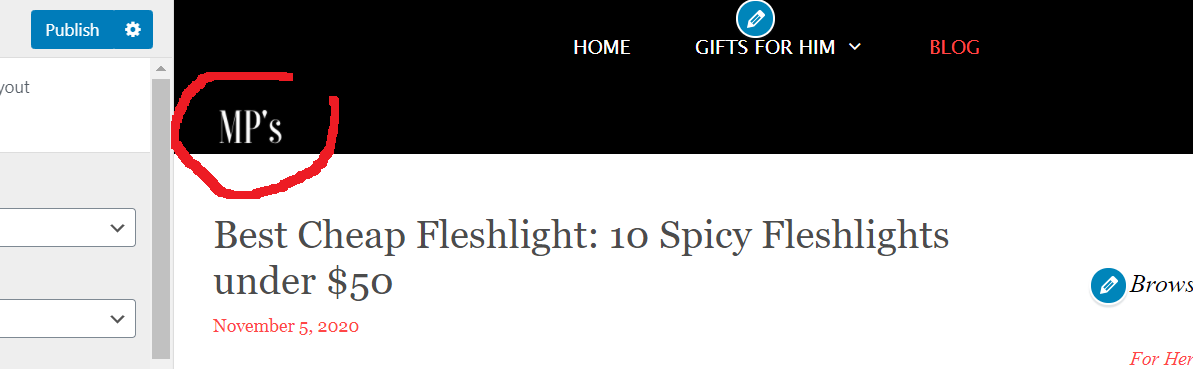
In reply to: [GeneratePress] Logo left but navigation centerI have, that is where I uploaded it to. This is what happens. Pushes header height down. Logo size as req’ 270 x 50. Altering width slider does not allow it to move up, ideally need logo to sit on same level as menu.
https://menspleasures.com/wp-content/uploads/2020/11/mp-logo-fff.png