Riversatile

Forum Replies Created
-
I understand.
Thanks, very appreciated.Forum: Plugins
In reply to: [WP Activity Log] MainWP does not register new child site for WP Activity LogHi Lucian,
First of all, thanks for the last plugin update to solve PHP Warnings I mentioned in the case “PHP Warning related to MainWPAddon”.I already noticed what @hetkanbeteronline ‘s talking about now.
For me, it’s not quite the same issue, but I’d like to take this opportunity to mention it here.
I also have 2 missing site in my MainWP Dashboard. I can see the events, but I not see the site names in the dropdown (to select the site and trigger the retrieve)
(I also followed recommendations in /support/topic/mainwp-does-not-update-to-show-new-sites/ before posting here)Clue
I can see some plugin updates events on the 2 missing sites, but unlike the others working sites, I’m not seeing events like “Extension is ready retrieving activity logs from child sites”- This reply was modified 1 month, 1 week ago by Riversatile.
Hi,
I confirm the last update solves the JS issue.Many thanks
Also, I’m facing some jQuery Deferred Exception in WordPress Editor for the undefined “cn_toc_admin_data”.
jQuery.Deferred exception: cn_toc_admin_data is not defined ReferenceError: cn_toc_admin_data is not defined
    at HTMLDocument.<anonymous> (.../easy-table-of-contents/assets/js/admin.min.js?ver=2.0.82.1:1:4919)
    at e (.../wp-admin/load-scripts.php?c=0&load%5Bchunk_0%5D=jquery-core,jquery-migrate,utils,wp-hooks&ver=6.9.4:2:27028)
    at .../wp-admin/load-scripts.php?c=0&load%5Bchunk_0%5D=jquery-core,jquery-migrate,utils,wp-hooks&ver=6.9.4:2:27330 undefined
(anonyme) @ load-scripts.php?c=0&load%5Bchunk_0%5D=jquery-core,jquery-migrate,utils,wp-hooks&ver=6.9.4:2
(anonyme) @ load-scripts.php?c=0&load%5Bchunk_0%5D=jquery-core,jquery-migrate,utils,wp-hooks&ver=6.9.4:2
setTimeout
(anonyme) @ load-scripts.php?c=0&load%5Bchunk_0%5D=jquery-core,jquery-migrate,utils,wp-hooks&ver=6.9.4:2
c @ load-scripts.php?c=0&load%5Bchunk_0%5D=jquery-core,jquery-migrate,utils,wp-hooks&ver=6.9.4:2
fireWith @ load-scripts.php?c=0&load%5Bchunk_0%5D=jquery-core,jquery-migrate,utils,wp-hooks&ver=6.9.4:2
fire @ load-scripts.php?c=0&load%5Bchunk_0%5D=jquery-core,jquery-migrate,utils,wp-hooks&ver=6.9.4:2
c @ load-scripts.php?c=0&load%5Bchunk_0%5D=jquery-core,jquery-migrate,utils,wp-hooks&ver=6.9.4:2
fireWith @ load-scripts.php?c=0&load%5Bchunk_0%5D=jquery-core,jquery-migrate,utils,wp-hooks&ver=6.9.4:2
ready @ load-scripts.php?c=0&load%5Bchunk_0%5D=jquery-core,jquery-migrate,utils,wp-hooks&ver=6.9.4:2
P @ load-scripts.php?c=0&load%5Bchunk_0%5D=jquery-core,jquery-migrate,utils,wp-hooks&ver=6.9.4:2
load-scripts.php?c=0&load%5Bchunk_0%5D=jquery-core,jquery-migrate,utils,wp-hooks&ver=6.9.4:2
Downgrade to version 2.0.81 solves the issue, but I’m loosing the recent security vulnerability fixes.
Forum: Plugins
In reply to: [Easy Table of Contents] 2.0.82 causes sticky ToC to stop workingHi,
Thanks.
Today’s update fixed the issue with the fixed this Sticky TOC issue.Forum: Plugins
In reply to: [WP Activity Log] PHP Warning related to MainWPAddonHi,
Yes, version 5.6.1 is active on the server and on all child sites.WordPress core version: 6.9.4
PHP version: 8.3.30Apparently, the Warning occur when I click “Retrieve Activity Logs Now” from the Activity Logs panel (/wp-admin/admin.php?page=Extensions-Wp-Security-Audit-Log).
I think this is is also the case when MainWP server Cron tasks runs.
[12-Mar-2026 13:09:09 UTC] PHP Warning:  Undefined array key "alert_id" in /plugins/wp-security-audit-log/classes/MainWPAddon/class-mainwp-helper.php on line 535
[12-Mar-2026 13:09:09 UTC] PHP Warning:  Undefined array key "meta_data" in /plugins/wp-security-audit-log/classes/MainWPAddon/class-mainwp-helper.php on line 535
[12-Mar-2026 13:09:09 UTC] PHP Warning:  Undefined array key "" in /plugins/wp-security-audit-log/classes/Controllers/class-alert-manager.php on line 783
[12-Mar-2026 13:09:09 UTC] PHP Warning:  Undefined array key "created_on" in /plugins/wp-security-audit-log/classes/MainWPAddon/class-mainwp-helper.php on line 518
[12-Mar-2026 13:09:14 UTC] PHP Warning:  Undefined array key "created_on" in /plugins/wp-security-audit-log/classes/MainWPAddon/class-mainwp-helper.php on line 518
[12-Mar-2026 13:09:14 UTC] PHP Warning:  Undefined array key "alert_id" in /plugins/wp-security-audit-log/classes/MainWPAddon/class-mainwp-helper.php on line 535
[12-Mar-2026 13:09:14 UTC] PHP Warning:  Undefined array key "meta_data" in /plugins/wp-security-audit-log/classes/MainWPAddon/class-mainwp-helper.php on line 535
[12-Mar-2026 13:09:14 UTC] PHP Warning: Undefined array key "" in /plugins/wp-security-audit-log/classes/Controllers/class-alert-manager.php on line 783Thanks to have updated the Change Log.
Hi @rabiul042
Very nice ! It works like a charm.
Thanks to have fixed this and done 131 updates in the master .POT file.The only remaining issue is the “Sold out” label.
https://i.postimg.cc/Zqw0Chfw/sold-out.png
References are broken in the master .POT file, so it will not work for any language.
And gettext method to change text not works because it’s an Ajax request.Can you check the master .POT and fix it for the “Sold out” label ?
- This reply was modified 2 months, 3 weeks ago by Riversatile.
Hi,
Waw ! Thanks, it was so buried in the settings that I hadn’t seen this option.
I still had to reinstall the booking plugin after setting the option to “Yes,” but it works better now.Hi @vizin,
Did you try to downgrade Elementor version ?
Because if you have Elementor version 3.31.3, when you try to edit a page with a user account with role “Editor” (and not “Administrator”), you may face a critical error.
The typic PHP error looks like :
Uncaught TypeError: Elementor\Core\Editor\Loader\Common\Editor_Common_Scripts_Settings::ensure_numeric_keys(): Argument #1 ($array) must be of type array, null given, called in /wp-content/plugins/elementor/core/editor/loader/common/editor-common-scripts-settings.php on line 165 and defined in /wp-content/plugins/elementor/core/editor/loader/common/editor-common-scripts-settings.php:180In this case, downgrade Elementor to the version 3.31.2, and the issue will be fixed.
- This reply was modified 8 months, 1 week ago by Riversatile.
Hi,
Many thanks guys.
It works fine !Your login pop-up window is on the same page (checkout). You should avoid having two instances of Turnstile. So you’ll have to provide a non-contextual login process (the link must open a new page). This should be possible depending on your theme.
Hi,
Regarding the Turnstile issue you’re facing
Try this :
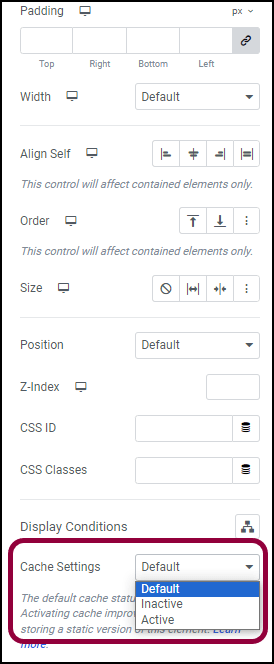
Elementor allows you to set “Enable” (by default) or “Disable” cache on each Elementor Widget.
Go to your Elementor editor to edit your element, then identify your form widget, and select “Inactive” to disable cache specifically for your Elementor Form widgets, then check if the issue goes away.