ragmag

Forum Replies Created
-
Forum: Themes and Templates
In reply to: Alternate Stylesheet for One Page!!!Hey Diane~
Well I think you hit the problem right on the money! *whew* I removed the double folder and now its reading the proper style sheet. Thanks so much!Forum: Themes and Templates
In reply to: Alternate Stylesheet for One Page!!!4k, are you saying my theme is the reason why my coding won’t read
<?php if ( is_page(‘6’) ) { ?>
<link rel=”alternate stylesheet” href=”/style2.css” type=”text/css” media=”screen” />
<?php } ?>Forum: Themes and Templates
In reply to: Alternate Stylesheet for One Page!!!ok when I put:
<?php if ( is_page(‘6’) ) { ?>
<link rel=”alternate stylesheet” href=”/style2.css” type=”text/css” media=”screen” />
<?php } ?>in header.php I got this error message:
Parse error: parse error, unexpected $ in /home/content/r/a/g/ragmagger/html/wp-content/themes/quadruple-blue/quadruple-blue/header.php on line 80
Forum: Themes and Templates
In reply to: Alternate Stylesheet for One Page!!!I changed your code to this:
<?php if ( is_page(‘6’) ) { ?>
<link rel=”alternate stylesheet” href=”/style2.css” type=”text/css” media=”screen” />
<?php } ?>tried adding it to ‘style.css’, ‘header2.php’ and ‘themag.php’ and it didn’t work.
am I missing a step?Forum: Themes and Templates
In reply to: Putting posts in the sidebarHey thanks for the help! I installed a plugin called Miniposts. I got it activated and its showing up under my widgets, but when I try to change the formatting under the Options tab, it goes to a missing page option: mysite.com/wp-admin/miniposts2.php is not found.
When I tried to upload the plugin under my admin folder in addition to having it installed in my wp-contents folder, I got an error message.
Not sure what else to do, the plugin author said something about not having the IIRC plugin installed, but I can’t find that plugin anywhere. Any suggestions?Forum: Requests and Feedback
In reply to: Where do you go if you’re not getting help on here?YOU HAVE FOUND THE ANSWRERS! THANKS whooami and moshu! Following both of your instructions have fixed the problem! PHEW!
Forum: Requests and Feedback
In reply to: Where do you go if you’re not getting help on here?The path for that plugin begins here (no public_html or any other directories):
/wp-content/plugins/wp-useronline.2.10
under that is another directory called wp-useronline
/wp-content/plugins/wp-useronline.2.10/wp-useronline
under that is another directory called useronline and two readme files.
/wp-content/plugins/wp-useronline.2.10/wp-useronline/useronline
under that are the php
hopefully I’ve answered ur question. thanks for the detailed look at this. I truly appreciate it.
Forum: Fixing WordPress
In reply to: Widget Plugin Not Appearing in Presentationyes I made sure to unzip my files. Here is a scrnshot:
http://i7.photobucket.com/albums/y272/sulaschild/srcnshot.jpg
Forum: Requests and Feedback
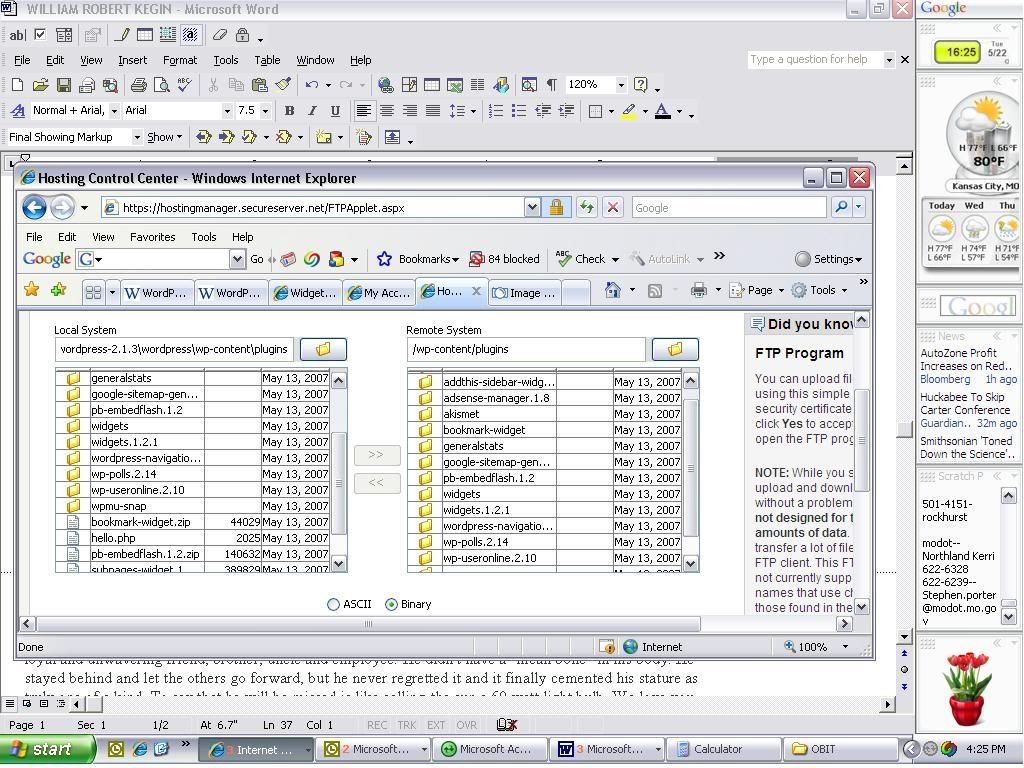
In reply to: Where do you go if you’re not getting help on here?I’m sorry for double posting but I wasn’t getting much help and I thought perhaps I wasn’t making my problem clear or posting in the right place. I really odn’t know what else to do. Here is a screenshot:
http://i7.photobucket.com/albums/y272/sulaschild/srcnshot.jpg
godaddy is my hosting server.
Forum: Requests and Feedback
In reply to: Where do you go if you’re not getting help on here?Well, then can someone please, PLEASE try to respond to my problem?
The plugins I’ve installed do not appear on my dashboard to activate. Also, the Widgets tab is not appearing under Presentation after I’ve uploaded the Widgets plugin to wp-content/plugins using my FTP Client under godaddy.
The only plugins that appear are the default hello dolly and askimet. they display, snap and social bookmark widget. Nothing else shows up and I’ve since tried to upload the following:
google-sitemap-generator
general stats
adsense-manager
widgets
wp-polls
pb-embedflash
wordpress-navigation-listForum: Plugins
In reply to: Urgent! Widgets Menu Tab does not appear!!!!how do I know if it is readable by the webserver? Alsi I am using the Quadruple Blue theme by WP Designer. It was touted that it supports widgets.
It’s urgent because my blog is supposed to be widget heavy, I have a deadline to “launch” the site and I’m at a standstill.Forum: Fixing WordPress
In reply to: Widget Plugin Not Appearing in Presentationwhy has it taken so long for a solution to this problem??? Not being able to active my plugins is really limiting my use of the blog.
Forum: Fixing WordPress
In reply to: Widget Plugin Not Appearing in PresentationI just download them and then using my FTP Client under godaddy I transfer them into /wp-content/plugins folder.
This is very frusturating.
Forum: Fixing WordPress
In reply to: feed and pages not workingactually miraculously the pages are showing now ( ?:-/ ) Not sure why. But I seem to getting I.E. error messages and my page keeps crashing. Any reasons why?
Forum: Fixing WordPress
In reply to: feed and pages not workingHey I’m having the same problem after I changed my Permalink structure from the default and been trying to read the forum for the answer. I keep hearing something about uploading a .htaccess file to fix this? How?