pressidium

Forum Replies Created
-
Forum: Plugins
In reply to: [Pressidium Cookie Consent] Troubleshooting Logs, Consent Mode V2Hey, @radovand!
Thanks for following up!
After looking over the logs you provided, I spotted this error:
WordPress database error Specified key was too long; max key length is 1000 bytes for query CREATE TABLE wpd8_pressidium_cookie_consentswhich might be due to the
MyISAMstorage engine’s limitations.This was addressed in
1.5.1(GitHub issue: #84), which was just released.Please let us know if this solution worked for you.
Forum: Plugins
In reply to: [Pressidium Cookie Consent] Import settingsHey, @aminux!
This was addressed in
1.5.1, which was just released.I’m going to mark this topic as resolved. If this doesn’t fixes your issue, please let us know.
Forum: Plugins
In reply to: [Pressidium Cookie Consent] Troubleshooting Logs, Consent Mode V2Hey, @radovand!
Thank you for your kind words! We’re pleased to hear that you find our plugin valuable.
As for the site displaying the cookie message window on each page reload, the problem is due to the Chrome browser. The problem no longer occurs when using other browsers. It was a clear cache problem.
Great! I’m glad that’s all sorted.
Upon reviewing the settings you shared, it appears that requests to the POST /wp-json/pressidium-cookie-consent/v1/consent endpoint are failing with the following response:
{
 "success": false
}
It turns out the plugin always responds with
"success": false, so that was a false negative. We’ll address that in the upcoming update.it does not register “Consent records” at all
Since there are no exceptions logged by the plugin, would you mind reviewing the server error logs for the website in question and sharing any relevant information?
Where you locate your server error logs will vary based on your hosting provider.
Remember to censor any sensitive data before posting.
Forum: Plugins
In reply to: [Pressidium Cookie Consent] Troubleshooting Logs, Consent Mode V2Hey, @radovand!
Thanks for following up!
I just upgraded from version 1.4.0 to version 1.5.0 without changing anything in the plugin settings.
[…]
True, but this is the default state after the plugin update.
[…]
As a conclusion, after the update from v 1.4.0 to v 1.5.0, there appeared this option “Hide empty categories” which is enabed by default.Yes, you’re right. The “Hide empty categories” option was introduced in
1.5.0. I see now that having it enabled by default might be confusing, so we’ll likely switch it off by default in the next version.In the next release, we’ll also include a warning to inform users when the “Hide empty categories” option is enabled, and no cookies are listed, which could interfere with Google Consent Mode.
I have another site, on which the plugin doesn’t work properly […] it does not register “Consent records” at all
Upon reviewing the settings you shared, it appears that requests to the
POST /wp-json/pressidium-cookie-consent/v1/consentendpoint are failing with the following response:{ "success": false }There’s probably an exception logged by the plugin for each failed attempt to record consents.
Would you be able to share the plugin logs so that we can better assist you with troubleshooting this issue?
To locate your logs, please follow these steps:
- Log in to wp-admin
- Navigate to “Cookie Consent”
- Switch to the “Logs” tab
- Click “Copy to clipboard”
- Paste the logs in your reply here
Remember to censor any sensitive data before posting.
On a particular site, on which I installed the plugin, the cookie acceptance window loads every time I reload the page, regardless of whether I have accepted cookies or not.
This could be happening due to an incorrect domain being set.
The issue could be caused by a misconfigured domain. This typically happens if you’ve imported settings from another site and forgot to update the “Cookie Domain” option.
Verify that the domain is set correctly in Cookie Consent → General → Configuration → Cookie Domain.
If that’s not the case, please provide a link to the affected website and your plugin settings as a JSON file for further investigation.
Displaying texts in the cookies window for different languages does not work.
This is already on our radar. We plan to implement this in a future iteration of the plugin. You can keep track of its progress in issue #54 on the plugin’s GitHub repository.
Forum: Plugins
In reply to: [Pressidium Cookie Consent] Import settingsForum: Plugins
In reply to: [Pressidium Cookie Consent] Import settingsHey, @aminux!
Are you using the latest version of Pressidium Cookie Consent to import your settings?
Additionally, could you please provide the JSON file you’re trying to import? This will help us troubleshoot the issue more effectively.
Forum: Plugins
In reply to: [Pressidium Cookie Consent] Troubleshooting Logs, Consent Mode V2Hey, @radovand!
It seems that you might have enabled the “Hide empty categories” feature without listing any cookies.
Here’s what might be happening:
- In the “General” tab, the “Hide empty categories” option is enabled
- In the “Cookies” tab, no cookies are listed
This configuration would cause all categories to be hidden, leading to them appearing as “Denied” in Google Tag Manager.
To resolve this, either list your website’s cookies in the “Cookies” tab or disable the “Hide empty categories” option.
If that’s not the case, please provide your settings to help us troubleshoot the issue you’re experiencing more effectively.
To export your settings as a JSON file:
- Log in to wp-admin
- Navigate to “Cookie Consent”
- Scroll to the bottom of the settings page
- Click “Export Settings”
Hey, @baggyno!
This was addressed in
1.5.0, which was just released.I’m going to mark this topic as “resolved”. If, however, you come across any issue or have any questions related to the Norwegian (
nb-NO) support, please don’t hesitate to reopen the topic 🙂Forum: Plugins
In reply to: [Pressidium Cookie Consent] Banner not showingHey, @javiermargencom!
I’ve imported the JSON file you provided on a testing WordPress installation and the cookie consent banner was shown as expected.
There could be a conflict between the cookie consent banner and your theme or a third-party plugin. It’s also possible that a browser extension is interfering, or you might need to clear your cache.
Would you mind testing it on a different browser, ideally without any browser extensions installed?
Forum: Plugins
In reply to: [Pressidium Cookie Consent] Few problems and suggestionsHey, @nikodemsky!
Cookie categories should hide if there’s no cookies inside – not all the websites using targeting or preference cookies 🙂
This feature was included in
1.5.0, which has just been released.You now have the option to select “Hide empty cookies” in the General tab.
Floating button as mentioned in #24
This feature was also added in
1.5.0.The new version introduces a Floating Button tab, allowing you to:
- Toggle the floating button on or off
- Adjust its size (small or large)
- Set its position (left or right)
- Choose an icon
- Pick a transition
Hey, @baggyno!
Thank you for your kind words.
My suspicion is that the language tag is “nb-NO” while your plugin might be looking for just “NO”
That’s spot on. Thanks for bringing this to our attention. This will be fixed in the next release.
Additionally, under the “Consent Modal” tab, I changed the secondary button to “Settings,” but it is not showing on the modal.
Did you update the label of the secondary button to “Settings” in Norwegian or English?
Forum: Plugins
In reply to: [Pressidium Cookie Consent] Banner works wrongIt’s been over a month since the last message on this topic. I’m assuming that the issue has been resolved. I’m going to update the status of this topic to resolved. If, however, you find that this is still an issue or have any further questions about it, please don’t hesitate to reopen the topic 🙂
Forum: Plugins
In reply to: [Pressidium Cookie Consent] Banner not showingHey, @javiermargencom!
It appears that the Pressidium Cookie Consent plugin isn’t active on the website you shared. It may be temporarily deactivated or uninstalled, making it tricky to troubleshoot.
Without knowing your selected options, please ensure the “Autorun” option is enabled in the plugin settings, or that you’re manually calling the
pressidiumCookieConsent.show()method.Would you mind sharing your settings? Navigate to wp-admin → Cookie Consent, under the “General” tab, scroll down, click “Export Settings,” and share the resulting JSON file.
Hey, @ameliefs38!
This is likely a result of the URL passthrough feature of GCM (Google Consent Mode), which passes information in URLs. An optional feature, this can be used to send event and session-based analytics across pages without cookies.
If you prefer not to have information appended to your URLs, you can disable this feature by unchecking the “URL passthrough” checkbox when configuring the Pressidium Cookie Consent tag in Tag Manager.
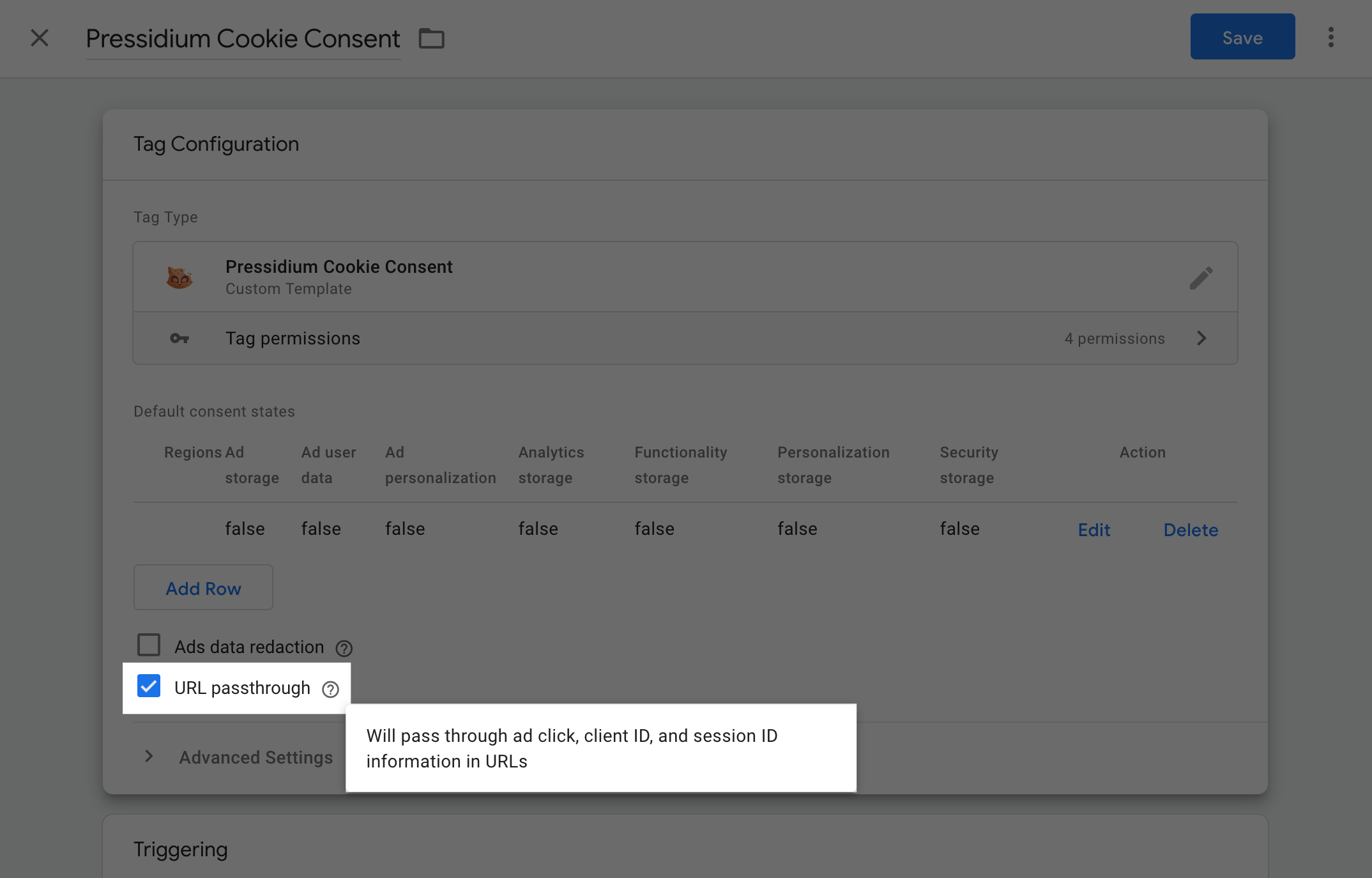
You can learn more about URL passthrough at https://developers.google.com/tag-platform/security/guides/consent?consentmode=advanced#passthroughs.
Forum: Plugins
In reply to: [Pressidium Cookie Consent] Language not workHey, @18tommyboy!
You need to click the edit button (the “pen” icon under the “Actions” column) next to the language you’d like to modify to open the edit panel.
