pollardd

Forum Replies Created
-
Forum: Plugins
In reply to: [Gwolle Guestbook] Upload PictureHi Marcel,
I think I read your posts out of order.
I’ll give that CSS a try. I’m a bit rusty with that but maybe me and ChatGPT can figure it out. 🤠Thanks
DavidForum: Plugins
In reply to: [Gwolle Guestbook] Upload PictureHi Marcel,
I have figured out how to allow a user named Guest to attach photos. That account does have a password.
There are two minor aesthetic things that I’m yet to figure out.On the page where a someone can sign the guest book if they are not logged in they are presented with the two login fields, user name and password.
I have unticked the setting to allow field names to be above the text boxes. It works for the other fields for actually leaving a message but not for the login fields.The second minor problem is the link that says “write a new entry” is just black text and hasn’t got the link colour from my style sheet. Other things on my main page do get the specified link colour. The correct colour would be a great start but is it possible to get this to look like a button so it’s obvious users should click on it?
Otherwise it’s going great!
The Page is https://rockholiday.x10.bzThanks
DavidForum: Plugins
In reply to: [Gwolle Guestbook] Upload PictureHi Marcel,
This looks great and I have just purchased the add on. Hopefully I can figure it all out.
It looks like you have worked hard on this project and I can spare the $24 Australian 🙂
I have been fumbling my way through WordPress for years and can usually force it to do what I want, not what it wants 🙂
I’m only working on a fun little web site just to keep my mind busy. Bit of a social experiment really.The nice people at Profile Builder found the problem and here is their response
We’re aware of this issue and the fix for it will be added in one of our next update to Profile Builder. But until then you can manually fix it on your site, by doing the following:Go to Dashboard -> Plugins -> Plugins File Editor -> now from the right side of the screen select the Profiles plugin and now from the “Plugin Files” section go to -> assets -> css -> style-back-end.css.
Now on line 1196, remove or comment out the following CSS style:
.ui-widget.ui-widget-content { max-width: 95%; }
Note: After you removed/commented this code, and go back to the UpdraftPlus settings, it is recommended to clear the browser cache (for example try CTRL+F5).I have opened a support ticket with ProfileBuilder but I’m only a free user there as well so don’t know it it will get any priority. I’m not sure if the problem lies with UpdraftPlus or with ProfileBuilder. I’ll post any details I get here as well.
Ps Set this post back to Unresolved
- This reply was modified 2 years, 8 months ago by pollardd.
Marked as solved. Well worked around 🤠
Wow that’s interesting. I am using the profile builder plug-in.
I’ll disable it while using UpDraft and hope the problem gets sorted soon where ever the problem lies.
I have done some backup and restores with that plug-in installed. I assume it was triggered by the latest Updraft update.
Thanks for responding
DavidUPDATE:
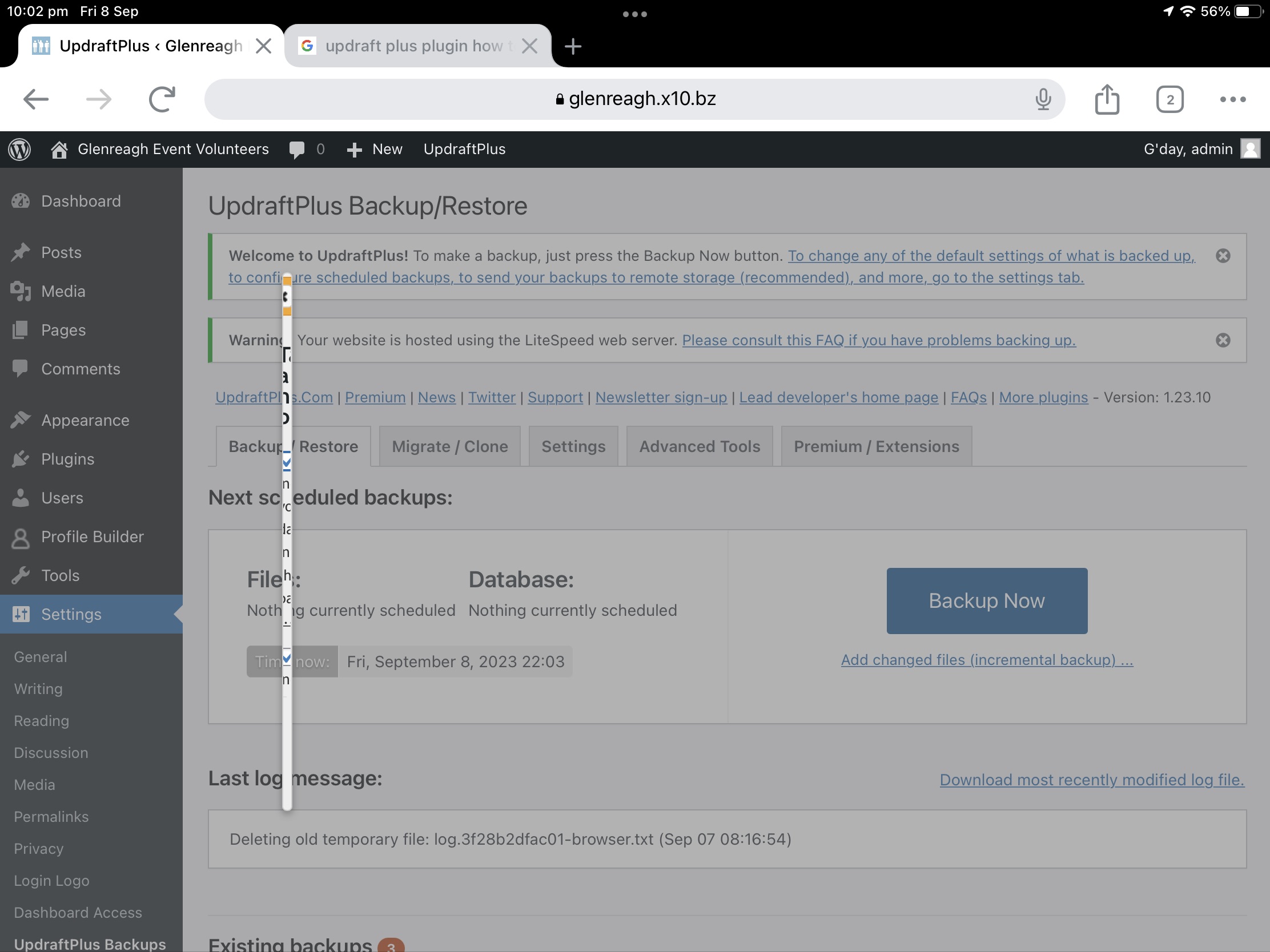
It does exactly the same thing on my Windows 10 PC when I try and do a backup while connected using Google Chrome. So it isn’t some funny ipad/ios thing.
I also deactivated the plugin and removed it. Then added it again and it didn’t make any difference.
- This reply was modified 2 years, 8 months ago by pollardd.
Hi Bryce,
I just stuck the screen shot in my WordPress media files
https://glenreagh.x10.bz/wp/wp-content/uploads/2023/09/73C76960-C05B-45D0-8430-82F523B4B0A9.jpeg
That should work.
You can see a white vertical line. I think that is the backup start dialogue.David
Forum: Plugins
In reply to: [Volunteer Sign Up Sheets] Register User Link goes to Login PageDont worry about slow response, I get how forums work. Reply when and if you can 🤠
I have quite a few different plugins installed to get all the features I want and I’m a little surprised they work so well together. Just hard to remember where every thing is. Im sure it will be harder to remember a year or five down the track when I get a support call 🤠
You have done a great job creating Signup Sheets. So many features. Well Done
Dave
Forum: Plugins
In reply to: [Volunteer Sign Up Sheets] Register User Link goes to Login PageCall this one fixed 🙂
Forum: Plugins
In reply to: [Volunteer Sign Up Sheets] Register User Link goes to Login PageI think I found it.
In WP Admin -> Profile Builder -> Private Website Tab -> Allowed Pages.Redirect To: Login Page.
Allowed Pages include “New User”Forum: Themes and Templates
In reply to: [Enigma Parallax] How to remove BreadcrumbsStop looking I found it!
it’s in Theme Options -> General -> Enable Page Header = un-ticked
Forum: Plugins
In reply to: [The Events Calendar] Events Calendar Database UpgradeHi Darian,
It appears that I’m using MySQL database. I have never had to fiddle with this which is a bonus 🙂
If I’m reading the second link provided in your post above Transactions in MySQL may be disabled. I’ll give the staging site approach a go and see what happens.Forum: Plugins
In reply to: [Gwolle Guestbook] Link Direct to Guest BookHi Marcel,
I thought I replied to this thread previously, then I was completely distracted. 🙂Your assumption is correct. I have the button on a page that opens the guest book.
I would like a link that points to a page with the form already open.That way I can put the URL in a QR-Code.
I’m not sure if the club I’m doing this page for will ever use it but now it’s a fun project to complete and learn new stuff.Thanks for your assistance.