pixelpixie0521

Forum Replies Created
-
Forum: Themes and Templates
In reply to: Can't fix image cropping problem with themeAs I’ve said before I really don’t think the settings>media was the issue but I do still thank you for your advice.
I did however experiment with changing the code I mentioned above that I found where I changed the 290 height that was listed to ” and that seemed to do the trick! No more cropped images. And then I used the code you gave me…
.single-portfolio .portfolio-thumbs img {
display: block;
margin: 0 auto;
}…and now the vertical images are centered and the height on all of the images are adjusted accordingly. Thanks again =)
Forum: Themes and Templates
In reply to: Can't fix image cropping problem with themeI think I just actually found the overrides in the code… Now I’m just not sure how to fix them for what I want. I don’t know if there is a way to set the height to automatically adjust per image? Or is it better to set a maximum height and then anything where they height is smaller it won’t matter? Is there a pm or email that I could maybe send you a snippet of this code and you might be able to help?
Forum: Themes and Templates
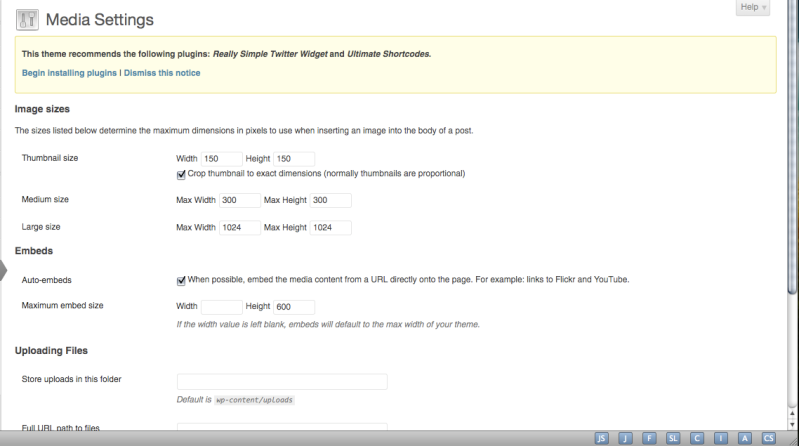
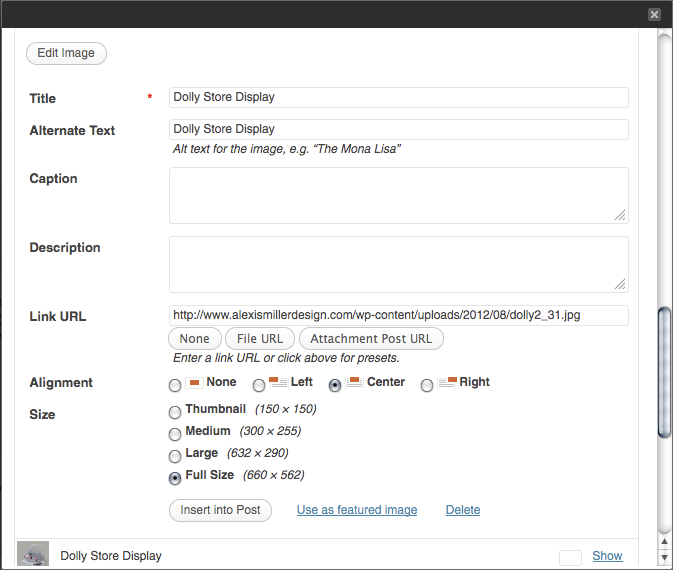
In reply to: Can't fix image cropping problem with themeI’m sorry, something just isn’t clicking about that. There has to be something in the code that is overriding those settings because in Settings>Media the max dimensions for “Large” images is 1024×1024 (see link below) not 632×290. 632×290 is also not even proportional to the dimensions of the image whose settings are shown in the first screen shot, which is why my image is being vertically cropped.
Just in general though I find it very hard to believe that wordpress’ standard settings would be to crop images to a height of only 290 pixels…
As I said before though I will try your other suggestions.
http://img.photobucket.com/albums/v329/CatOCraze/Picture2-1.png
Forum: Themes and Templates
In reply to: Can't fix image cropping problem with themeOnce again thanks for the advice, I will try those things out.
I don’t know why I didn’t notice this before but I just realized something on the upload menu. Even though I’m uploading the images at full size, the option right above it is “Large” and it’s listed as 632×290 which is the dimensions it’s cropped my images to. Here’s a link to a screenshot of this menu…
I’m no coder but does it sound probable that if I can find out where this is defined then I can alter it? Any ideas on where that might be or is that impossible without seeing the code?
Forum: Themes and Templates
In reply to: Can't fix image cropping problem with themeThanks so much for your replies Robin. I’ve looked into both of your suggestions.
When I went into settings>media though it showed that large images would upload at 1024×1024 which is huge, bigger than needed. And I went back in and looked at the actual upload image menu/area and it shows that I’m uploading the images at “Full size”, for instance I looked at one of the images and its 660×562.
Then I tried putting your code into the css file and it worked like you said, it just stretched my images and cropped them. But it did give me hope that somehow it is possible to increase the height of the box holding these images, so thank you for that. =)
Perhaps another thing I would like to add while asking these questions is is there a way to get the images that aren’t 640 pixels wide to center in the box instead of aligning left?