phyllisrae

Forum Replies Created
-
Forum: Themes and Templates
In reply to: [Pinboard] Quotes Look FunkyAha! I found it. I had a plugin called wp-Typography, which I had activated but not used yet. As soon as I deactivated it, the issue went away. There must be a conflict between the typography settings in the template and the plugin–makes sense.
Usually I keep plugins deactivated until I’m ready to use them-I dunno why this one was still on, I wasn’t even remotely using it.
Good work!
Forum: Themes and Templates
In reply to: [Pinboard] Slider vs Blog LayoutsThat option was already checked.
The issue was that in some instances it (the checked option you described) was working–others, it wasn’t.
1) If I have the blog page actually assigned as my posts page in “customize”, it was working (removing posts from the loop).
2) BUT then the slider would appear on BOTH the home page AND the posts page (which I did not want).
3) Then, if I removed the “posts page” assignment to my blog page and just used a blog layout instead, the sticky posts would return whether the option was checked or not..however, this got rid of the slider on that page. So my problem was that I could either have a blog page with portfolio posts (did not want) OR a slider on my blog page with no portfolio posts in the loop, and only one blog layout option (also did not want).
What I wanted was to have:
-the blog page
-have four columns
-no slider
-no portfolio posts in the loop
-still have a slider on my home page, which is NOT for posts/blogIt didn’t seem to be doing all of these at the same time as long as the slider was activated on my site.
The slider would show up in BOTH the home page AND the blog page at the same time, but only if I activated the blog page as my “posts page” in customize. If I did NOT do this, it would allow me to use the “blog” page any way I wanted, but wouldn’t get rid of the portfolio pages from the loop.
I ended up un-checking the slider option, and the issue seemed to resolve itself automatically even though the posts were still sticky.
I have no idea why and I’m not sure I even care anymore. A lot of the problems I am having pertain to the slider and related settings so I think I’m just going to remove it for now and focus on other aspects of the site.
Forum: Themes and Templates
In reply to: [Pinboard] Quotes Look FunkyThe first quote, from Brenda whats-her-name, was from Tumblr. It doesn’t show up immediately on the front page and you have to let some of the older posts load.
The other ones (that are at the top, with Picasso and etc) I added directly from dashboard (but as plain text) as a result of noticing the error. I made sure to paste them as plain text to make sure that nothing weird would happen, and it still kept happening.
So… it would seem to me that the errors are being caused by the quotes, not resulting from them, but I don’t know. 🙁
Forum: Themes and Templates
In reply to: [Pinboard] Quotes Look FunkyI added that afterward I think, but I’ll try it again. Maybe I have to reinstall the theme? Hmm….
…Nope. That was only applied to one quote, and all of the quotes do it, including the one that I uploaded from Tumblr. Maybe it’s just a glitch, then..I can’t think of any other reason why it would happen.
If I uninstall and reinstall the theme, though..I need to back up what I currently have first, right? Do you think this would help perhaps get rid of the issue, whatever it is?
Forum: Themes and Templates
In reply to: [Pinboard] Quotes Look FunkyForum: Themes and Templates
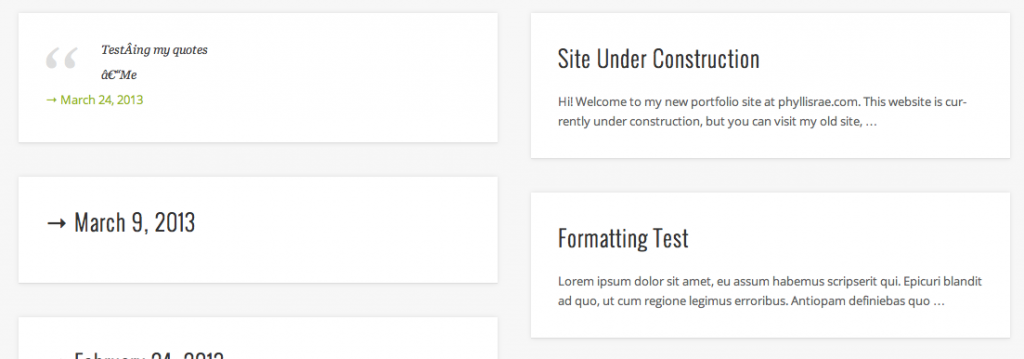
In reply to: [Pinboard] Quotes Look FunkyYeah..it’s displaying extra characters I didn’t enter. I just typed a standard quote, with regular characters, like, example: “Hello, I’m a person. – Me” and when it shows up on the list of blog posts, a bunch of extra superfluous characters are added that don’t belong there.
If you click on that post, the weird characters aren’t there anymore. It’s just in the preview of the quotes, and it’s only when I have a quote post. It doesn’t show up on regular posts as far as I know.
My most recent quote shows up like this:
“TestÂing my quotes
–Me”Even though I didn’t put any of those special characters there. It’s supposed to just say, “Testing my quotes – Me” and I posted it there that way because one of my earlier quotes from Tumblr was doing the same thing. I thought maybe it was an error on Tumblr’s part from the transfer, but it isn’t.
Forum: Themes and Templates
In reply to: [Pinboard] Quotes Look FunkyI’m not really sure what custom CSS to add to fix this issue. It only seems to be doing this if I use a block quote (aka, press the quote button and write up a quote), which is also an HTML block quote in the code? If I take this away, and make it a quote-formatted page, but don’t have the actual quote coded as a “blockquote”, nothing shows up. It’ll be blank on the main “blog” page and then when I click on that post, it’ll show up as the permalink.
Forum: Themes and Templates
In reply to: [Pinboard] Quotes Look FunkyYeah, I have a construction page up for the main site…I have a menu bar up that leads to the blog page. That’s where the issue is occurring, not on the main page.
Forum: Themes and Templates
In reply to: [Pinboard] Quotes Look FunkyOh, I also wanted to add that this is only happening on the preview, not on the actual permalink once you click on the post.