nguyensynhungoc146

Forum Replies Created
-
There are 2 new issues after I used the solution that enabled the Ajaxify Widget option for 3 days
1. The data of plugin is loaded very slowly. I mean that sometimes I read all the content of one articles (maybe 1-2 minutes) but the data of plugin still not displayed. In that case, nothing displays instead of “Sorry. No data so far.” message. But sometime the data plugin load very fast. Maybe it a problem of Ajax technology, right?
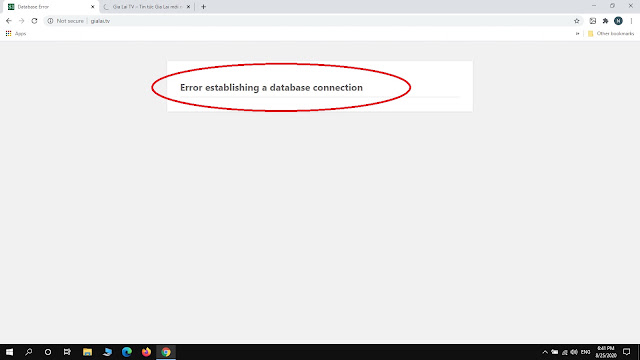
2. The issue “Error establishing a database connection” caused by the WPP plugin when enabled the Ajaxify Widget option. This problem happened unusually, mean that it just happened some times per day but at that time, user can not access to the web. I don’t understand why.
Because of 2 above issue then I have to disabled the Ajaxify Widget option. So, the issue “Sorry. No data so far.” still happened.
Please take a look and give me an advice. Thanks so much!
If you haven’t already, try enabling the Ajaxify Widget option (WP Dashboard > Settings > WordPress Popular Posts > Tools, under Data) to make sure your Popular Posts widget loads asynchronously.
WordPress Popular Posts is working normally after enabled the Ajaxify Widget option.
Thanks so much for your help. I very appreciate 🙂
Update:
I’m trying to contact with the hosting provider for checking that the issue happened because of the caching system or what reason.
I’ll inform you the update. But in that time, if you have any advice for me, let me know. I very appreciate.
Some hostings, like SiteGround or WPEngine for example, provide their own built-in caching system. Said caching system is in place to help your website’s performance by converting your posts and pages into static HTML files for faster access. Static HTML files, unfortunately, are not dynamic (hence “static”) and so your posts and pages won’t update their dynamic contents until the next time the cache gets regenerated.
The reason I’m asking this is because I suspect that yours is a caching issue but can’t tell for sure because I don’t have any details about your hosting environment
I don’t think the issue come from caching system of the hosting. Because I have just update PHP version for the hosting and dit not anything else with the hosting. More further that for 1 year I used WPP plugin, it still working in that hosting. The hosting now still working in the same environment with the hosting before I updated PHP version.
But anyway, how can I provide you the detail of my hosting environment to check the caching system ?? What do you need to check I can provide ?
I’m using the exact same PHP version on my website and there WordPress Popular Posts is working normally. Because of that I don’t think that the PHP upgrade is the issue here.
My hosting in detail is a VPS (Virtual Private Server) using Direct Admin control panel. I’m not a professional in VPS so maybe the process of updating PHP version caused the issue with the caching system.
If you know how to check that, please help to guide me to check.
Many Thanks
I’m not sure “my website is being proactively cached by hosting or not”. How to check that?
Let me explain:
I used WordPress Popular Posts plugin for a year, from August 2019 until now. The WPP plugin works through all the time. However last week, I have to update PHP version of hosting (from version 7.0 to 7.3.21) because the theme request new PHP version then I did it. After that, the WPP did not working as normal.About the hosting, I only update PHP version and did not do anything related to cache.
So, do you have any advice for me??
Many Thanks
Hi Héctor Cabrera,
Please take a look at the settings of WordPress Popular Posts widget:
Hi Héctor Cabrera,
Please take a look at my Debug screen:
https://1.bp.blogspot.com/-LCRd2GG6iRc/X0KK4gaVXEI/AAAAAAABV90/t5WY2ZPxv6Er2DvVpLUUFb0VjjAHsz6tgCLcBGAsYHQ/d/Untitled.jpg