mark l chaves

Forum Replies Created
-
Hello @pcgardner,
That’s a great question.
Before writing custom code to display a popup, can you please check if our triggers can handle your use case first?
https://docs.wppopupmaker.com/article/545-a-beginners-guide-to-popup-triggers
If you absolutely need to write custom code to launch a popup, have a look at this doc next.
https://docs.wppopupmaker.com/article/84-getting-started-with-custom-js
Here’s a basic template you can use for writing jQuery to call a popup via a PHP hook.
https://gist.github.com/marklchaves/34ee7dcf3734bc59a898557bc188f02b
For sending values on a form submit, we think you should use hidden form fields. Here’s an example of sending a hidden field via a Mailchimp form inside a Popup Maker popup.
https://gist.github.com/marklchaves/da0ab6412986d1085e52dacca83c6851
Please let us know if you have any questions.
Cheers!
Mark
Hi @joeinc,
We’re going to mark this as resolved since we took care of you via our helpdesk.
Thanks again for posting.
Cheers!
Mark
Hello @nims,
Just to confirm, you cannot add a plugin to create a custom role for your “Lister” type of Contributor?
If you cannot add a plugin, then you’ll probably have to write custom code to figure out programmatically who are your active listers and give them access to the pages you want.
If you can install a plugin and create a custom “Lister” role, then the solution we outlined above should work for you.
We wish you the best with that.
Cheers 🙂
Mark
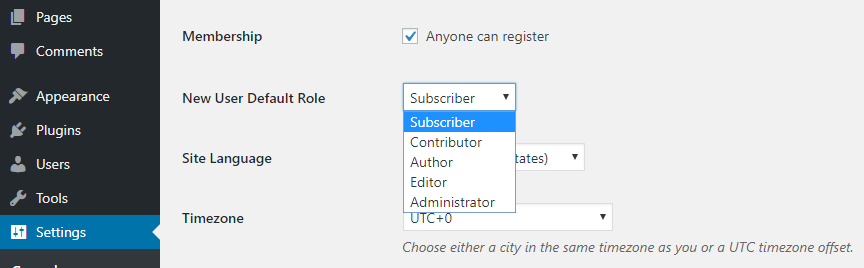
FYI, you should be able to change the default new user role under your general settings https://www.dreamhost.com/blog/wp-content/uploads/2016/06/10-important-wp-settings-website-11.jpeg
- This reply was modified 4 years, 9 months ago by mark l chaves. Reason: Formatting
- This reply was modified 4 years, 9 months ago by mark l chaves. Reason: Typo
Hello @redbulb,
Sorry for the delay.
Like you said, Content Control prioritizes Restrictions. The top Restrictions take priority over the lower restrictions.
That’s is by design. There’s no way to short-circuit that.
But, each Restriction allows you to select multiple roles (see the checkbox next to each role).
https://ps.w.org/content-control/assets/screenshot-2.png
That means you can definitely create a Restriction for a page that allows multiple roles by ticking the checkbox next to the roles you want to give access to.
Maybe you already tried that?
We hope that helps. Let us know if you need anything else.
Have a great day 🙂
Mark`
Hello @mlapl1,
We’re going to mark this thread as resolved since we haven’t heard back from you.
Please feel free to start a new thread or submit a help request 🙂
https://code-atlantic.com/contact-us/
Have a great day!
Mark
Hello @mgofv,
Yes. We see your custom login page when going to https://uroforum.de/indikationsgebiete/harninkontinenz/.
That is working fine.
You can only set a redirect OR show a custom message, not both.
If you want to show a custom message and also allow people to log in, you can insert a link to your custom login page inside your custom message.
We hope that helps.
We will close this thread as resolved for now. Please reach out again if you need anything else.
Have a great day 🙂
Mark
Hello @nims,
Thanks for posting.
Just so we understand. Do you have 2 types of contributors such as the following?
1) Contributors who do NOT have an active classified listing
2) Contributors who have an active classified listing
Then for type #2, do you want them to have access to a set of pages that only published listing contributors (#2s) can see?
For example:
Page A: Everyone can see.
Page B: Only active listing contributors can see.
Is that right?
If so, you can create a custom role like “Lister” and create a Content Control Restriction for Listers to see a certain group of pages. See the screengrabs below.
Lister role: https://share.wppopupmaker.com/yAuyrr8P
List of pages: https://share.wppopupmaker.com/Wnu0xxze
Here’s a list of plugins that can help you create custom roles.
https://wordpress.org/support/article/roles-and-capabilities/#plugins
We hope that helps. Let us know if you have any questions.
Have a great day 🙂
Mark
Hey everybody,
There could be a couple of causes for the issues posted on this thread.
For future reference, we’ve documented the 2 most common cases with their solutions.
https://docs.wppopupmaker.com/article/544-your-popup-is-not-displaying-on-your-homepage
Thanks so much,
Mark
Hello @tanalombard,
Thanks for posting your question.
Have you tried to create a restriction for the Administrator role only to view your selected course pages? Make sure you place (drag/drop) that admin-only restriction above your logged-out restriction(s) to give it a higher priority.
See the screen capture for an example.
https://share.wppopupmaker.com/v1u0b0J6
We hope that helps.
Let us know if you need anything else.
Have a great day 🙂
Mark
Hello @joeinc,
If you’re using Redirect and Login & Back under you Protection settings, any clicks should be automatically redirected to the original restricted page.
For example, when you click on the email link and you’re not logged in, you should see the standard login page. Then, in the link address, the URL should look something like this.
Where the
redirect_toURL will be the (encoded) link they clicked from the email.Have you tried it without your membership plugin turned on? There could be a conflict.
If you want us to try a test, please reach out to us at https://code-atlantic.com/contact-us/
Thanks!
Mark
Hello @sergiouson,
Thanks so much for your kind words.
You should be able to style your Denial message using HTML and CSS.
The idea is to:
1) Go to your wp-admin > Settings > Content Control > General.
2) You should see the classic editor. Click the Text tab.
3) In the Text tab, type in the HTML that contains your text and CSS styles.
I’ve posted a full example here https://gist.github.com/marklchaves/4303808a084cff34bdd26908b0a2e6cc
Please take that and tweak it as needed.
If you’re not fluent with CSS, let us know how you want your message to look and we’ll guide you from there.
Thanks!
Mark
Forum: Plugins
In reply to: [User Menus - Nav Menu Visibility] Two issuesClosing due to staleness.
Thanks!
Hello @mgofv,
Thanks for posting.
We scrolled through 3 pages of your blog posts at the link you provided. We saw excerpts for every post. Here’s an example.
You’ve probably know this, but you can always check the Show excerpts above access denied message? setting. See below.
We hope that helps. Let us know if you need anything else.
Have a great weekend 🙂
Mark
Hello @bnonsare,
Our Content Control plugin is great for restricting posts/pages and sections of content based on:
– logged in users
– specific user roles
– logged out usersTo restrict a post/page that has a link to a PDF file to an individual account, you can mark the post/page as Private then assign the Author of that post/page to the Contributor that should have access to that PDF.
When that’s done, the Contributor will need to log in to see that PDF link when they try to bring up that post/page.
Learn more here https://wordpress.org/support/article/content-visibility/#private-content
Please note that the PDF link itself is not protected or restricted. Meaning, that the Contributor can share that link with others who can view the PDF.
There are 3rd-party plugins you can search for that can add extra security on WordPress PDF links.
We hope that helps. Let us know if you need anything else.
Have a great weekend 🙂
Mark