MirkoH

Forum Replies Created
-
Forum: Plugins
In reply to: [WP Photo Album Plus] Great pluign! But some questions though.Hey opajaap,
the Photo-Tag Filter widget works great! 😀
Though there is one thing that I do not understand:
As I have only one album (with many images), I created a direct link to the thumbnail page instead of the album page (in the main navigation menu).When I use the new tagword-Filter, everything works fine. But, when I deactivate all Tags cheboxes again (in order to see all thumbnails again), I get redirected to the album view instead of the thumbnail view.
Is it possible to fix that little issue?Thanks again!
Forum: Plugins
In reply to: [WP Photo Album Plus] Great pluign! But some questions though.YEEEEEEEEEESSSSS!!!!! 😀
I have searched the best image database/gallery plugin for WP for WEEKS. And now, I finally found it.Thank you so much Opajaap for this great plugin! 🙂
Forum: Plugins
In reply to: [WP Photo Album Plus] Great pluign! But some questions though.Will be released in the next update.
WOW!!!!!! That’s good news!!!
I can’t wait to test that feature. Do you need someone for beta-testing it …? 😉Do you think there is a chance to also see a “resized image” AND “orig fullsize image” option available in the next update?
However – thank you very much opajaap!!! I have never seen such a great software support before! 😀
Forum: Plugins
In reply to: [WP Photo Album Plus] Great pluign! But some questions though.I will make such a widget, based on the existing tags system.
YES!!!! 😀
Thank you so much Opajaap!!! You are great!About the filenames: […]
I do absolutely unterstand your objection! Of course it is not a good idea to change such a core element!
Thanks for your explanation though! 🙂Forum: Plugins
In reply to: [WP Photo Album Plus] Great pluign! But some questions though.Thank you opajaap!
WPPA+ identifies each picture by a one time use integer positive number.
Yes, but that’s exaclty what I mean. When I look into my wppa+ image folder via an ftp-explorer, all I can see is a file list of 1.000 images – all named with numbers.
For me, it would have an appeasing effect if the (physical) file name of an image would be something like: “0348_PhotoshootingInNewYork2006_IMG_7862.jpg”.
The Prefix-number is the one that is added by WPPA+, while the rest of that string is the original file name. This would guarantee, that I will find the original image (e.g. PSD file) on my local hard drive when I search my computer for “PhotoshootingInNewYork2006_IMG_7862”.There is a plan to add the possibility to have both the orig files as well as the resized ( and of course the thumbnails ), but not yet implemented because of the backward compatibility problem ( how to recover the orig files and names ).
Ok.
The Tags field has been added in 4.9.0. See the Photo Albums -> Album admin -> Edit -> Manage photos admin section. You can define as many as you want and there is a WPPA+ Photo Tags tagcloud widget.
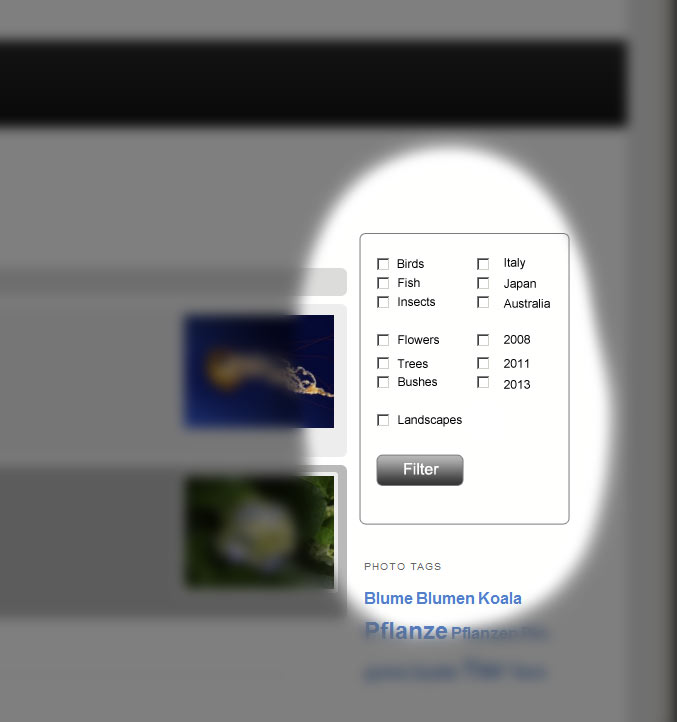
Yes, the tagcloud is a great tool, indeed. But a checkbox based tagword filter would be much more powerfull. Here is an example: Link
It would allow the user to show up all images with ‘australian’ ‘birds’ which were shot in ‘2011’.