miguelcera

Forum Replies Created
Viewing 4 replies - 1 through 4 (of 4 total)
-
Forum: Themes and Templates
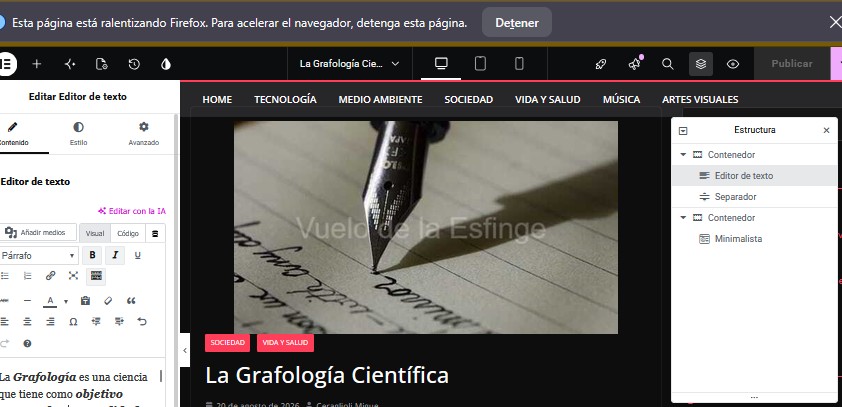
In reply to: [ColorMag] colormag-econs.cssHello again, I’ve also taken a screenshot of the error in Firefox. As you can see from the structure box, it’s not a huge issue.
https://vuelodelaesfinge.com.ar/img/firefox.jpg
GRACIAS
Forum: Themes and Templates
In reply to: [ColorMag] colormag-econs.cssHi, sorry for the delay in replying. I tried Jam, which only works well in Chrome, but there are two problems:
- It doesn’t show the error message that Chrome displays about waiting or closing.
- I clicked “wait” a bunch of times and it never exited the loop.
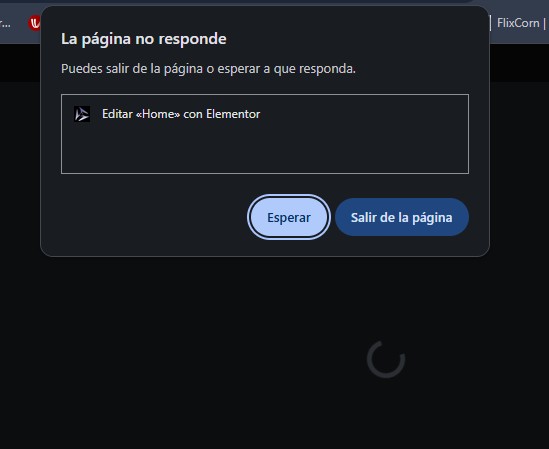
- In Chrome, it’s impossible to modify even the homepage or any other page or post, as the message shown in this image is constantly displayed. It’s IMPOSSIBLE TO WORK.
I looked for a screen recorder to show what Firefox does, which, all things considered, at least lets me work. - In Chrome, it’s impossible to modify even the homepage or any other page or post, as the message shown in this image is constantly displayed. It’s IMPOSSIBLE TO WORK. : https://vuelodelaesfinge.com.ar/img/chrome.jpg
- I can share the video capture I managed to upload to MediaFire:
https://www.mediafire.com/file/1oar8q4b8g2ewg0/error_web_16-00-52.mp4/file - IMPORTANT NOTE: I HAVE THE SAME COMBINATION OF ELEMENTOR AND ELEMENTOR PRO IN THEIR LATEST VERSIONS AS OF TODAY (SEPTEMBER 1, 2026) ON THE WEBSITE HOSTELDERETA.COM.AR, WITH LESS MEMORY ALLOCATED BY PHP, SAME HOSTING SERVER, AND THERE It works perfectly, without interruptions, and I can use it in Chrome and Firefox without any problems.
The problem is purely with vuelodelaesfinge.com.ar
- This reply was modified 1 week ago by miguelcera.
Forum: Themes and Templates
In reply to: [ColorMag] colormag-econs.cssHi, thanks for replying. First, I’ll tell you what I did after explaining the issue, and it still persists when I edit a page or post:
- I downloaded and installed again the latest versions of Elementor (the latest version of the standard version, 4.2.2, and the security version of the Pro version, 4.2.3).
- I downloaded again the latest version of ColorMag, 4.2.2.
- I deactivated all plugins except Elementor and Elementor Pro.
- Regarding the initial problem where I was looking for the folder (/wp-content/themes/colormag/inc/elementor/assets/css/colormag-econs.css), I found it in the ColorMag zip file in the colormag/inc/compatibility folder and placed it where it was supposed to be.
NOW!! only when editing pages or posts :
- The problem is slowdown and buffering (it’s almost impossible to work in Chrome; in Firefox, both are the latest versions and I have no ad blockers, and at one point I even had no antivirus installed. I have to wait a while for the “slow page” warnings to stop). This happens when “saving and…” “Exit”
- This occurs in the case of pages with multiple elements, such as posts with 2 or 3 containers.
- I disabled Elementor’s beta options and told it to regenerate Elementor files when syncing the folder.
- I tested with the Hello Elementor theme and in Elementor safe mode, and the error does not occur.
- I enabled Firefox hardware acceleration.
- PHP – The PHP memory configuration is 1024M, which is excessive, but at least I’m testing with that.
display_errors = Off
max_execution_time = 300
max_input_time = 60
max_input_vars = 6000
memory_limit = 1024M
post_max_size = 256M
session.gc_maxlifetime = 1440
session.save_path = “/var/cpanel/php/sessions/ea-php84”
upload_max_filesize = 256M
zlib.output_compression = Off
Forum: Themes and Templates
In reply to: [ColorMag] colormag-econs.cssObviously, when editing, nothing is noticeable on the front end.
Viewing 4 replies - 1 through 4 (of 4 total)