Bigul Malayi

Forum Replies Created
-
Forum: Developing with WordPress
In reply to: wp_get_attachment_image_attributes ignores fetchpriorityHi @webec,
Have you received any feedback from Astra Pro or WP Rocket support regarding this issue? If so, could you please share their findings or recommendations?
Maybe you can try the following functions:
https://developer.wordpress.org/reference/functions/wp_get_loading_optimization_attributes/
https://developer.wordpress.org/reference/functions/the_post_thumbnail/
WordPress manages fetchpriority through its loading optimization system, so these functions should be a good place to start when testing fetchpriority=”high” on a featured image.
Forum: Fixing WordPress
In reply to: Fatal error: Uncaught TypeError: call_user_func_array()It looks like the issue is due to a core file version mismatch in your WordPress installation. Have you migrated the site recently or manually upgraded WordPress?
Try the following steps after a full site backup (especially wp-config.php and the wp-content folder).
- Check your current WordPress version in wp-includes/version.php.
- Download the exact same version of WordPress from wordpress.org.
- Unzip it and replace all files in:
- wp-includes/ folder
- wp-admin/ folder
- Root files (like wp-settings.php, wp-load.php, etc.)
- DO NOT overwrite wp-config.php or anything inside the wp-content/ folder.
- Clear your browser cache and any site/server cache.
This fixes most cases where core files got mixed up during a manual or failed update.
If it still doesn’t work, try disabling all plugins (by renaming the plugins folder) and switching to a default theme, such as Twenty Twenty Four.
Let me know your current WordPress and PHP versions if the problem persists.
A similar issue: https://stackoverflow.com/questions/79904023/wp-is-valid-utf8-is-undefined-wordpress-6-9-1
Forum: Localhost Installs
In reply to: Local Install – WAMP – DropboxI guess it makes the things complex. Instead of trying with Dropbox you can use a host spacing.
Forum: Fixing WordPress
In reply to: Fatal Error Will Not Let Me Do AnythingTake a full site backup. Then rename the-events-calendar & events-calendar-pro folders from *wp-content/plugins* folder. Then check you can log in or not.
If you have Event Calendar Pro licence contact them directly. They can help you better.
Forum: Fixing WordPress
In reply to: Fatal Error Will Not Let Me Do AnythingLogin to your FTP and delete/rename one of the plugins from *wp-content/plugins* folder
Forum: Installing WordPress
In reply to: Errors during installation of WPTry with the latest version of WordPress in a fresh installation. Which version of PHP are you using?
Forum: Fixing WordPress
In reply to: Fatal Error Will Not Let Me Do AnythingIf it has happened after recent upgrade or if you having Event Calendar Pro license contact their support directly
Forum: Installing WordPress
In reply to: How do I install WordPressHi,
You can install Mamp – https://www.mamp.info/en/ on your machine to install WordPress locally
Check the following tutorials for more details.
https://codex.wordpress.org/Installing_WordPress_Locally_on_Your_Mac_With_MAMP
Hi Serge,
Please post the query in our WPML support forum http://wpml.org/forums/
—
With RegardsBigul
Dear wonderm00n,
Sorry, not sure about it. It’s not a feature we have
Dear LIJE,
Please try following code and let me know your feedback.
global $wp_query; $post = $wp_query->post; $photos = get_post_meta($post->ID, 'wpcf-photo'); foreach($photos as $photo){ echo '<a rel="group" href="'.$photo.'"><img src="'.$photo.'" alt="" style="width:140px;height:auto;margin:0 4px;" width="140" /></a>'; }Dear moxojo,
Please try the following and let me know the following.
        $post_h1_title = types_render_field('h1-title', array('raw' => true));

    	if (!empty($post_h1_title)) {

    	     echo $post_h1_title;

    	}

    	//but if that doesn't exist then get the post title

    	else {

    	    the_title();

    	}
Dear Michael,
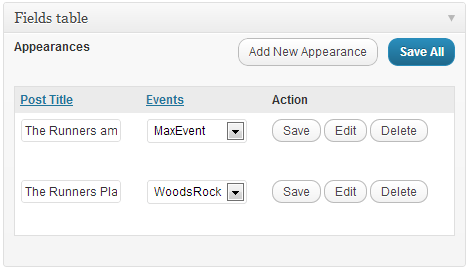
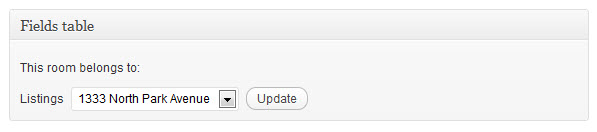
It is not possible exactly. But some similar is possible like this http://d7j863fr5jhrr.cloudfront.net/wp-content/uploads/2012/12/appearances-for-bands.png or http://d7j863fr5jhrr.cloudfront.net/wp-content/uploads/2012/03/fieldstable2.jpg. I mean you can choose Parent Posts in Child Post Edit screen, if you are using a Parent — Child Post relationship. Please check following tutorial links for more details.
http://wp-types.com/documentation/user-guides/creating-post-type-relationships/
http://wp-types.com/documentation/user-guides/many-to-many-post-relationship
http://wp-types.com/documentation/user-guides/bulk-content-editing-with-fields-table/
Dear Jan Dembowski,
Sorry. I was not aware about it.
Dear Michael,
Please explain little more about the requirement for better understanding.
[ Signature moderated. Could you PLEASE stop doing that? ]